Developer Guide
OpenSteward ships a single tenant-scoped REST surface for developers building on top of a self-hosted deployment. One credential authenticates everything: customer management, hosted Connect Link creation, and the per-vertical resource APIs (/v1/accounting/*, /v1/crm/*, etc.). Two kinds of credential are supported, and both carry the same scopes. The default is an API key, which every new deployment accepts. The other is an OAuth token from the operator’s own identity provider, which stays off until the operator registers an issuer and turns it on. The operator chooses which of the two a deployment accepts, and which scopes each developer gets, to fit the company’s needs. Ask them which applies to you. Operators set this up in the Admin UI under API keys, OAuth clients and Settings → Authentication, and §2 has the details.
This doc covers the developer-facing pieces. Everything is also in the unified OpenAPI spec at docs/openapi/openapi.yaml and rendered as the Unified API reference.
1. Mint an API key
Section titled “1. Mint an API key”Two ways. Pick one.
Admin UI (recommended)
Section titled “Admin UI (recommended)”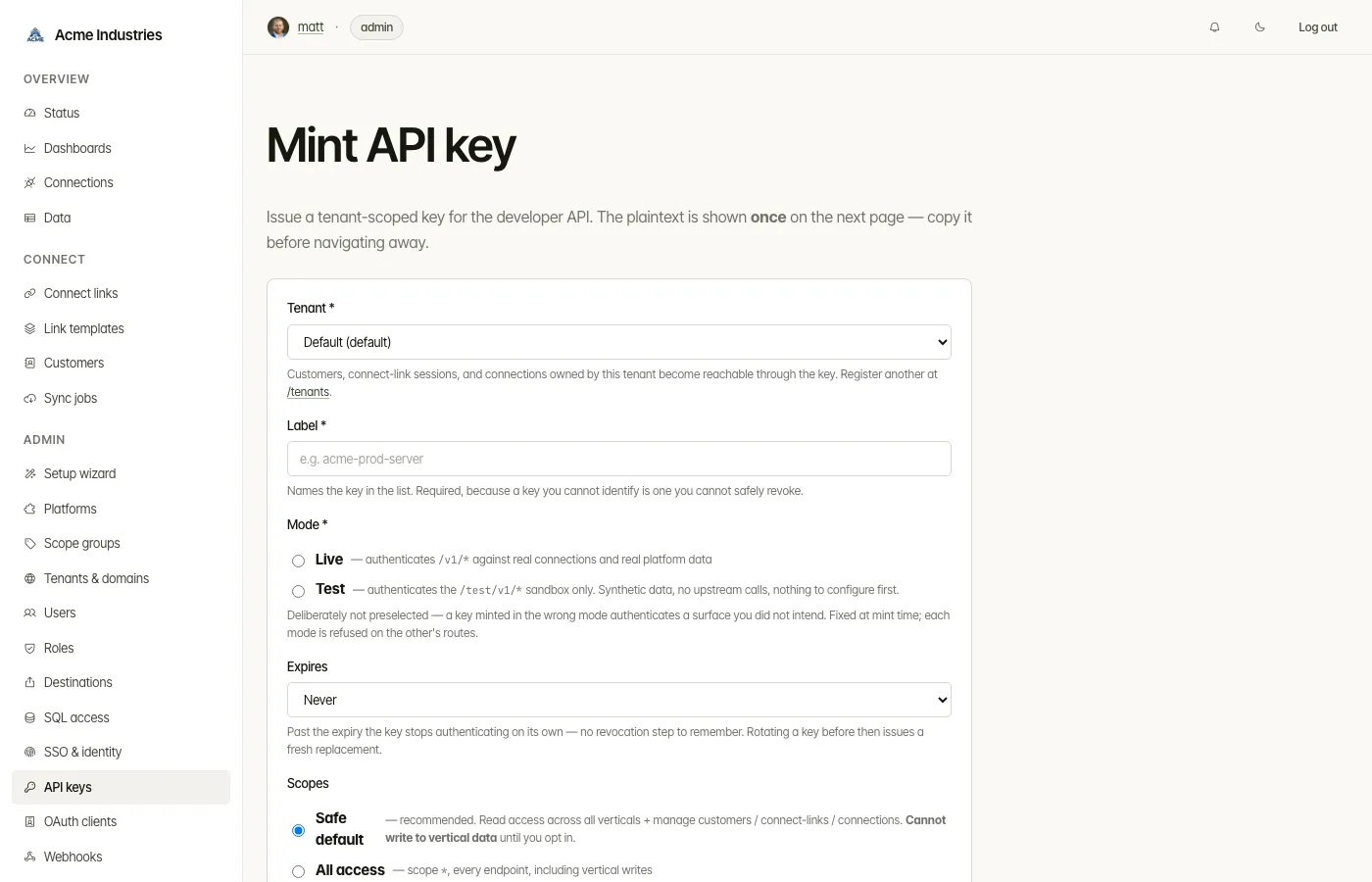
- Open the admin app at
http://localhost:3000, log in. - Sidebar → Admin → API keys → Mint key.
- Pick a tenant id (default:
default), an optional label, and either “All access” or a custom set of scopes. - Copy the plaintext from the green banner. It is shown exactly once.
pnpm --filter integration-server mint-api-key --tenant <tenantId> --label "<label>"Prints:
id: <uuid> tenant: <tenantId> label: <label> key: osk_<tenant-suffix>_<random>Save the key. The store retains a one-way hash; the plaintext is unrecoverable.
The CLI takes no scope flag and mints an all-access (*) key. When you want the
read-only-by-default preset described in §3, mint from the admin UI.
--list shows existing keys (optionally --tenant <id>) and --revoke <key-id>
revokes one.
Self-serve sandbox keys (when the operator has enabled it)
Section titled “Self-serve sandbox keys (when the operator has enabled it)”Some deployments let you skip the admin entirely for a sandbox key:
curl -X POST "$B/test/v1/keys"# 201 → { "data": { "plaintext": "osk_test_sandbox-8f3a2b9c_…", "expiresAt": …, … } }No authentication — the key lands in a throwaway tenant of its own, works only on
the synthetic /test/v1/* sandbox, and expires after 7 days. Off by default
(403 SANDBOX_SELF_SERVE_DISABLED); the operator opts in with
auth.sandbox_self_serve_enabled. Going live still goes through the admin.
1b. Key modes: live and test
Section titled “1b. Key modes: live and test”Every key carries a mode, fixed at mint time and visible on the key record:
| Mode | Plaintext shape | Authenticates |
|---|---|---|
live (default) |
osk_<tenant>_<random> |
/v1/* — real connections, real upstream platforms |
test |
osk_test_<tenant>_<random> |
/test/v1/* — the sandbox |
Mint a test key with --test:
pnpm --filter integration-server mint-api-key --tenant <tenantId> --test --label "sandbox"or "mode": "test" in the admin mint body. --list accepts --test / --live to filter.
Crossing the two is refused in both directions with 403 KEY_MODE_MISMATCH, on every
route that takes a Bearer key — the vertical resource APIs, /v1/customers*,
/v1/connections* and /v1/events alike. Anything that is not explicitly a test surface is
live-only, so a sandbox key can never read production data by being pointed at the wrong path.
The mode is stored on the key record and is never inferred from the plaintext. The test_
marker is there so a key is recognisable at a glance; it is not what the server trusts. (A
tenant literally named test mints a live key whose plaintext also begins osk_test_ —
which is precisely why the string is not authoritative.)
The sandbox
Section titled “The sandbox”A test key addresses /test/v1/*, which mirrors the live surface and serves synthetic data:
# 1. Mint a test key.pnpm --filter integration-server mint-api-key --tenant default --test --label sandbox
# 2. Find your sandbox connections. No OAuth, no setup — they always exist.curl -H "Authorization: Bearer $TEST_KEY" http://localhost:3010/test/v1/connections
# 3. Call it.curl -H "Authorization: Bearer $TEST_KEY" \  "http://localhost:3010/test/v1/accounting/invoices?connection_id=$CONN"
It works on a fresh clone with no adapters enabled. The sandbox never resolves a real adapter, so nothing has to be configured first — that is the point of it.
Connection ids are derived, not created. There is one per tenant per vertical, computed
from your tenant id, so they are the same after a restart and there is no provisioning step.
GET /test/v1/connections lists yours. Any other id — including a real connection’s — is
rejected with 403 CONNECTION_FORBIDDEN.
Data is per tenant, and writes persist. Records are seeded on first read from the same
examples the Unified API reference shows, so GET /test/v1/accounting/invoices/inv_1042 returns the
invoice in the docs. POST / PATCH / DELETE behave normally and read back. Fields the
schema does not declare are dropped, so a response is always shaped like the real thing.
DELETE /test/v1/reset clears your sandbox; the next read reseeds it.
Nothing reaches an upstream platform. No credential is decrypted and no adapter is
constructed on this path, so a sandbox request cannot make an outbound call. Even
POST /test/v1/{vertical}/sync respects this: the job lifecycle is simulated —
pending → running → completed over about two seconds (?fast=true completes before
the response returns), completion seeds a couple of fresh fixture rows per resource
type so a re-poll genuinely sees new data, and a callback_url is validated and
stored but never dialed; poll GET /test/v1/{vertical}/sync/{jobId} instead.
Rehearse the whole sync flow here before your first live one.
Scopes, rate limits and the MCP guards apply exactly as they do on /v1/*. Errors match too,
plus 403 SANDBOX_QUOTA_EXCEEDED when a tenant’s sandbox hits its storage cap.
Mounted for all nine verticals — accounting, crm, customer-support,
docsign, ecommerce, inventory, logistics, payments and projects.
Logistics keeps two shapes worth knowing about, because the sandbox mirrors the
live routes rather than tidying them: rate shopping is POST /test/v1/logistics/rates
with the query in the body, and GET /test/v1/logistics/tracking-events/{trackingNumber}
returns a parcel’s whole event list rather than a single record — an unknown
number is 200 and an empty list, not a 404.
Child resources are addressed exactly as the live routes address them. Docsign’s
signers, documents and audit-trail entries take ?envelope_id= and each envelope
has its own; payments nests instead, so line items are at
GET /test/v1/payments/invoices/{id}/line_items. Parents can themselves have
parents — a projects comment belongs to a task and a task to a project, so
GET /test/v1/projects/comments?task_id=… needs a task id you got from
?project_id=…, and each level answers 400 MISSING_PARAM without it.
Most action verbs hang off a record, but ecommerce’s stock writes name their
target in the body instead — POST /test/v1/ecommerce/inventory_levels/adjust
with { variantId, locationId, delta } moves that level’s available and
answers 404 for a pair the sandbox has never seeded.
Action verbs work and mean something: POST /test/v1/docsign/envelopes/{id}/void
reads back voided, and payments’ capture, cancel, void, pay and
evidence all transition the record and persist. DELETE /test/v1/payments/payment_methods/{id} detaches, and the id stops resolving.
The sandbox’s own three control routes are documented under the Sandbox tag:
POST /test/v1/keys (self-serve sandbox keys — see §1),
GET /test/v1/connections (start here — every other sandbox resource request
needs one of these ids) and DELETE /test/v1/reset (drops this tenant’s
records; the next read reseeds them).
The control-plane endpoints are sandboxed too, so a test key can exercise the
whole developer API — not just the vertical resource routes. /test/v1/customers*,
/test/v1/connections/{id}, /test/v1/webhook-subscriptions* and /test/v1/events
serve deterministic pre-seeded mock data: reads return a small, stable synthetic
set (two customers, one webhook subscription, the derived connections, a couple of
events), and writes (POST/PATCH/DELETE, the webhook /test send) return a
schema-valid canned response without persisting or dialing anything. This is mock
data, not a live store — the /test/v1/customers list is always the same two seeded
customers regardless of what you POST.
The OAuth/connect journey is sandboxed too — as a mock ceremony. The live
/auth/{vertical}/{platform}/connect dance needs a real provider and real OAuth
client config, which the no-egress sandbox can never have; instead the sandbox
simulates the whole flow against its one synthetic platform:
# Programmatic: skip the browser page with ?outcome=…curl -i "$BASE/test/v1/auth/accounting/sandbox/connect?tenant_id=default&outcome=granted"# → 302 → follow it:# GET /test/v1/auth/accounting/sandbox/callback?code=sbx_granted&state=…# → 201 { "data": { "id": "<the derived sandbox connection id>", … } }?outcome= |
The callback answers |
|---|---|
| (omitted) | 302 to the hosted mock authorize page (Approve / Deny buttons) — the browser journey |
granted |
201 with the derived connection id (= GET /test/v1/connections’s id for that vertical) |
denied |
400 OAUTH_ACCESS_DENIED, no id |
error |
400 OAUTH_PROVIDER_ERROR, no id |
expired |
400 INVALID_STATE (the state was never stored — what a lapsed live state looks like) |
The state is one-time, exactly like live: replaying a callback answers
400 INVALID_STATE, and a state started for another vertical answers
400 STATE_MISMATCH. The ceremony never mints ids — the only id it can grant
is the derived sandboxConnectionId(tenant, vertical), so nothing it does can
disturb real connections.
Sandbox Connect Links open. POST /test/v1/customers/{id}/connect-links
returns a URL under /test/v1/connect/{token} served by this deployment: a
hosted mock picker (one entry per vertical) → the mock authorize page → a done
page showing the granted connection id. The three HTML pages are deliberately
unpublished in the OpenAPI spec (the live /connect/* pages aren’t published
either); the two JSON ceremony routes are, under the Sandbox tag
(sandbox.auth-connect / sandbox.auth-callback). The link token is
deterministic and expiry is not enforced.
The platform catalog is curated in test mode. GET /test/v1/platforms
returns exactly one synthetic sandbox platform per vertical (always
enabled: true) — the platforms the sandbox connections actually use — rather
than mirroring the ~1,500-platform live catalog. GET /test/v1/platforms/{vertical}/sandbox resolves; any real slug 404s there.
(The live GET /v1/platforms now requires a credential — a Bearer dev key or
X-Admin-Secret — matching what the spec always declared.)
In the Unified API reference (/unified-api) these tenant surfaces —
customers, connections, events, webhook-subscriptions — carry both
servers, so you switch to test mode with the Servers dropdown at the top
(pick the …/test/{version} entry) and Try it out hits /test/v1/*. The
typed SDK does the same via mode: 'test'. The operator connection surface
is separate: it lives at /admin/connections* (X-Admin-Secret, live only) and
has no sandbox variant — the tenant GET /test/v1/connections is how you list
connections with a test key.
Operators can turn the whole surface off with the runtime setting
features.test_mode_enabled — every /test/v1/* route then returns 503 TEST_MODE_DISABLED
within one settings poll, with no restart, and /v1/* untouched.
The sandbox takes test credentials only: osk_test_ keys, or tokens from the
deployment’s own test issuer. A token from a real identity provider is refused on
/test/v1/* — verifying one means fetching the issuer’s keys over the network, and the
sandbox’s no-egress guarantee does not bend for auth. The test issuer needs no fetch: its
signing key is held in memory, and its tokens are the OIDC counterpart of test keys —
minted by the deployment, accepted here, refused on /v1/* with KEY_MODE_MISMATCH.
This cuts the other way too — the auth.dev_api_keys_enabled kill switch gates only
/v1/*, so a deployment that has gone OIDC-only for production still onboards developers
through test-mode keys.
Rehearsing the OIDC flow against the sandbox. The operator registers the test issuer on
/oauth-clients/new with the “OpenSteward test issuer” preset (issuer URL
<integration-server public base>/test/oidc, audience of their choosing), enables
auth.dev_oauth_enabled, and registers your subject as a service account with a tenant and
scopes — the same steps a production IdP takes. You then trade a test key for a token:
POST /test/oidc/tokengrant_type=client_credentials&client_id=<your subject>&client_secret=<osk_test_… key>and send the access_token where the key would go. Whether it is admitted is the issuer’s
configuration — registry, intersect or token-decides — exactly as on /v1/*. The tenant
claim is always the key’s tenant; the token can never reach another.
Going to production
Section titled “Going to production”The switch from sandbox to live is deliberately small. In order:
- Swap the credential — a
live-mode key from the operator (or an OIDC token, where enabled). The test key will answer403 KEY_MODE_MISMATCHon/v1/*. - Drop the path prefix —
/test/v1/*→/v1/*. SDK users change one option: removemode: 'test'(SDK guide). - Get a real
connection_id— sandbox connections are synthetic and do not exist on the live surface. Mint a Connect Link for your customer, or list/v1/connectionsfor tenant-wide connections (§5b). - Run your first
/sync— bulk-populate the cache (§7). You have already rehearsed the mechanics against/test/v1/{vertical}/sync; the live one has its own budget (10/hour per key per vertical), really dials yourcallback_url, and is where upstream rate limits first become real. - Re-check error handling — live adds failure modes the sandbox cannot produce:
upstream 5xx, expired grants (
connection.authorization_expiredwebhook), and the per-key/per-IP budgets in §2. CaptureX-Request-Idfrom responses now — it is what the operator will ask for.
2. Authentication
Section titled “2. Authentication”The API exposes three security schemes. Two are interchangeable developer credentials for the same routes; the third is the operator path.
| Scheme | How to send | Used on |
|---|---|---|
ApiKeyAuth (Bearer dev key) |
Authorization: Bearer osk_<tenant>_<random> |
/v1/* — the public developer surface |
OAuth2Bearer (OIDC token) |
Authorization: Bearer eyJhbGciOiJSUzI1NiI… |
/v1/* — the same surface, when the operator has enabled it |
AdminSecret (header) |
X-Admin-Secret: <value> |
/admin/* and the operator /connections* routes (GET / PATCH / DELETE /connections/{id}) — operator-only and inter-service routes. The developer equivalents live at /v1/connections* and take the Bearer key instead. |
If you’re integrating from your own app, you almost certainly want one of the first two — ask the operator which they accept. The admin secret is for the operator running the deployment and for inter-service calls between admin-api and integration-server; never share it with external integrators.
OAuth2Bearer — a token from the operator’s own IdP
Section titled “OAuth2Bearer — a token from the operator’s own IdP”Where a deployment’s service accounts already live in Keycloak, Auth0, Okta or
Entra ID, the operator can register that issuer and let you authenticate with a
short-lived token from it instead of a static key. Get the token however that
IdP issues one — for a service account, usually client_credentials — and send
it exactly where the key would go.
OpenSteward is only a resource server here. It verifies your token against the issuer’s published public keys; it never mints tokens and holds no client secret of yours.
The token resolves to the same scopes described in §3 — the two-axis vertical model and all of it — so nothing else about this document changes. Which scopes you get is the operator’s choice per issuer: from a client they registered for you, from your token’s own scope claim, or from the registered set narrowed by your claim. Ask them which.
Two failures are worth recognising:
| Code | Status | Meaning |
|---|---|---|
OAUTH_DISABLED |
403 | The deployment does not accept OIDC tokens. Use a key, or ask the operator to enable it. |
API_KEYS_DISABLED |
403 | The deployment no longer accepts osk_ keys. Get a token from their IdP. |
Every verification failure — bad signature, wrong audience, expired token, a
client the operator never registered — answers the same 401 UNAUTHENTICATED.
That is deliberate: a more specific error would let anyone holding a junk token
enumerate the operator’s service accounts. If you are stuck, the reason is in
the deployment’s logs and the operator can read it.
Operators: the setup walkthrough is
deployment/oauth-clients-setup.md.
Both credentials have a kill switch in Admin → Settings
(auth.dev_api_keys_enabled, auth.dev_oauth_enabled), read per request, so a
flip applies within a minute without a redeploy. Turning keys off is refused
unless an issuer is enabled, can admit somebody, and has already verified a
real token — otherwise it locks every developer out. X-Admin-Secret is never
gated by either, and is the way back in.
The hosted /connect/* routes are neither. They are opened by your customer’s browser and carry no header at all — the opaque link token in the path is the credential. It expires, and it stops working once the session it names is consumed or revoked.
Why a separate AdminSecret scheme?
Section titled “Why a separate AdminSecret scheme?”ADMIN_SECRET solves the bootstrap problem. The very first API call to a fresh deployment happens before any user, JWT, or developer key exists — admin-api needs a way to call the integration-server’s /admin/* routes during boot to seed platforms, mint the first dev key, etc. A single env-var is the simplest possible mechanism for that. Day-2 operator actions on tenant data should already be done with a Bearer dev key (connections:write, vertical:write scopes).
Bearer-key failures
Section titled “Bearer-key failures”Authorization: Bearer osk_<tenant-suffix>_<random>| Code | Status | Meaning |
|---|---|---|
UNAUTHENTICATED |
401 | Header missing or key invalid/revoked |
KEY_MODE_MISMATCH |
403 | A test key was used on /v1/*, or a live key on /test/v1/*. See §1b |
INSUFFICIENT_SCOPE |
403 | Key is valid but lacks the scope this endpoint requires |
RATE_LIMITED |
429 | 600 req/60s per key exceeded; Retry-After header set |
CUSTOMER_NOT_FOUND |
404 | Resource id does not belong to your tenant (also returned for cross-tenant lookups to avoid leaking ids) |
CONNECTION_FORBIDDEN |
403 | The connection_id is not owned by your tenant |
All success responses carry X-RateLimit-Limit + X-RateLimit-Remaining. A 429 sets
those two headers plus Retry-After (whole seconds) and returns the standard error
envelope:
{ "error": { "code": "RATE_LIMITED", "message": "Rate limit exceeded — retry in 37s." } }There are two independent budgets, and a request has to pass both:
| Budget | Keyed on | Default | Tuned by |
|---|---|---|---|
| Per-API-key | apiKeyId |
600 req / 60 s | Fixed at the default on the vertical resource routes (/v1/{vertical}/*). Tunable only on /v1/customers/*, /v1/connections* and the inbound-events routes, where RATE_LIMIT_MAX / RATE_LIMIT_WINDOW_MS set the boot value and the live runtime settings rate_limit.api_key.per_minute / rate_limit.api_key.window_ms override it (admin → Settings → Rate limits, no restart) |
| Per-source-IP (whole server) | req.ip |
600 req / 60 s | RATE_LIMIT_MAX / RATE_LIMIT_WINDOW_MS, or rateLimitMax / rateLimitWindowMs in config.yml |
The per-IP budget skips static prefixes (/design/, /specs/, /data/, /public/,
/health) so one page of logos doesn’t spend a caller’s budget, and it exempts requests
presenting a matching X-Admin-Secret — sibling services all arrive from one container
IP with no X-Forwarded-For, so without the exemption the deployment throttles its own
admin UI long before any outside caller notices. An unset ADMIN_SECRET exempts nothing.
The default backend is an in-process token bucket — fine for single-instance deployments and resets on container restart. For horizontally-scaled deployments, set REDIS_URL (or use the scale docker-compose profile: docker compose --profile scale up -d) and the budget is shared across replicas via a Redis counter. Redis outages fail open — a transient blip won’t 429 every request.
License refusals
Section titled “License refusals”A deployment runs on a license or, without one, in community mode. When the license does not allow a request, the answer is a 403 with the standard error envelope and one of these codes:
| Code | Status | Meaning |
|---|---|---|
LICENSE_FEATURE_NOT_ENTITLED |
403 | The deployment’s license does not include this vertical, or MCP for an mcp:read credential. GET /v1/capabilities lists what answers. |
LICENSE_LIMIT_EXCEEDED |
403 | Creating a connection would exceed the license’s connection limit, or (on a write) this connection is beyond the limit and is read-only. Reads and POST /{vertical}/sync still work, and nothing is deleted. To replace a connection at the limit: export its data, delete it, then reconnect. |
LICENSE_EXPIRED |
403 | The license expired more than 30 days ago and the feature is outside community mode. The message is Renew at https://opensteward.dev/license. Not returned by this release: community mode includes every current vertical. |
{ "error": { "code": "LICENSE_FEATURE_NOT_ENTITLED", "message": "This deployment's license does not include 'vertical:accounting'. See https://opensteward.dev/license", "feature": "vertical:accounting" }}These are never refused for license reasons:
/healthand/version;- connection management (rename, schedule, delete);
- data export.
A connection or tenant limit never refuses reads (GET), POST /{vertical}/sync or GET /v1/capabilities: a connection beyond the limit stays readable and keeps syncing. Two license checks still apply to them:
- a vertical the license does not include is refused as a whole, reads and syncs included (
LICENSE_FEATURE_NOT_ENTITLEDabove); - an
mcp:readcredential is refused on every authenticated route,GET /v1/capabilitiesincluded, when the license does not include MCP.
GET /auth/{vertical}/{platform}/connect is unauthenticated, so its refusal carries only code and a generic message. A Connect Link customer is sent back to their link page instead.
GET /v1/capabilities
Section titled “GET /v1/capabilities”This lists the verticals the deployment serves to your credential, as { "data": { "verticals": [...] } }: every vertical it runs that its license includes.
- Any Bearer dev key works, with no particular scope. An
mcp:readkey is also subject to the MCP checks: it is refused here whenfeatures.mcp_enabledis off or the license does not include MCP. - End-user tokens use
GET /v1/me/capabilities, which lists the verticals mounted under/v1/methat the license includes. - In test mode, call
GET /test/v1/capabilitieswith a test key. - No license details are ever returned.
X-Request-Id
Section titled “X-Request-Id”Every response carries an X-Request-Id header. Send one on the request and it is
echoed back; omit it and the server generates one. Log it alongside your own request
records — it is the correlation id the operator’s logs are keyed by, so quoting it turns
“a request failed yesterday” into a one-line lookup. This is the id to include in any
support report, especially for the uniform 401 UNAUTHENTICATED responses, which are
deliberately unspecific on the wire (§2) and specific only in
the server logs.
Off by default: with no configuration the API sends no Access-Control-* headers at
all, which is what a Bearer-token API wants — a page the operator does not control must
not be able to spend a victim’s key from the victim’s browser and read the response.
Set CORS_ORIGIN to a comma-separated list of origins to opt in. * is honoured and
means every origin; trailing slashes are stripped, because a browser sends Origin: https://host with no path and the comparison is exact. There is deliberately no way to
reach “reflect whatever Origin arrives” from an env var.
/admin/* stays outside the boundary whatever CORS_ORIGIN says — those routes are the
operator’s own server-to-server surface. Preflights answer for GET, HEAD, POST,
PUT, PATCH, DELETE, OPTIONS; credentials stays off, so no cookie ever rides
along. docker-compose defaults CORS_ORIGIN to http://localhost:3003 so docs-server’s
Swagger console can “Try it out” out of the box.
Idempotency-Key
Section titled “Idempotency-Key”Every POST / PATCH / PUT / DELETE honours an optional Idempotency-Key
request header so a retry after a timeout doesn’t double-process. The value is
opaque to the server — send a UUIDv4 — and is capped at 255 characters. GET,
HEAD and OPTIONS bypass it entirely; so do streaming responses, whose body
the server never holds.
The cache is keyed on (tenant, method, route, Idempotency-Key) with a 24 h TTL.
The key is looked at only once authentication, scopes and the license checks
have let the request through, so the tenant is the one your credential belongs
to:
| Situation | Response |
|---|---|
| First request | Processed normally; status, headers and body stored under the key |
First request refused: 401, 403, 409, 429, or any LICENSE_* error |
Nothing stored. A retry with the same key is checked again, so a freed connection slot or a renewed license applies at once |
| Retry, same key, same URL and body | The stored response replayed verbatim, plus Idempotency-Replayed: true |
Retry, same key, different URL (query included, so another connection_id) or body |
422 with Idempotency-Key-Conflict: true; the stored response is kept |
| Retry while the first is still in flight | 409 with Retry-After: 1 |
A replay is still checked against authentication and the license first: a write that was stored before a license lapsed is refused like any other until writes are allowed again, and then replays.
Storage follows the rate limiter: Redis when REDIS_URL is set, so replicas
share one cache; an in-process LRU otherwise.
3. Scopes
Section titled “3. Scopes”Every key carries a list of scope tokens. Available scopes:
| Token | Endpoints unlocked |
|---|---|
* |
Everything |
customers:read |
GET /v1/customers, GET /v1/customers/{id} |
customers:write |
POST /v1/customers, PATCH /v1/customers/{id}, DELETE /v1/customers/{id} |
customers:* |
customers:read + customers:write |
customers:read_pii |
Allows ?include_pii=true on customer reads to decrypt PII (firstName, lastName, phone, address, personalIdNumber). Each reveal writes a pii_reveal structured log line — visible in container logs. |
connections:read |
GET /v1/customers/{id}/connections, GET /v1/connections, GET /v1/connections/{id} |
connections:write |
PATCH /v1/connections/{id}, DELETE /v1/connections/{id} |
connect-links:write |
POST /v1/customers/{id}/connect-links |
webhooks:read |
GET /v1/webhook-subscriptions[/{id}], GET /v1/webhook-subscriptions/{id}/deliveries |
webhooks:write |
POST/PATCH/DELETE /v1/webhook-subscriptions* plus the /test, /paused and /rotate-secret actions — register and manage your own outbound webhook endpoints (see §8) |
mcp:read |
Marks the key read-only at the auth layer: any non-GET/HEAD request is rejected with 403 MCP_READ_ONLY. Cannot be minted alongside a write-granting scope (*, <resource>:*, or anything ending :write). |
vertical:<v> |
Touch axis, one per vertical. GETs on /v1/<v>/*. Writes need vertical:write in addition. The nine are accounting, crm, ecommerce, logistics, payments, docsign, projects, customer-support, inventory. |
vertical:read |
Touch axis convenience. GETs on every /v1/{vertical}/* without per-vertical scopes. |
vertical:write |
Verb axis. Required for POST / PATCH / PUT / DELETE on any /v1/{vertical}/* — with one exception, POST /v1/{vertical}/sync (see below). Independent of which vertical the key can touch. |
Wildcards: <resource>:* covers any action on that resource. * covers anything.
Sync is a read. POST /v1/{vertical}/sync needs only the touch axis
(vertical:{v} or vertical:read). It is a POST because it enqueues a job, not
because it changes anything: the worker lists upstream resources and upserts
them into OpenSteward’s own store, never writing back to the platform. Requiring
vertical:write would mean a key minted with the recommended preset — which
omits that scope deliberately — could read a vertical’s data but never refresh
it.
The one part of sync that does need vertical:write is callback_url. Supplying
one makes the deployment issue an outbound POST from inside its own network,
which is a different authority from refreshing a cache. That URL must be https
and must not resolve to a loopback, private or link-local address; it is checked
when the job is enqueued and again immediately before the request is sent.
Two-axis vertical access
Section titled “Two-axis vertical access”/v1/{vertical}/* requires both axes to pass:
| Axis | Scopes that satisfy it |
|---|---|
| Touch (can the key see this vertical at all?) | * OR vertical:<v> OR vertical:read OR vertical:write |
Verb=read (GET) |
Touch alone is sufficient |
Verb=write (POST / PATCH / PUT / DELETE) |
Touch + (* OR vertical:write) |
Examples:
| Key scopes | Read accounting | Write accounting | Read CRM | Write CRM |
|---|---|---|---|---|
* |
✅ | ✅ | ✅ | ✅ |
vertical:accounting |
✅ | ❌ | ❌ | ❌ |
vertical:accounting, vertical:write |
✅ | ✅ | ❌ | ❌ |
vertical:read |
✅ | ❌ | ✅ | ❌ |
vertical:read, vertical:write |
✅ | ✅ | ✅ | ✅ |
Default scope set on mint
Section titled “Default scope set on mint”The recommended preset for new keys (the Safe default option in the admin UI) pre-selects:
customers:read, customers:write, customers:read_pii,connect-links:write, connections:read, connections:write,vertical:accounting, vertical:crm, vertical:ecommerce, vertical:logistics,vertical:payments, vertical:docsign, vertical:projects,vertical:customer-support, vertical:inventory, vertical:readThe vertical entries are derived from the same list the admin’s vertical pickers render, so a new vertical joins the preset the day it ships rather than the day someone remembers to copy it in.
vertical:write is deliberately omitted so a key minted with the recommended preset can read every vertical and manage customers / connect-links / connections, but cannot push writes back to the upstream systems. This default exists because operators of a self-hosted deployment are liable for what gets written upstream — defaulting to read-only across verticals avoids surprise mutations bypassing regulatory controls.
To grant writes, mint with All access (*) or pick Custom and check vertical:write.
Scope rejection
Section titled “Scope rejection”A request to a route requiring customers:read with a key carrying connections:read returns:
HTTP/1.1 403 Forbidden{ "error": { "code": "INSUFFICIENT_SCOPE", "message": "This API key is missing required scope 'customers:read'.", "requiredScope": "customers:read" }}A POST /v1/accounting/contacts with a key that has vertical:accounting but no vertical:write returns:
HTTP/1.1 403 Forbidden{ "error": { "code": "INSUFFICIENT_SCOPE", "message": "'vertical:write' scope required to mutate /v1/accounting/* data.", "requiredScope": "vertical:write" }}Boot-time scope normalization
Section titled “Boot-time scope normalization”On boot, any key whose scopes contain vertical:<v> but neither * nor vertical:write has vertical:write added. The boot log shows api-keys: added missing 'vertical:write' scope to N key(s). The pass is idempotent — subsequent boots are no-ops.
4. Customers
Section titled “4. Customers”B=http://localhost:3010KEY=osk_default_…Create / upsert (idempotent on (tenantId, lower(email))):
curl -H "Authorization: Bearer $KEY" -H "Content-Type: application/json" \ -d '{"email":"jane@acme.com","displayName":"Jane (Acme)","externalReference":"crm-123"}' \ $B/v1/customersList / search:
curl -H "Authorization: Bearer $KEY" "$B/v1/customers?q=acme&limit=20"Get by id, update, delete:
curl -H "Authorization: Bearer $KEY" $B/v1/customers/<id>curl -X PATCH -H "Authorization: Bearer $KEY" -H "Content-Type: application/json" \ -d '{"displayName":"Jane Doe"}' $B/v1/customers/<id>curl -X DELETE -H "Authorization: Bearer $KEY" $B/v1/customers/<id>By default, deleting a customer leaves their connections (and synced data)
intact. Add ?cascade=connections to also delete every connection the
customer’s links produced — the standard connection-delete cascade drops cached
resources, sync jobs and external-account links. The response is 204 either
way; the customer.deleted webhook event then carries a deleted_connections
count. See operations/data-erasure.md for the
full erasure runbook.
PII (firstName, lastName, phone, address, personalIdNumber) is encrypted at rest. By default, customer reads strip the pii field. To retrieve it, the key must carry the customers:read_pii scope and the request must opt in:
curl -H "Authorization: Bearer $KEY" "$B/v1/customers/<id>?include_pii=true"Every reveal writes a structured log line:
{ "event": "pii_reveal", "endUserId": "<uuid>", "tenantId": "default", "apiKeyId": "<uuid>", "msg": "PII revealed via developer API"}Inspect via docker logs OpenSteward-integration-server-1 | grep pii_reveal (or your log aggregator).
5. Connect Link
Section titled “5. Connect Link”Spawn a hosted link for a customer. The customer opens the URL, picks an integration (or uses the one you pinned), authorises, and a connection lands tagged back to that customer.
The link’s behaviour depends on which fields you set, mapping to one of two modes on the developer surface:
| Mode | What you send | Customer experience |
|---|---|---|
| Pinned | customer-id in the path + vertical+platform in the body |
Skips the picker, lands in OAuth for the chosen adapter. Both fields are required — a link with only one of them is not pinned to anything. |
| Customer picks adapter | customer-id in the path; omit platform (and optionally vertical) |
Picker appears with whatever adapters you allowed. |
A third mode, self-register — no customer bound at mint time, the landing page
captures the email and the public POST /connect/:token/customer route creates the
end-user and binds it before the picker appears — exists on the connect session but is
reachable only from the operator surface: POST /admin/connect-sessions with
allowSelfRegister: true (X-Admin-Secret), or the Connect links page in the admin
UI. The developer route always mints against a customer in the path, and its body
schema is strict, so sending allowSelfRegister there is a 400 VALIDATION.
# Pinned (most common)curl -H "Authorization: Bearer $KEY" -H "Content-Type: application/json" \ -d '{"vertical":"accounting","platform":"xero","label":"Q2 reconciliation"}' \ $B/v1/customers/<customer-id>/connect-linksReturns:
{ "data": { "id": "<session-uuid>", "token": "<opaque hex>", "url": "https://your-deployment.example.com/connect/<token>", "status": "active", "expiresAt": 1777734104240, "endUserId": "<customer-id>", "allowedVerticals": ["accounting"], "allowedPlatforms": [{ "vertical": "accounting", "slug": "xero" }], "redirectUrl": null }}Email the url. After the customer completes OAuth, listing connections reveals the new row:
curl -H "Authorization: Bearer $KEY" $B/v1/customers/<customer-id>/connectionsBody shape:
| Field | Type | Notes |
|---|---|---|
vertical |
string | optional — one of the nine vertical names. Restricts the picker to this vertical. |
platform |
string | optional — pin to a specific adapter. Only takes effect together with vertical. |
label |
string | optional, free-form, internal-only. Defaults to Connect link for <customer email>. |
redirectUrl |
URL | optional, where the customer lands after success. |
expiresInSeconds |
int | optional, max 90d. When omitted, expiry comes from the operator’s connect_link.default_expiry_hours runtime setting (72h out of the box; an operator setting it to 0 mints links with no expiry). |
allowedVerticals |
string[] | optional. Explicit allow-list; overrides the single vertical. |
allowedPlatforms |
object[] | optional. [{ "vertical": "...", "slug": "..." }]; overrides the single platform. |
oneTimeOnly |
bool | optional. Auto-deletes the connection after the first sync; pair with a read-only scope group. When omitted, defaults to the operator’s connect_link.one_time_default runtime setting (off out of the box) — pass false explicitly if the link must not be one-time. |
scopes |
string[] | optional. Explicit OAuth scope list. Setting it implies scopePolicy: "custom". Some adapters configure scopes at the OAuth-app level and ignore per-call overrides — see the platform’s configure page. |
scopePolicy |
enum | optional, default read_only. read_only requests the platform’s curated read-only scopes (falling back to the platform default where none are catalogued), platform_default sends no override, custom uses the scopes array. Resolved per-platform at OAuth-start, so a multi-platform link still means read-only. |
Any other key is rejected: the body schema is strict, and an unknown field returns
400 VALIDATION with the Zod issues attached.
url can come back null. The link is opened by a customer’s browser, so it must
never carry the compose network’s own hostname. When the request arrives from inside
that network (Host: integration-server:3010) and neither PUBLIC_BASE_URL nor the
operator’s company base URL is set, the response withholds the URL and adds
"urlUnresolved": true. The session itself is created and usable — set a public base
URL and build the link from the returned token.
5b. Tenant-wide connection management
Section titled “5b. Tenant-wide connection management”After connections land via Connect Link, you can manage all of them at the tenant level:
# List every connection your tenant ownscurl -H "Authorization: Bearer $KEY" $B/v1/connections
# Filtercurl -H "Authorization: Bearer $KEY" "$B/v1/connections?vertical=accounting&platform=xero"
# Renamecurl -X PATCH -H "Authorization: Bearer $KEY" -H "Content-Type: application/json" \  -d '{"label":"Acme prod"}' $B/v1/connections/<id>
# Revoke (does NOT call the upstream platform — issue a platform-side revoke separately)curl -X DELETE -H "Authorization: Bearer $KEY" $B/v1/connections/<id>
A connection’s ownerTenantId is set at OAuth-callback time from the Connect Link session that produced it. Connections created out-of-band via admin tooling have ownerTenantId = null and are not visible here — use the operator /admin/connections surface (X-Admin-Secret) for those.
Connecting a platform that has no OAuth
Section titled “Connecting a platform that has no OAuth”Not every platform has an authorization endpoint to redirect to. Carriers in
particular (and a handful of CRM platforms) issue a static key you paste in.
Those adapters declare a credentialFields() form, and there are two ways to
submit it:
- Connect Link — the hosted page, scoped by a one-time session token. This is the flow for your customers: they never see an admin credential.
POST /auth/{vertical}/{platform}/connect— headless, for your own tooling and bulk provisioning. Takes either credential, and they are not equivalent:X-Admin-Secret—tenant_idcomes from the body, so an operator can provision for any tenant or for none.- A tenant Bearer key with
connections:write— works too, buttenant_idcomes from the key and the body’s value is ignored. That is what makes it safe to hand out: you can provision your own carriers headlessly and cannot reach another tenant’s. A sandbox (osk_test_…) key is refused — this writes a real credential.
# As a tenant — your own key, your own tenant.curl -X POST -H "Authorization: Bearer $KEY" -H 'content-type: application/json' \  -d '{"fields":{"apiKey":"shippo_live_…"},"label":"Shippo prod"}' \  $B/auth/logistics/shippo/connect
# As an operator — any tenant, or none.curl -X POST -H "X-Admin-Secret: $ADMIN_SECRET" -H 'content-type: application/json' \  -d '{"fields":{"apiKey":"shippo_live_…"},"tenant_id":"acme","label":"Shippo prod"}' \  $B/auth/logistics/shippo/connect
Send the adapter’s own field names — GET /v1/platforms/{vertical}/{slug}
lists them, and some adapters want a client id and secret rather than one key.
api_key is accepted as shorthand only where the adapter declares exactly one
field; anything else answers 400 and names what it needs. An adapter with no
static-credential flow answers 404 — use the OAuth GET instead.
Cross-tenant lookups return 404 (not 403) so the API does not leak the existence of other tenants’ connection ids.
Telling a dead grant from an idle one
Section titled “Telling a dead grant from an idle one”Each row carries expiresAt plus the outcome of the last token refresh:
| Field | Meaning |
|---|---|
lastRefreshAt |
epoch ms of the last refresh attempt, or null if there has never been one |
lastRefreshStatus |
ok, failed (transient — network / 5xx / rate limit), expired (the grant itself is dead; the customer must re-authorize), or platform_error (the operator’s OAuth client credentials were rejected — affects every connection for that platform) |
lastRefreshError |
short reason from the last failure: the OAuth code, its description and the HTTP status, truncated — or, when the failure has no OAuth shape (a network timeout, say), the bare error message. Never the raw request or response: the underlying error object holds the client secret and the refresh token. null after a success. |
A lapsed expiresAt on its own is not a fault. Access tokens are short (an hour on
several platforms) and renewed automatically, both ahead of expiry by the keep-alive
worker and on demand by the request path, so a healthy idle connection spends much of
its life with a dead access token and a working grant behind it. Read expiresAt in the
past together with lastRefreshStatus: "ok" as healthy; treat expired and
platform_error as needing a human.
6. Vertical resource APIs
Section titled “6. Vertical resource APIs”After a connection lands you call the per-vertical APIs with the same key plus the connection_id:
curl -H "Authorization: Bearer $KEY" \ "$B/v1/accounting/contacts?connection_id=<connection-uuid>"The middleware verifies your key’s tenant owns the connection (cross-tenant access returns 403 CONNECTION_FORBIDDEN) and also enforces the vertical:<vertical> scope.
Browse the per-vertical paths in the unified spec at docs/openapi/openapi.yaml or via Swagger UI on docs-server.
List responses and paging
Section titled “List responses and paging”Every list route answers { data, meta }, where meta is { platform, totalCount, page, limit, hasMore, fetchedAt }.
limitdefaults to 100. The server clamps it to 1–500, and to the platform’s page maximum where the adapter declares one. Commerce Layer’s maximum is 25, so a request withoutlimitagainst Commerce Layer returns up to 25 rows.meta.limitis the page size the server asked the platform for: yourlimitafter both clamps, or a smaller size when one endpoint of a platform takes fewer rows than the rest (JD.com’s promotions take 10).datanever holds more rows thanmeta.limit.- Page with
meta.hasMore, not withdata.length.hasMoreistrueorfalsewhenever the server can tell: from a total the platform reports, from the platform’s own next-page signal, or from a page shorter thanmeta.limit. A page can be shorter thanmeta.limitand still not be the last, when the platform says more rows remain, so trust a booleanhasMoreover the row count.hasMoreisnullonly when the page is full and nothing else is known, because that page cannot be told apart from a collection that ends exactly on a page boundary. Request the next page to find out: an empty page is the end. - Page N starts after (N − 1) ×
meta.limitrows on platforms that honour the paging contract, so walkingpage=1, 2, 3…reaches every row once. Some platform endpoints ignore the page number, and there page 2 repeats page 1: stop when a page repeats ids you have already seen.pnpm check:paging-contracttracks those endpoints. - Not every platform’s page maximum is declared yet. About 390 platforms cap some list pages between 100 and 499 rows without saying so, and the same check tracks them. A
limitabove such a cap comes back short, withmeta.limitstill reporting yourlimitandhasMorepossiblyfalsetoo early. At the defaultlimitof 100 or below, every measured endpoint serves the full page or reportshasMoreitself. pageis 1-based. A missingpage, or one that is not a decimal number of at least 1, is the first page, andmeta.pagereports1. So0,-3,abc,2abcand1e3all read as page 1, and so does a page too large to be an exact integer. A fractional page is rounded down:2.7is page 2.
7. Data store, ?is_live=true, and /sync
Section titled “7. Data store, ?is_live=true, and /sync”The integration-server runs in one of three data-store modes (DATA_STORE_MODE env / dataStore.mode in YAML). The mode is database by default.
| Mode | What happens on a GET /v1/{vertical}/... |
|---|---|
database (default) |
Read-through SQLite cache. Cache hit → DB. Cache miss → upstream + write back. Writes (POST / PATCH / DELETE) call upstream first, then update the cache. |
passthrough |
Every request live to upstream. No cache writes. Pick this when your app already has its own persistence layer. |
external |
Same as database for reads + writes, plus every cache write fires a signed outbound resource.synced / resource.updated / resource.deleted webhook event so your app can mirror the data into its own store. Reuses the existing webhook subscription system (HMAC signing, retry, dead-letter, replay UI). |
?is_live=true — bypass-read, write-through
Section titled “?is_live=true — bypass-read, write-through”Append ?is_live=true (or ?live=true) to any GET to skip the cache and fetch fresh data from the upstream platform. The fresh result is still written back to the cache — is_live skips reads, not writes.
# Cached read (fast, may be stale)curl -H "Authorization: Bearer $KEY" \  "$B/v1/accounting/invoices/inv-42?connection_id=<conn>"
# Force fresh fetch from upstream; cache is updated as a side-effectcurl -H "Authorization: Bearer $KEY" \  "$B/v1/accounting/invoices/inv-42?connection_id=<conn>&is_live=true"
In passthrough mode ?is_live=true is a no-op (every read is already live). The reserved query keys are is_live and live; both are stripped before the request reaches the adapter.
Cache-status headers — telling fresh from stale
Section titled “Cache-status headers — telling fresh from stale”Every vertical GET answers with a cache-status header, so you never have to call
?is_live=true speculatively just to find out:
| Header | Values | Meaning |
|---|---|---|
X-OpenSteward-Cache |
hit |
Served from the cache. X-OpenSteward-Synced-At says when it was written. |
miss |
Fetched upstream just now and cached on the way out. | |
live |
You sent ?is_live=true; the cache was bypassed. |
|
passthrough |
This deployment caches nothing — every read is live. | |
X-OpenSteward-Synced-At |
ISO 8601 | Present on hit only: when the served rows were last written. On a list it is the newest row’s write time. Absent = the body left the upstream platform moments ago. |
So the client-side staleness rule is one comparison: on a hit, if
X-OpenSteward-Synced-At is older than your tolerance, repeat the call with
?is_live=true. Mutations (POST/PATCH/DELETE) carry neither header — a
write is always upstream-first.
POST /v1/{vertical}/sync — bulk-populate the cache
Section titled “POST /v1/{vertical}/sync — bulk-populate the cache”Each vertical exposes a /sync route that walks the vertical’s listable resources (invoices, contacts, bills, …) and bulk-upserts them into the cache. Useful after a fresh connection or to reconcile drift.
# Enqueue a sync (returns 202 with the job)curl -X POST -H "Authorization: Bearer $KEY" \  "$B/v1/accounting/sync?connection_id=<conn>" \  -H "Content-Type: application/json" \  -d '{"callback_url":"https://your-app.example/hooks/sync-done"}'   # needs vertical:write
# Poll statuscurl -H "Authorization: Bearer $KEY" \  "$B/v1/accounting/sync/<job-id>?connection_id=<conn>"
# List recent jobs for one connectioncurl -H "Authorization: Bearer $KEY" \  "$B/v1/accounting/sync?connection_id=<conn>&limit=10"
Why polling needs connection_id too. A job id identifies the job on its
own, so the query param looks redundant on GET /v1/{vertical}/sync/{jobId}.
It is not: every /v1/{vertical}/* route is gated by the unified auth
middleware, whose first action — before routing, before scope checks — is to
resolve ?connection_id= so it can pick the platform adapter and verify the
connection belongs to your tenant. Without it you get
400 CONNECTION_ID_REQUIRED from the middleware, not the handler. The handler
then scopes the lookup as well, returning 404 SYNC_NOT_FOUND for a job that
belongs to a different connection, so job ids cannot be probed across tenants.
Job status progresses pending → running → completed (or failed). Each resource type carries its own progress entry under progress.<resource>.{synced,status}. Jobs older than 30 days are gc’d by a daily cleanup pass — except each connection’s latest successful sync and any failures since it, which a sync schedule still reads.
Sync schedules
Section titled “Sync schedules”Besides the syncs you request, every connection has a sync schedule (syncMode on GET /v1/connections/{id}):
syncMode |
What syncs it automatically |
|---|---|
default |
Every deployment interval — data_store.sync.default_interval_minutes, 6 hours unless your operator changed it. |
custom |
Every syncIntervalMinutes (15 – 43 200). |
trigger_only |
Nothing. Not even the sync after connecting: only POST /v1/{vertical}/sync (or the operator’s Sync now). |
once |
One sync, when the connection is made. |
A failed scheduled sync is retried after 15 minutes, doubling per consecutive failure, never later than the interval. A connection whose authorization has expired is not scheduled until it is re-authorized. Each job carries origin — api, manual, connect, boot or schedule — so you can tell your syncs from scheduled ones. Only one sync per connection is queued at a time; POST /sync answers 409 SYNC_IN_PROGRESS while one is. The schedule is set by the operator (admin console, or on the Connect Link that created the connection); it is read-only on this API.
In external mode every sync, scheduled or not, sends a resource.synced event for every record it reads — changed or not — to the tenant’s webhook subscriptions, and each delivery is stored (see external mode events). On the default schedule that is a full re-delivery of each connection’s data about four times a day; a custom interval repeats it at that interval. If your consumer cannot take full periodic re-deliveries, ask the operator to set your connections to once or trigger_only, or to turn the scheduler off (data_store.sync.scheduler_enabled). batchEvents (below) cuts the number of deliveries, not the volume of data.
POST /sync returns:
202with the job envelope on success400 CONNECTION_ID_REQUIREDwhen the query param is missing,400 CONNECTION_ID_INVALIDwhen it is not a UUID400 INVALID_BODYwhen the body fails validation,400 INVALID_CALLBACK_URLwith the reason whencallback_urlfails the checks above403 INSUFFICIENT_SCOPE(requiredScope: "vertical:write") when acallback_urlis supplied by a key without that scope403 CONNECTION_FORBIDDENfrom the auth middleware on cross-tenant connection ids409 SYNC_IN_PROGRESSwhen a pending or running job already exists for that connection429 SYNC_RATE_LIMITED— see below
POST /sync carries a second, much tighter budget than the 600/60 s read bucket:
10 enqueues per hour, keyed per API key per vertical, so syncing CRM does not
spend the accounting allowance. Exceeding it returns 429 SYNC_RATE_LIMITED with
Retry-After. Periodic warm-ups fit comfortably inside it; an accidental loop does not.
In passthrough mode the /sync routes are not mounted (404).
Rows deleted upstream
Section titled “Rows deleted upstream”A sync that reaches a known end for a resource type, having written at least one row of it, also removes the cached rows of that type the platform did not return. Without this, a record deleted upstream would stay in the cache indefinitely.
The end is known when the adapter reports whether more rows remain, or declares the page size its platform fills, which makes a short page the last one. Every sync is a full sync, and it rewrites each row it gets back, refreshing the write time even when nothing changed. So once it reaches a known end, a cached row for that connection and resource type that was written before the sync started is one the platform’s list no longer returns, and it is removed. Rows that a cache miss or a write-through stores while the sync runs are newer than that, and they are kept.
The sync removes nothing, and does not mark the collection complete, when:
- The end was only guessed. Most adapters give no stop signal, so the sync stops at the first short page. On a platform that caps pages below the requested size, the first page looks like the last, and a missing row may just be on a page the sync never asked for. The next queryless list goes upstream.
- The sync returned 0 rows for that resource type. Some adapters turn a
403or404from the platform into an empty list. Taking that to mean “the collection is now empty” would wipe the cache on a permissions error, and marking the collection complete would serve the kept rows as whole and fresh. So queryless lists go upstream, and the kept rows are only reachable by id. A collection really emptied upstream keeps them untilPOST /admin/connections/<conn>/cache-clearremoves them.
A sync that fails or is cancelled before a resource type reaches its end removes nothing of that type.
The 0-row rule only covers a sync that got nothing at all. Suppose an adapter reports its end or declares its page size, and turns an error on a later page into an empty or short page. That still reads as a known end, and every cached row past that page is removed. No such adapter is known today.
Removal is cache housekeeping, not news from the platform, so it emits no event (see external mode events). In external mode, your own mirror is never told that a sync found a record gone.
A sync also removes a row the platform still has when:
- Paging skipped it. On a list paged by page number or offset, a record can move to an earlier page while the sync runs: a deletion, an update on a list sorted by modification time, or a record leaving the list’s default filter. Every later record then shifts back, and the one that crosses a page boundary is never returned. Cursor paging avoids this only when each cursor is a stable position. Shopify inventory levels page through batches of locations and re-read the location list on every page. An adapter that reaches page N by walking again from page 1 is exposed like an offset; the shared cursor pager does that after 60 s idle between pages, or for a page requested out of order. The skipped row is missing from queryless lists until the next sync, and a by-id read fetches it again.
- It is outside the list’s scope. Some list endpoints return only part of a collection by default: a time window, or active or open records only. Every row outside that scope looks deleted, including rows an earlier sync wrote while they were still in scope. For example, Shopify returns only the last 60 days of orders to an app without the
read_all_ordersscope, which OpenSteward does not request. So each Shopify sync removes cached orders older than that, together with the refunds, fulfillments and transactions read from them. Shopify documents the same limit for its Order resource as a whole, so a by-id read is unlikely to bring such an order back (not verified live). Rows cached under an id the list does not use go the same way. Shopify and Haravan address a refund or transaction by id asorderId:refundId, but their lists return the bare id, so each sync removes the by-id copy and the next by-id read fetches it again. - Its write time came from another clock. Every writer stamps a row with its own process clock, taken before its write lands. With a single integration-server that is sound. Suppose instead that several replicas share a Postgres store. A replica whose clock runs behind can stamp a row it writes during a sync with a time before the sync started, and so can a write that waited on the connection pool across that start. Either row is removed until the next read or sync fetches it again. Keep replica clocks synchronised.
- A declared page size claimed an end that was not there. Declaring a page size makes a short page the end for every list method of that adapter. Some methods do not return one upstream page of their own rows: they flatten rows from a page of parents (refunds from a page of orders), or drop rows client-side. Such a method must report where it ends itself (see
maxPageSizeinAdapterCapabilities). Otherwise its first short page counts as the end, and every cached row past it is removed.
Pagination + filter quirk
Section titled “Pagination + filter quirk”Cached lists are only served when the request has no query params other than connection_id and is_live. Any of page, limit, search, updated_after, or adapter-specific filter params bypass the cache and go straight upstream.
This is intentional: the cache stores all rows for (connection, resource_type) but doesn’t reproduce per-platform pagination semantics. Two implications:
- Use
/syncto populate the cache, then querylessGET /v1/{vertical}/<resource>calls hit the cache. This is the fast path for “give me all my contacts.” - Pagination requests (
?page=2&limit=50) always go upstream. They’re useful when you want platform-native ordering, but they don’t benefit from the cache.
The rule is: queryless = cached, paginated = live.
Stale-cache TTL
Section titled “Stale-cache TTL”By default cached rows live forever (until manually invalidated via ?is_live=true, sync, write-through, connection delete, or /admin/connections/:id/cache-clear). For frequently-changing data, set DATA_STORE_STALE_AFTER_SECONDS=N so rows older than N seconds are treated as a miss and re-fetched. Reasonable starting points:
300(5 min) — fast-moving data like orders, shipments, deals3600(1 hr) — slow-moving data like products, customers, contacts86400(1 day) — barely-changing data like tax rates, accounts
Unset = no TTL. The TTL applies to all verticals uniformly; if you need per-resource granularity, file an issue or use ?is_live=true per-call.
Cold-start warm-up
Section titled “Cold-start warm-up”A fresh deployment with N connections × M resource types serves every first request as a cache miss. If your downstream app hits all of them shortly after boot, every miss goes upstream — some adapters rate-limit aggressively, and you can spike from zero to thousands of upstream requests per minute.
Mitigations, in order of preference:
DATA_STORE_AUTO_SYNC_ON_BOOT=trueon the first restart. The integration-server enqueues one sync job per active connection on boot; SyncWorkers drain them in the background at the configured concurrency (default 2 per vertical). Unset the flag after the first warm boot — leaving it on is harmless but wastes one round-trip per connection on every subsequent restart.- Warm specific connections manually. For each active connection, enqueue + poll the
/syncendpoint:Terminal window curl -X POST -H "Authorization: Bearer $KEY" \"$B/v1/{vertical}/sync?connection_id=<conn>"# then poll GET /v1/{vertical}/sync/<job-id> until 'completed' - Lower per-key rate limits temporarily with
RATE_LIMIT_MAXandRATE_LIMIT_WINDOW_MSso the downstream app self-paces during the warm-up window.
external mode events
Section titled “external mode events”In external mode every cache write fires a signed event:
| Event | Fires on |
|---|---|
resource.synced |
Bulk upsert from the SyncWorker |
resource.updated |
GET miss → upstream → cache write, OR successful POST/PATCH |
resource.deleted |
Successful DELETE, OR connection-delete cascade |
A sync that removes cached rows the platform no longer returns (see Rows deleted upstream) emits no event: no resource.deleted, and no webhook of any kind.
Event body shape (snake_case for parity with the other webhook payloads):
{ "id": "<uuid>", "type": "resource.updated", "created_at": 1777000000000, "data": { "vertical": "accounting", "platform": "fortnox", "connection_id": "<uuid>", "resource_type": "invoices", "resource_id": "inv-42", "data": { "id": "inv-42", "amount": 100, "...": "..." }, "fetched_at": 1777000000000, "op": "upsert" }}Set dataStore.external.batchEvents: true (or DATA_STORE_EXTERNAL_BATCH_EVENTS=true) to coalesce sync upserts into one event per page (data.items[]) instead of one event per resource. Trades replay granularity for a smaller delivery volume.
Subscribe to resource.* (or specific event types) via the admin UI’s Webhooks → Add subscription panel — same UI used for customer.* / connect_link.* events.
Admin: clear a connection’s cache
Section titled “Admin: clear a connection’s cache”If you suspect cache drift on one connection, an operator can drop its cached rows without revoking the connection itself:
curl -X POST \ -H "X-Admin-Secret: $ADMIN_SECRET" \ "$B/admin/connections/<conn>/cache-clear"Returns { ok: true }. Subsequent reads re-fetch from upstream and re-populate. The connection’s completeness markers are dropped with its rows, so queryless lists go upstream until a sync or a full list marks each collection complete again.
8. Outbound webhooks
Section titled “8. Outbound webhooks”Receive HTTPS POSTs when interesting things happen. Two ways to subscribe:
Self-service, with your API key (scope webhooks:write) — no operator needed:
curl -X POST -H "Authorization: Bearer $KEY" -H 'content-type: application/json' \ "$B/v1/webhook-subscriptions" \ -d '{ "url": "https://your-app.example/hooks/opensteward", "events": ["customer.*"] }'The response carries the signing secret once. The subscription is pinned to
your tenant (taken from the key, never from the body), and the same routes let you
list, patch (format/headers/label), pause, delete, rotate the secret, send a
synthetic /test delivery, and read the per-subscription delivery log — see the
Webhook subscriptions tag in the Unified API reference. Destination URLs get the same
SSRF guard as operator-created ones (public https hosts only), and one tenant
may hold at most 20 subscriptions this way.
Or via the admin UI (the operator’s surface — it sees dev-created subscriptions too):
- Sidebar → Admin → Webhooks → Add subscription.
- Pick a tenant, paste a URL, choose “All events” or a custom set, pick a payload format, save.
- Copy the plaintext shared secret (shown once).
Each delivery includes:
POST <your-url> HTTP/1.1Content-Type: application/jsonX-OI-Event: customer.createdX-OI-Event-Id: <uuid>X-OI-Signature: sha256=<hex>User-Agent: opensteward-webhooks/1
{ "id": "<uuid>", "type": "customer.created", "created_at": 1777, "data": { … } }
Verify the signature — receiver must HMAC-SHA256 the raw body with the shared secret and compare hex against X-OI-Signature (after the sha256= prefix).
import { createHmac, timingSafeEqual } from 'crypto'
function verify(body, signatureHeader, secret) {  const provided = signatureHeader.replace(/^sha256=/, '')  const expected = createHmac('sha256', secret).update(body).digest('hex')  const a = Buffer.from(provided, 'hex')  const b = Buffer.from(expected, 'hex')  return a.length === b.length && timingSafeEqual(a, b)}
Available events:
| Event | Fires when |
|---|---|
customer.created |
POST /v1/customers succeeds |
customer.updated |
PATCH /v1/customers/{id} succeeds |
customer.deleted |
DELETE /v1/customers/{id} succeeds |
connect_link.created |
POST /v1/customers/{id}/connect-links returns 201 |
connect_link.consumed |
Customer completes OAuth on a hosted link |
connection.authorization_expired |
A token refresh hard-failed with invalid_grant — the customer must re-authorize this connection |
connection.platform_credentials_invalid |
A token refresh failed with invalid_client — the platform’s OAuth client credentials (the operator’s client id/secret) were rejected. Affects every connection for that platform; the operator must fix the credentials (customer re-authorization will not help) |
resource.synced |
Sync worker bulk-upserted a resource (only when dataStore.mode: external) |
resource.updated |
Cache write from a GET miss or successful POST/PATCH (only when dataStore.mode: external) |
resource.deleted |
Cache invalidation from DELETE or connection-delete cascade (only when dataStore.mode: external) |
connect_link.disposed |
A one-time link’s post-OAuth sync completed and the resulting connection was auto-deleted — the snapshot is final |
platform.event |
A verified inbound webhook from the platform (Stripe charge.succeeded, Shopify orders/create) was routed to its owning connection |
Filtering:
*matches every event- exact name (
customer.created) - prefix wildcard (
customer.*)
Delivery is at-least-once with retry:
- The integration-server signs the body and tries one immediate POST so the happy path is fast.
- Every attempt is enqueued in
webhook_deliveries(sqlite). On a 5xx, a network failure, or a408/425/429, the row stayspendingand the worker retries with backoff:0s, 5s, 30s, 2m, 10m, 30m, 2h. After 8 attempts the row moves todead. - A response that will never succeed on a later attempt kills the delivery immediately, on attempt 1:
400,401,403,404,405,406,410,413,414,415,422,501. These say “this request is wrong”, not “try later” — a receiver that rejects the payload shape or the credential answers identically two hours from now, and retrying only delays your seeing it.last_errorsays so on the row. - Retries reuse the same
X-OI-Event-Idso receivers can dedupe.
The admin UI exposes per-subscription deliveries — sidebar Webhooks → Deliveries on each row. Dead rows can be replayed manually (button next to the row); replay resets attempts to 0 and the worker picks it up on the next tick.
Payload formats
Section titled “Payload formats”The body above is the default (opensteward). A subscription can instead render each
event in the shape its destination demands — set format at create time, or change it
later with PATCH /v1/webhook-subscriptions/{id} (your own key, scope
webhooks:write) or PATCH /admin/webhook-subscriptions/{id} (operator):
format |
Body | Use for |
|---|---|---|
opensteward |
The signed event envelope shown above | An endpoint you control |
slack |
{ text, blocks } |
A Slack incoming-webhook URL |
teams |
An Adaptive Card (schema 1.5) inside a message attachment |
A Teams Workflows (Power Automate) URL |
flat |
One level of dotted keys — data.connection_id, data.items.count |
Tools that only map top-level fields (Slack Workflow Builder, Zapier, some SIEMs) |
Three things worth knowing before you pick one:
- The signature always covers the bytes actually sent.
X-OI-Signatureis computed over the rendered body, so aslackdelivery is just as verifiable as the default — Slack simply will not check it. - The format is resolved when the event fires, not when it is retried. The rendered body is stored on the delivery row, so changing a subscription’s format does not re-shape deliveries already queued.
- Teams means Workflows, not the retired connector. Microsoft retired Office 365 connectors
in Teams, so the legacy
MessageCardshape is not a target for new work. Create a Workflows URL in the channel and paste that.
Slack and Teams need no credential beyond the URL itself — the URL is the secret, so keep it out of shared documents.
Checking a destination works
Section titled “Checking a destination works”Rather than creating real data to trigger a real event, send a synthetic one:
curl -X POST "$BASE/admin/webhook-subscriptions/$ID/test" -H "X-Admin-Secret: $ADMIN_SECRET"# → {"data":{"id":"…","ok":true,"status":200,"format":"slack","sentBody":"{\"text\":\"Test event…"}}It renders an opensteward.test event in the subscription’s own format, signs it with its own
secret and sends its custom headers — the same delivery path a real event takes — and returns what
the receiver said. The admin UI exposes it as Send test on each row.
Three deliberate properties:
- Nothing is queued and no delivery row is written. A diagnostic must not pollute the record of real deliveries, and a failed test must never be picked up and retried by the worker.
- A rejection is a result, not an error. A receiver answering
400comes back asok: falsewith the status; that is the answer to “does this work?”. - It works on a paused subscription — you are checking configuration, not resuming delivery.
The payload says plainly that it is a test, so nobody reading the channel mistakes it for an incident.
Custom headers
Section titled “Custom headers”For a receiver that authenticates by header rather than by signature (Authorization: Bearer …,
DD-API-KEY), a subscription can carry up to 10 custom headers:
curl -X POST "$BASE/admin/webhook-subscriptions" \ -H "X-Admin-Secret: $ADMIN_SECRET" -H 'content-type: application/json' \ -d '{"tenantId":"default","url":"https://metrics.example.com/hook", "format":"flat","headers":{"DD-API-KEY":"…"}}'- Values are stored encrypted and never returned — not by the API, not in the admin UI, which
shows header names only. Changing one means replacing the whole set (
PATCHwith the full map); an empty map removes them. - Reserved names are rejected:
x-oi-*(they carry the signature and the event id),host,content-*,user-agent,proxy-*, and the hop-by-hop headers. A custom header can never displace the signature we compute. - CR, LF, NUL and non-ASCII characters are rejected rather than stripped — a silently mangled credential fails later, at the receiver, where it is much harder to diagnose.
- Caps: 10 headers, 64 characters per name, 2048 per value, 4096 bytes in total.
Endpoint receivers should:
- Respond 2xx within 5 seconds.
- Verify the HMAC signature (snippet above) — never trust the body without it.
- Be idempotent on
X-OI-Event-Id. - Answer a payload they cannot parse with a
400, so the delivery dies at once rather than retrying for two hours.
9. Tenant isolation
Section titled “9. Tenant isolation”A key minted for tenant A cannot:
- list / read / mutate customers owned by tenant
B(404, not 403, to avoid existence leaks) - spawn a connect-link for tenant
B’s customer (404) - call
/v1/{vertical}/*with aconnection_idthat belongs to tenantB(403CONNECTION_FORBIDDEN) - receive webhook events for tenant
B
9b. End-user mode (/v1/me/*)
Section titled “9b. End-user mode (/v1/me/*)”A short-form eut_* token mints per-end-user (an admin-side action on the customer detail page). Auth flow mirrors the tenant key but scoped to one customer:
GET /v1/me— the bearer’s own end-user record. PII suppressed unless the token carriesmcp:read_piiand?include_pii=true.GET /v1/me/connections— connections linked to the bearer viaconnect_sessions.end_user_id.GET /v1/me/{vertical}/{resource}?connection_id=<conn>— same shape as/v1/{vertical}/{resource}, but the connection-resolution middleware rejects anyconnection_idnot owned by the bearer (403CONNECTION_FORBIDDEN). Mounted for five verticals:accounting,crm,ecommerce,logistics,payments. The other four are tenant-key only.
Rate limit is keyed on end_user:<id> (admin-tunable via rate_limit.mcp_end_user.per_minute, default 60/min). Two AI-agent installs for the same customer share the bucket.
The end-user mount is gated on the runtime setting features.end_user_mode_enabled. It is read once at boot, wrapping the route registration — so when false the /v1/me/* routes are never mounted and return 404, and flipping it needs a restart to take effect. The rest of the API is untouched either way.
See docs/mcp.md for the install flow.
10. Rotation and revocation
Section titled “10. Rotation and revocation”Rotate — POST /admin/api-keys/{id}/rotate mints a same-shape replacement
(same tenant, label, scopes and mode) whose plaintext is returned once,
while the old key keeps verifying through a grace window before revoking
itself. overlapSeconds sets the window: default 24h, 0 cuts over
immediately, max 30d. Rotating a key already inside its grace window is
refused (404) — rotate the replacement instead. Two surfaces:
- Admin UI → API keys → Rotate on the row (rows show Rotating out / Expired badges).
- CLI:
os api-keys rotate(the localmint-api-keyscript has no rotate flag).
Expire — mint with a hard expiry (the admin mint form’s expiry select, or
expiresAt in the mint body) and the key stops verifying past it, with no
revocation step.
Revoke — the immediate-cutoff path. Either:
- Admin UI → API keys → Revoke on the row. Confirms first.
- CLI:
pnpm --filter integration-server mint-api-key --revoke <key-id>
The next request from a revoked key returns 401 UNAUTHENTICATED immediately.
11. OpenAPI server variables (Swagger UI “Servers” dropdown)
Section titled “11. OpenAPI server variables (Swagger UI “Servers” dropdown)”The served spec exposes one templated root server entry:
{scheme}://{host}:{port}/{version}…with four variables (scheme, host, port, version). The dropdown
above the operation list in /unified-api reads its options from the
variables’ enum fields and pre-selects the default for each. Out of the
box the spec resolves to http://localhost:3010/v1 — the fresh-clone path
needs no configuration.
Two namespaces, one Servers dropdown
Section titled “Two namespaces, one Servers dropdown”Spec paths live in two namespaces:
/{vertical}/{resource}— vertical resources (162 paths). These inherit the root server URL, so the full request is{scheme}://{host}:{port}/{version}/{vertical}/{resource}→http://localhost:3010/v1/accounting/invoicesout of the box. The generator strips the/v1/prefix from path keys; integration-server’s actual routes stay mounted at/v1/*./admin/*,/auth/*,/connections*,/v1/connections*,/health,/webhooks/*, and the three/test/v1/*sandbox control routes (/test/v1/keys,/test/v1/connections,/test/v1/reset) — these carry a per-path-itemserversoverride of{scheme}://{host}:{port}(no/{version}suffix). They sit outside the versioned namespace — the sandbox control routes spell their full/test/v1/...path in the path key — and the override keeps Swagger UI’s “Try it out” from prepending a spurious/v1.
Both server objects share scheme/host/port enums + defaults, kept in sync by the docs-server overlay so admin-DB edits propagate to both.
Two entries in the dropdown: live and sandbox
Section titled “Two entries in the dropdown: live and sandbox”The root servers array carries two entries, so Swagger UI’s dropdown
flips the whole vertical-resource surface between them:
| URL template | ||
|---|---|---|
| OpenSteward deployment | {scheme}://{host}:{port}/{version} |
the live API |
| OpenSteward sandbox (test mode) | {scheme}://{host}:{port}/test/{version} |
synthetic data, no upstream calls |
The sandbox entry carries the same four variables rather than a hardcoded
/test/v1, so an operator who points host at their deployment moves both,
and a future /v2 appears under both at once.
Every versioned path — /{vertical}/sync included, whose sandbox variant
simulates the job lifecycle (see §1b) — is served by both entries.
Each override records which block it was built from in
x-opensteward-servers (unversioned or live-only; the live-only set is
currently empty). That marker is what
lets docs-server rebuild the right block when an operator edits host or port,
and what tells generate-postman which paths are genuinely absolute — the
presence of a servers key alone does not mean “absolute”, since versioned
paths can carry overrides of their own.
Resolution order
Section titled “Resolution order”Three sources merged per-variable, per-field (default and enum independently):
| Priority | Source | Propagation |
|---|---|---|
| Highest | Admin DB (admin UI /settings → category OpenAPI / docs) |
60 s — RuntimeSettingsClient cache TTL |
| Middle | apps/integration-server/config/config.yml → openapi.servers |
Restart integration-server + docs-server |
| Lowest | Compiled defaults (localhost / 3010 / http) |
Always available, no config |
Static config (config.yml)
Section titled “Static config (config.yml)”openapi: servers: scheme: { default: https, enum: [https, http] } host: default: oi.acme.com enum: [oi.acme.com, oi-staging.acme.com, localhost] port: { default: '443', enum: ['443', '3010'] } # quoted — server variables are strings version: { default: v1, enum: [v1] } # add 'v2' here when a versioned route shipsconfig.example.yml ships the section commented out. Validation fires at
boot: default must be in enum; duplicate enum values are rejected.
Dynamic config (admin UI)
Section titled “Dynamic config (admin UI)”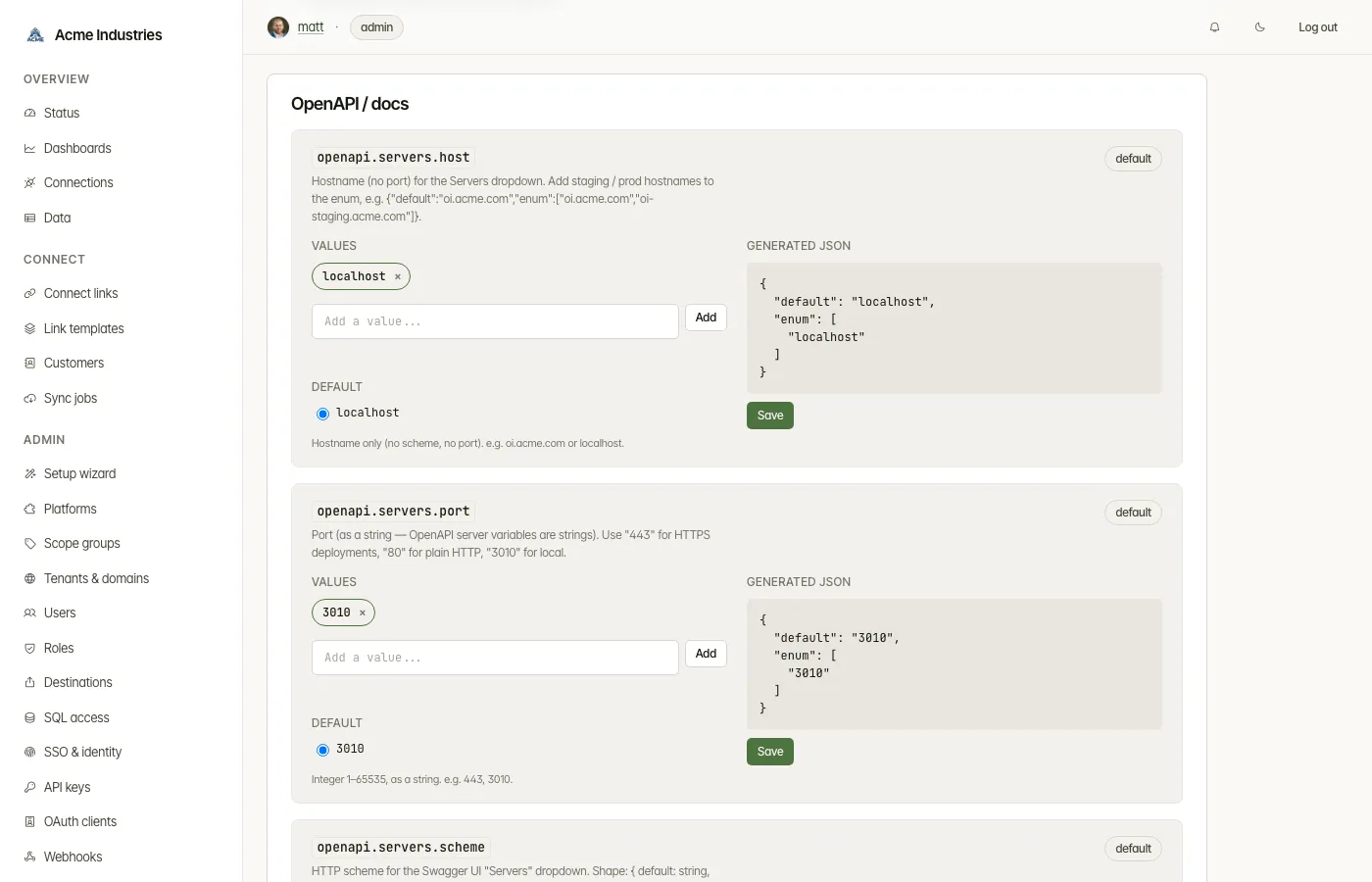
Admin → Settings → OpenAPI / docs. Four rows
(openapi.servers.scheme, openapi.servers.host, openapi.servers.port,
openapi.servers.version), each a JSON value of shape
{"default":"<value>","enum":["<value>",...]}. Click Save — the admin-api
notifies integration-server to invalidate its 60 s cache; the docs-server
picks up the new spec on its next 60 s refresh. Total propagation up to
120 s (admin-DB refresh + docs-server cache). Hard-refresh the
/unified-api page to see the new dropdown.
The same validation applies on PATCH: default ∉ enum returns
400 VALIDATION with a descriptive error — operators see the typo
immediately, not later in a confusing Swagger UI.
Postman bundle
Section titled “Postman bundle”The bundle has two parts with different propagation behaviour:
-
Collection (
openapi.postman_collection.json) — pure structure (paths, schemas, the{{baseUrl}}Postman variable). Build-time artifact generated bypnpm docs:all. Regenerated only on deploy (the docker build runs the generator). Adding adapters / verticals → rebuild → push. -
Production environment (
openapi-production.postman_environment.json) — served by an explicit handler on docs-server that overlays the admin-DB-mergedbaseUrlonto the cached env file. Every download reflects current/settings → OpenAPIstate. The port is omitted when it’s the scheme’s default (:443for https,:80for http) for readability in the Postman environment editor. -
Local environment (
openapi-local.postman_environment.json) — stays static; alwayshttp://localhost:3010. For developer-on-laptop use. -
Sandbox environment (
openapi-test.postman_environment.json) — the same collection withbasePathset to/test/v1instead of/v1. Also static. Pair it with anosk_test_…key and every versioned request in the collection hits the sandbox instead of the live API.There is no second collection: the versioned requests are built as
{{baseUrl}}{{basePath}}<path>precisely so one variable switches surface. The 45 absolute requests (/admin/*,/auth/*,/health,/webhooks/*,/connections*,/v1/connections*, and the three/test/v1/*sandbox control routes) do not carry{{basePath}}. The admin/auth/health set still points at the live API under this environment — correct, since none of them is mounted under/test/v1— while the sandbox control routes spell/test/v1in full and hit the sandbox under every environment.
Postman client snapshot caveat: Postman imports a collection once and
caches it locally. Updating baseUrl on /settings makes the next
download correct, but already-imported collections in users’ Postman
workspaces are snapshots. Re-import to pick up changes.
opensteward.dev ·Plans and free license ·Terms ·Privacy ·support@opensteward.dev
© 2026 Falco Consulting AB. Built from open-steward/opensteward@a3961d8. This site sets no cookies, runs no analytics and loads nothing from other sites, except platform logos from Brandfetch on the Platforms page.