End-user journey
What an end-user experiences. In OpenSteward’s model, the end-user is a customer of the developer’s app — a person whose data in one of the nine verticals (accounting, CRM, ecommerce, logistics, payments, docsign, projects, customer-support, inventory) the developer wants to read or write on their behalf.
The end-user is not the developer, not the operator who runs the integration-server, and not an admin. They never see the admin UI, never see API keys, and rarely see an OpenSteward URL at all.
There are two flows depending on how the developer integrated OpenSteward:
- Hosted Connect Link — the developer mints a one-time link and sends it to the end-user (in-app, by email, etc.). The end-user clicks it, lands on a branded
/connect/:tokenpage, picks a provider, runs the OAuth dance, and is returned to the developer’s app. This is the default flow and the one most end-users will see. - Headless / API-mediated — the developer already holds a
connection_idfor that customer (e.g. authorized once during onboarding) and reads/writes via/v1/*directly. The end-user never sees an OpenSteward page; they only see the developer’s app surfacing data that came through the integration-server.
Flow A — Hosted Connect Link (default)
Section titled “Flow A — Hosted Connect Link (default)”The customer lands on the host-branded picker shown below (here with the empty-state copy that surfaces when no platforms are configured yet):
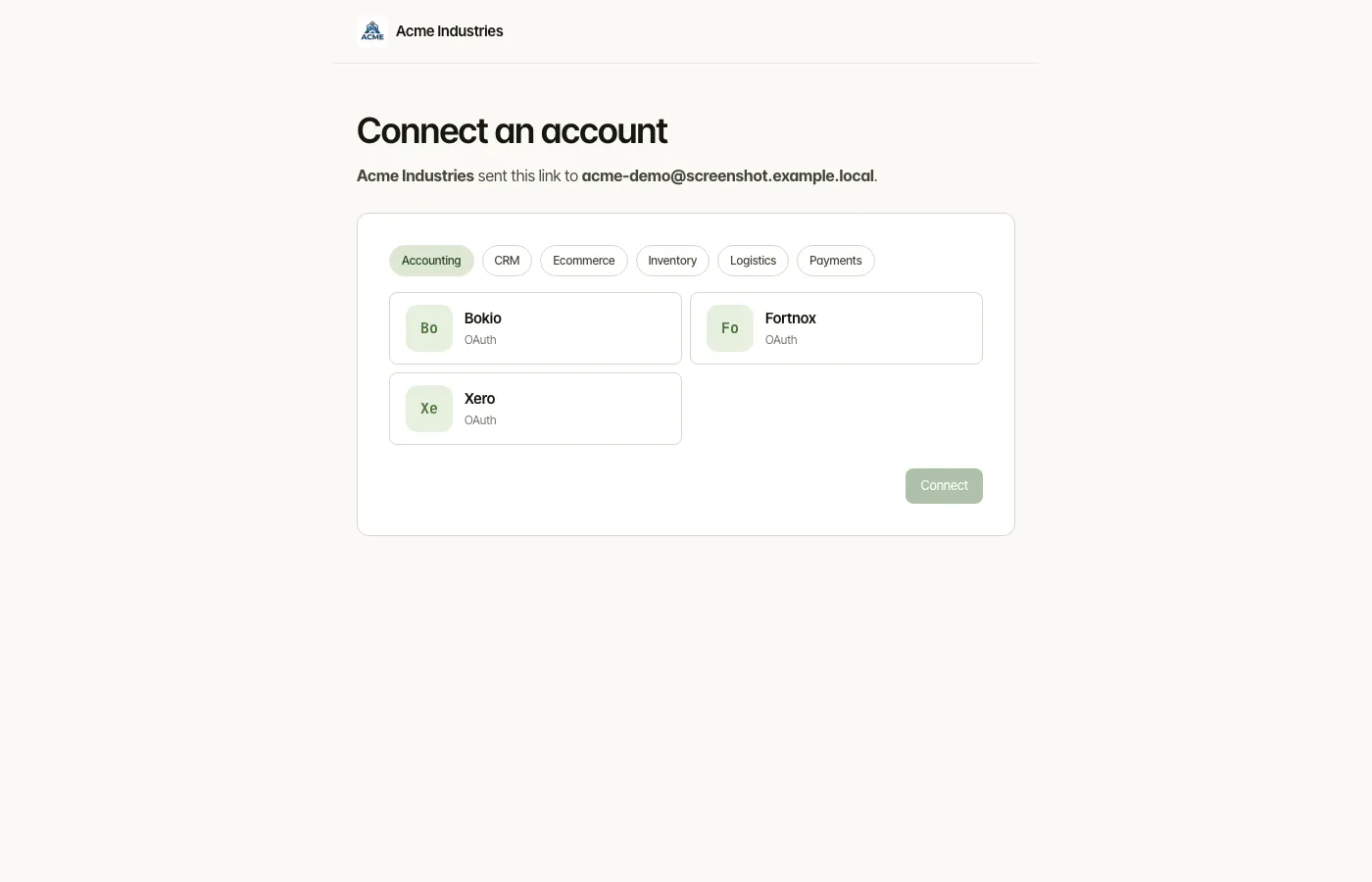
Chart 11a — End-user UX journey
Section titled “Chart 11a — End-user UX journey”

The two dips at 3/5 are inherent to OAuth: the end-user has to remember credentials for the provider (not us), and consent screens are written by the provider (not us). Everything inside the OpenSteward boundary scores 4–5.
Chart 11b — Connect Link sequence (what actually happens)
Section titled “Chart 11b — Connect Link sequence (what actually happens)”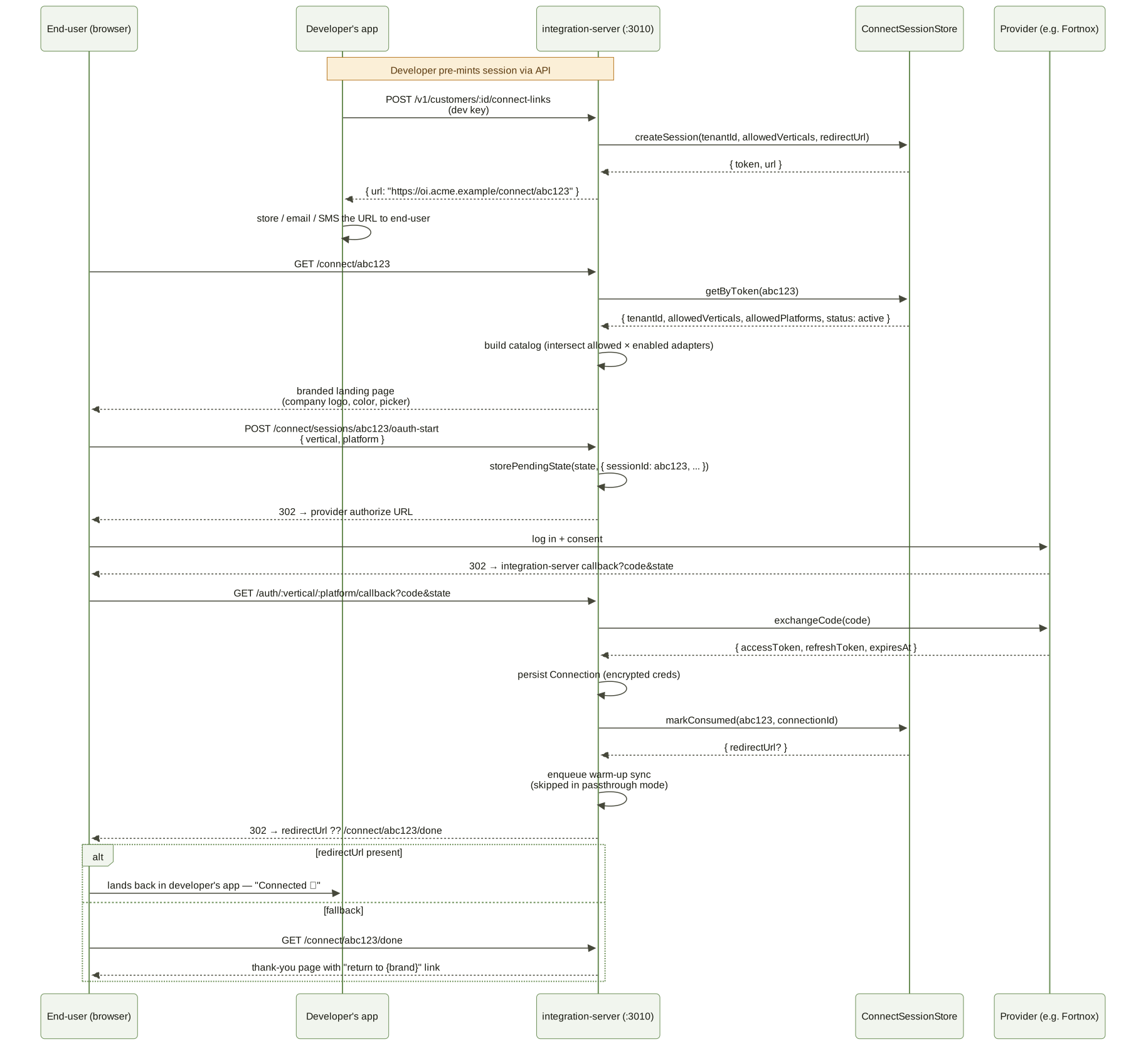
What the end-user actually sees:
- Landing page at
/connect/:token— picker styled with the operator’s company logo / primary colour from/company-info - Provider’s own OAuth screens (OpenSteward has no control over these)
- Either an auto-redirect back to the developer’s app, or a thank-you page with a button to return
Variant: self-register links (admin doesn’t know the customer yet)
Section titled “Variant: self-register links (admin doesn’t know the customer yet)”When the admin mints in self-register mode (no customer email at
mint time, allow_self_register = 1), the end-user lands on the same
/connect/:token page but sees an email-capture form before the
picker. On submit the page POSTs /connect/:token/customer with
{ email, displayName? }; integration-server upserts an end-user row
(EndUserStore.upsertByEmail) and atomically attaches it to the
session (ConnectSessionStore.attachEndUser). The page reloads into
the normal picker view.
The attach is idempotent — a second tab racing the same POST gets
409 ALREADY_REGISTERED instead of overwriting the binding. From the
customer’s perspective: enter email, the picker appears, OAuth
proceeds as in the main flow above. Re-opening the same URL after
binding skips the email form.
The other two modes — pinned (admin set the customer + adapter
upfront) and customer-picks-adapter (admin set the customer but
left the platform open) — produce the same UX as the chart above.
Mode is a server-side combination of end_user_id /
allowed_platforms / allow_self_register; the customer never sees
the mode label.
What the end-user never sees:
- Tokens, refresh tokens, scopes, encrypted credentials
- Adapter slugs (they see “QuickBooks” not
quickbooks-online) - Anything resembling admin UI, API keys, dashboards
Friction points specific to the end-user
Section titled “Friction points specific to the end-user”| Step | Score | What can dip it | What we control |
|---|---|---|---|
| Provider login | 3 | End-user forgot their provider password / can’t find their account | Nothing — provider’s auth is out of scope |
| Consent screen wording | 4 | “Why does this app want access to my invoices?” | Operator pre-fills App name + privacy URL in step 2 of the wizard, which lands on the consent screen |
| Provider scope list | 4 | Some providers list 20+ scopes verbosely | A read-only link asks only for that platform’s curated readScopes rather than everything the OAuth app could ask for. Links from the developer API are read-only by default; links minted in the admin console default to the platform’s configured scopes, so pick Read-only there for the shorter list. How the provider renders them is theirs |
| Branded landing page | 5 | Looks unfamiliar / off-brand | Operator’s logo + colour appear; if they’re missing, end-user sees the OpenSteward default and may bounce |
The single biggest UX investment the operator makes for end-users is filling in step 2 of the setup wizard (display name, logo, primary colour, privacy URL). That data flows directly into the landing page, the OAuth consent screen branding, and the thank-you page.
Flow B — Headless / API-mediated
Section titled “Flow B — Headless / API-mediated”Sometimes the end-user never visits an OpenSteward URL. The developer’s app already holds a connection_id for that customer (often created once at onboarding and stored in the developer’s own DB) and uses it to call /v1/* directly.
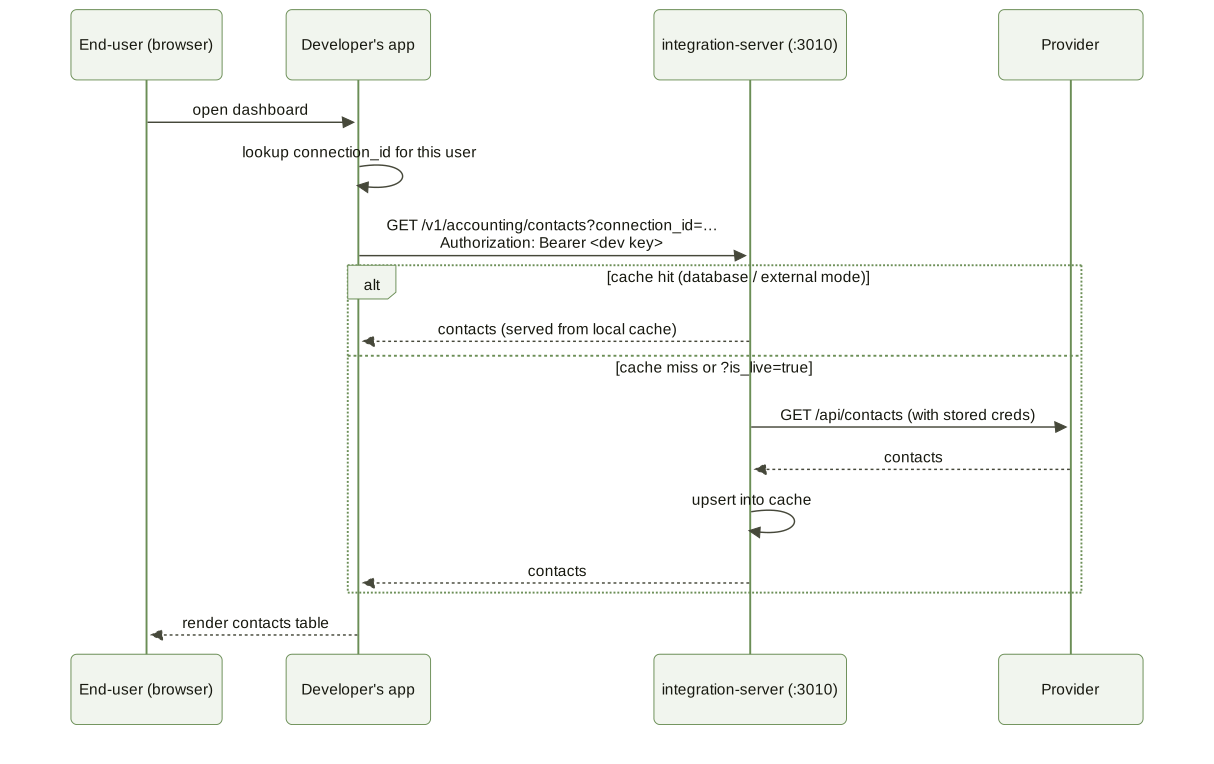
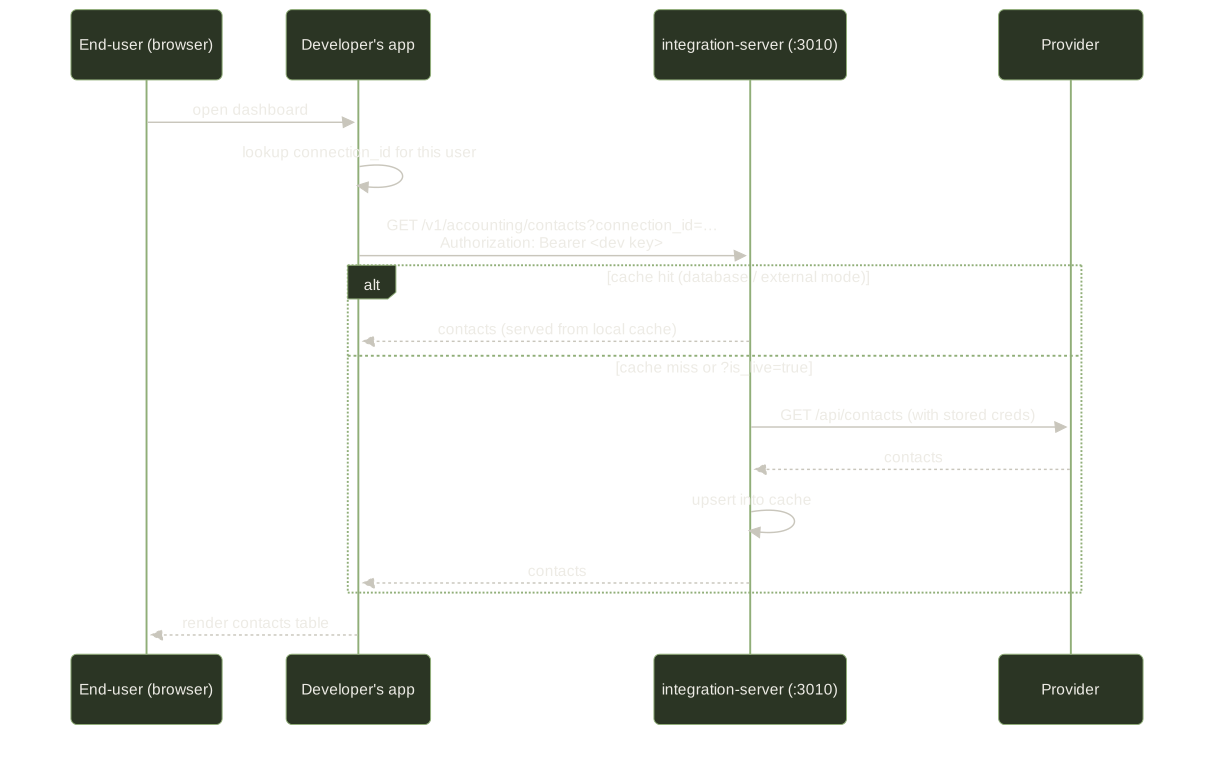
In this flow the end-user only ever sees the developer’s app UI. From their perspective, “the integration just works” — there is no separate provider login, no Connect Link, no consent screen. The connection was authorized once (via Flow A above) and is reused indefinitely until tokens revoke or the operator deletes the connection.
When does an end-user re-enter Flow A?
Section titled “When does an end-user re-enter Flow A?”Most end-users do Flow A exactly once. Re-entry happens when:
- Tokens revoked at the provider. The provider invalidates the refresh token (user changed password, the OAuth grant was rotated, etc.). The next API call fails with a 401, the connection is marked
expired, and the developer’s app shows a “Reconnect” button that mints a fresh Connect Link. - Scopes need to widen. The developer’s app starts using a new endpoint that requires a scope the original consent didn’t include. A new Connect Link with the wider scope set re-prompts the end-user. It is common for links minted through the developer API, which are read-only by default: unless the caller passes
scopePolicy: 'platform_default'or explicitscopes, the link asks only for that platform’s curatedreadScopes. Links minted in the admin console default to the platform’s configured scopes instead. Seeconnect-links.md. - End-user voluntarily disconnects. The developer’s app exposes a “Disconnect from QuickBooks” option which deletes the connection and (next time) mints a new Connect Link.
Each re-entry is a fresh Connect Link with a one-time token — never a reused URL. The ConnectSessionStore enforces this.
See also
Section titled “See also”runtime-flows.md— the full OAuth + webhook + sync sequence diagrams (operator-facing detail behind the same flow)setup-wizard.md— the operator/developer journey that gets the deployment to the point where end-users can show uppersistence.md— theconnect_sessions,end_usersandcredentialstables that track an end-user’s link, identity and resulting connectionvertical-internals.md— what happens inside a vertical when/v1/*serves an end-user request
opensteward.dev ·Plans and free license ·Terms ·Privacy ·support@opensteward.dev
© 2026 Falco Consulting AB. Built from open-steward/opensteward@a3961d8. This site sets no cookies, runs no analytics and loads nothing from other sites, except platform logos from Brandfetch on the Platforms page.