Setup wizard state machine
The first-run guard plus the eight-step wizard, with all branches and back-references.
Chart 10 — First-run + 8-step wizard
Section titled “Chart 10 — First-run + 8-step wizard”

Step 8 is functionally optional outside external mode — the rail labels it (optional) and Skip-for-now is the prominent action.
The wizard stores no progress of its own. computeWizardProgress (apps/admin/src/core/routes/wizard-progress.ts) derives each step’s done-ness on every wizard GET from what is actually persisted — company record, a deliberate logo choice, enabled adapters, adapters carrying config, API keys, webhook subscriptions — and hands it to the rail through reply.locals.wizardProgress. Work done outside the wizard counts (enabling a platform from /platforms marks step 4 done), and a wiped record un-marks its step. GET /setup/wizard redirects to the first incomplete step; ?stay=1 opts out, and the rail’s own link back to step 1 carries it. Steps 7 and 8 are requireRole('admin'), so the scan skips them for anyone else rather than resuming an operator into a 403, and step 8 counts as outstanding only in external data-store mode. Steps 3, 6 and 8 are never resume targets — an operator content with monogram tiles or uninterested in webhooks would otherwise be sent back to them forever.
Resuming from the Status page
Section titled “Resuming from the Status page”An admin who leaves the wizard half done sees a Finish setting up card at the top of / — “Setup is not finished — next: Credentials (step 5 of 8)” — with Continue setup (the same target GET /setup/wizard would redirect to, or /setup/wizard?stay=1 when that step is step 1) and Skip for now. It is derived by the same scan: loadWizardProgress (apps/admin/src/core/routes/wizard.ts) is the wizard preHandler’s body, exported, and the Status page calls it with withRailInputs: false (the logo choice and the tenant count only tick rail items, never decide the next step) and a structural WizardProgressClient built from the verticals and platform rows the Status page has already fetched, so the card costs the page three extra reads (getCompanyInfo, listApiKeys, listWebhookSubs) plus the data-store mode. The Status page makes those reads itself, strictly, and hands the scan the resolved values: computeWizardProgress swallows a failed read as “not done”, which is right for the rail (an unticked item) and wrong for a card that would then name step 2 or 7 on a finished deployment. The step names come from WIZARD_STEP_LABELS in wizard-progress.ts, which the rail reads too (reply.locals.wizardSteps), so the two cannot disagree.
Admins only: the last two steps are requireRole('admin') and two of the reads are operator+ on admin-api, so for an operator or viewer the scan is not run at all. The card is hidden — not shown with a wrong step — when the scan cannot run (the platform rows or any of its three reads could not be read, or the scan itself threw), and it disappears once firstIncomplete === null. The data-store mode is the one input that cannot be read strictly: the client answers null both on an outage and on a passthrough deployment, where there are no metrics to have. The Status page tells the two apart by its sync-jobs read (passthrough has no sync engine and answers 404); with the mode unknown and every other step done the deployment may be external with webhooks outstanding, so the card is hidden and ?wizard=complete says it could not confirm rather than “Setup complete”. While an earlier step is outstanding the mode changes nothing and the card names that step.
Skip for now (POST /dashboard/setup/skip, admin, CSRF) stores the step in the Status page’s task-dismissal table as wizard:<step> with the step slug as fingerprint (dismissDashboardTasks; see persistence.md). It is keyed by the step it skipped, so it invalidates itself: the moment the next step is a different one the card returns. A deployment whose last API key was revoked is the case this exists for — without it the card would come back forever. A skip is a deployment-wide write next to Continue setup, so for 15 minutes the Status page shows “Setup reminder hidden” with Undo — the panel’s POST /dashboard/tasks/undismiss, which accepts wizard:<step> at the admin floor. The ?wizard=complete success panel step 8 links to renders only when the scan agrees nothing is outstanding, so “Setup complete” can never sit above “Finish setting up”; on that landing a skip is ignored (the card shows, rather than the page saying nothing at all), and a scan that could not run renders “Couldn’t confirm setup is finished — open the Setup wizard to check”.
Every step is one an admin can finish alone. That is the constraint the shape of this list has to respect: a step gated on another service being up, or on a third party acting (such as a customer authorizing OAuth), would strand people. Connection health therefore lives on /connections — status pills, a Sync now button, search and filters — not in a wizard step. The wizard is eight steps.
Step-by-step
Section titled “Step-by-step”First-run guard
Section titled “First-run guard”A preHandler hook on every request (except anything under /setup, /public or /design, and the three unauthenticated endpoints /health, /version, /api/version-info) calls adminApiClient.hasUsers(). If no users exist, every request 302s to /setup/init so the operator can create the first admin account.
Setup init (/setup/init)
Section titled “Setup init (/setup/init)”A small form: username, password, password confirmation, and an optional bootstrap token. Posts to adminApiClient.setup() which creates the first admin user via the admin-api’s POST /api/auth/setup endpoint (which itself only works when no users exist — second call returns 409). Rate-limited to 3 attempts per minute.
The bootstrap-token field is the first-run gate. When admin-api is started with BOOTSTRAP_TOKEN set, the setup POST must carry the matching value in an X-Bootstrap-Token header or it returns 401 — the admin UI forwards whatever the operator typed. Without the env var the field is ignored, so a local dev deployment still sets up with three fields. Set it on any deployment reachable from the internet: POST /api/auth/setup is unauthenticated by construction, so on a fresh or wiped volume the first stranger to reach it would otherwise own the admin account. The first admin created here is auto-pinned as the break-glass account (see sso-and-identity-providers.md).
Login (/login)
Section titled “Login (/login)”Standard credentials form. Calls adminApiClient.login(). On success, stores the JWT in a signed session cookie alongside the user info. CSRF token + rate-limited to 5 per minute.
Wizard step 1 — Data store strategy (/setup/wizard)
Section titled “Wizard step 1 — Data store strategy (/setup/wizard)”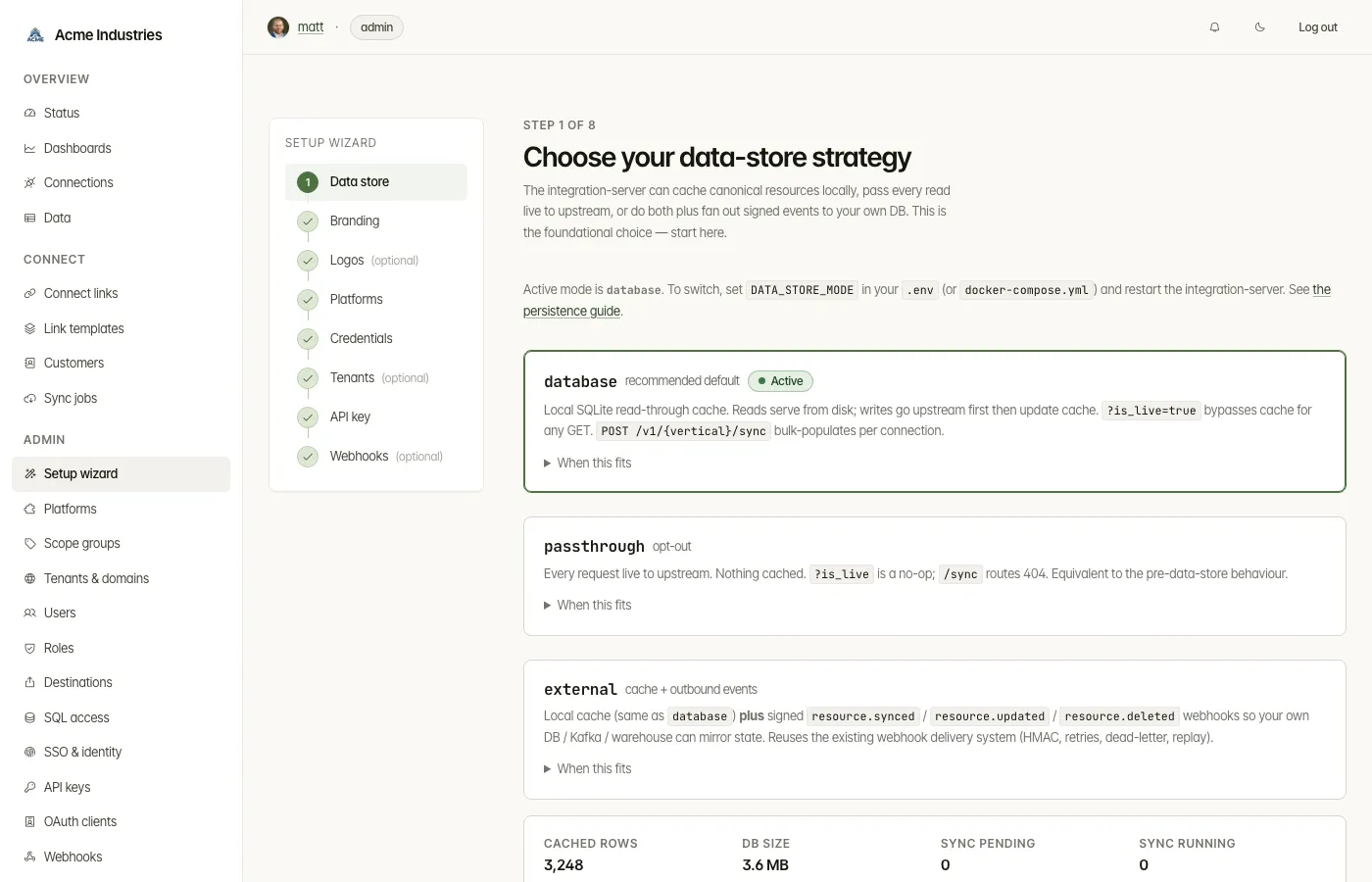
Foundational choice — the data-store mode shapes how every /v1/* request behaves and must be picked before adapters are wired. Calls apiClient.getDataStoreMetrics(token) (proxies /health/data-store) to read the active mode.
Three cards explain the trade-offs:
database(recommended default) — local SQLite read-through cache. Reads serve from disk; writes write through;?is_live=truebypasses cache;POST /v1/{vertical}/syncbulk-populates.passthrough— every request live to upstream; nothing cached. Pick when your app already has its own DB or you’re running multi-replica without a shared store.external—databasecache plus signedresource.synced/resource.updated/resource.deletedoutbound webhooks. Subscribers mirror state into their own DB / Kafka.
Reaching this step at all means setup has not started, or the operator asked for it: GET /setup/wizard redirects to the first incomplete step, and only ?stay=1 (the link the rail itself renders) holds the page. The mode is set via DATA_STORE_MODE on the integration-server. The wizard is informational: shows the active mode, explains how to change it (env var + restart), and links to dev-api.md §7 for the full request-path semantics and to persistence.md for the operations runbook.
Wizard step 2 — Brand the deployment (/setup/wizard/company-info)
Section titled “Wizard step 2 — Brand the deployment (/setup/wizard/company-info)”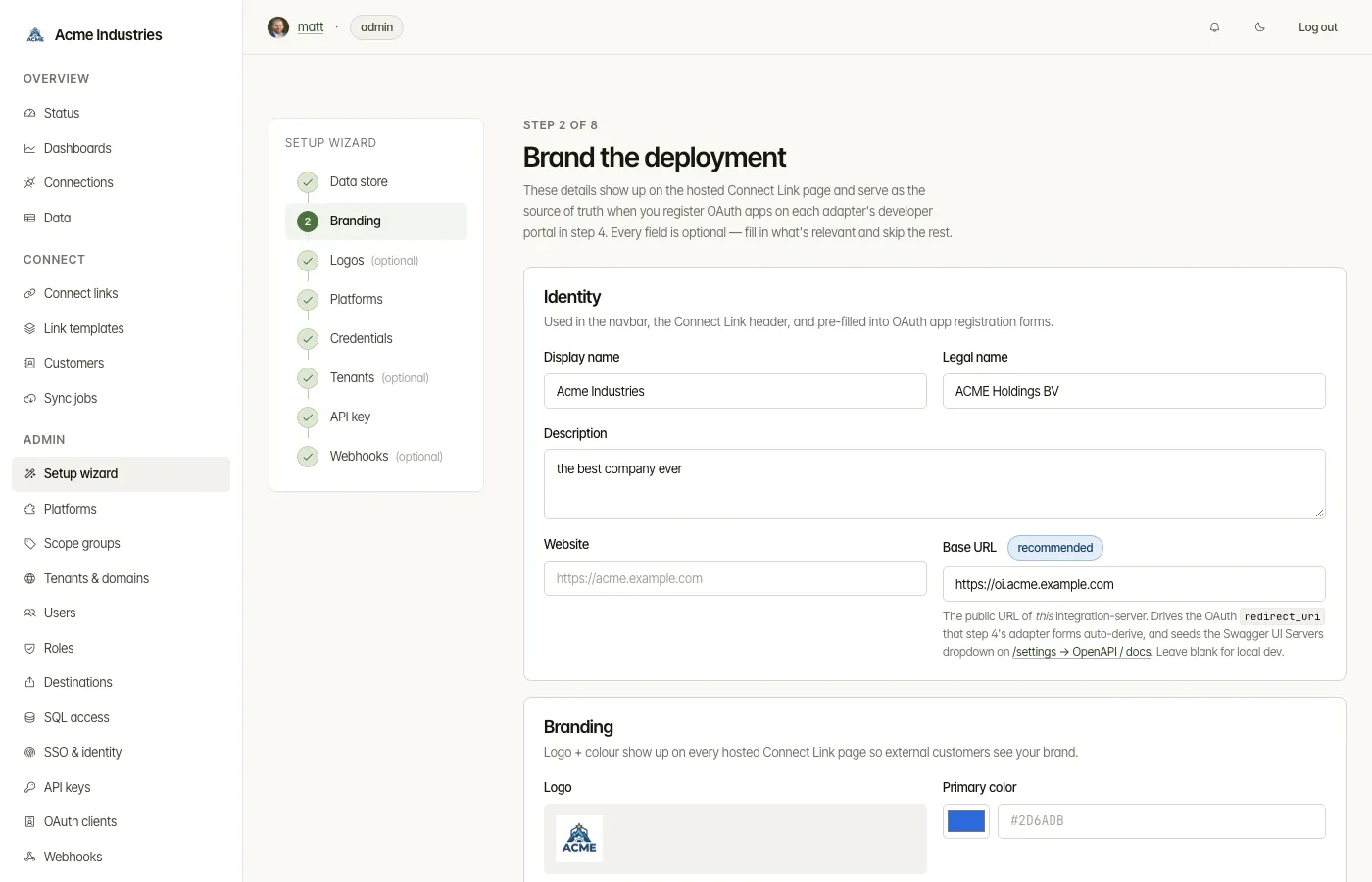
Wraps the same form rendered at /company-info with wizard chrome. Captures display name, legal name, description, website, base URL, logo (uploaded as a data URL), primary brand colour, support email, privacy-policy / ToS URLs, and an optional address. The address Country field is a single-select dropdown of full country names (backed by the canonical ISO 3166-1 alpha-2 list from @opensteward/shared); the stored value remains the two-letter code. Posts to POST /setup/wizard/company-info which calls apiClient.setCompanyInfo(token, patch); the patch is built from a fixed COMPANY_FIELDS whitelist so unknown form fields are dropped. On validation error the form re-renders with the error banner. A “Skip for now” link advances to step 3 without touching the saved company info.
The captured values feed two downstream surfaces:
- Connect Link page — display name, logo, primary colour, privacy / ToS URLs.
- Step 5 sidebar — auto-derives the OAuth
redirect_urifrombaseUrl + /auth/{slug}/callbackand shows copy-to-clipboard rows for the dev-portal registration form.
Wizard step 3 — Platform logos (/setup/wizard/logos)
Section titled “Wizard step 3 — Platform logos (/setup/wizard/logos)”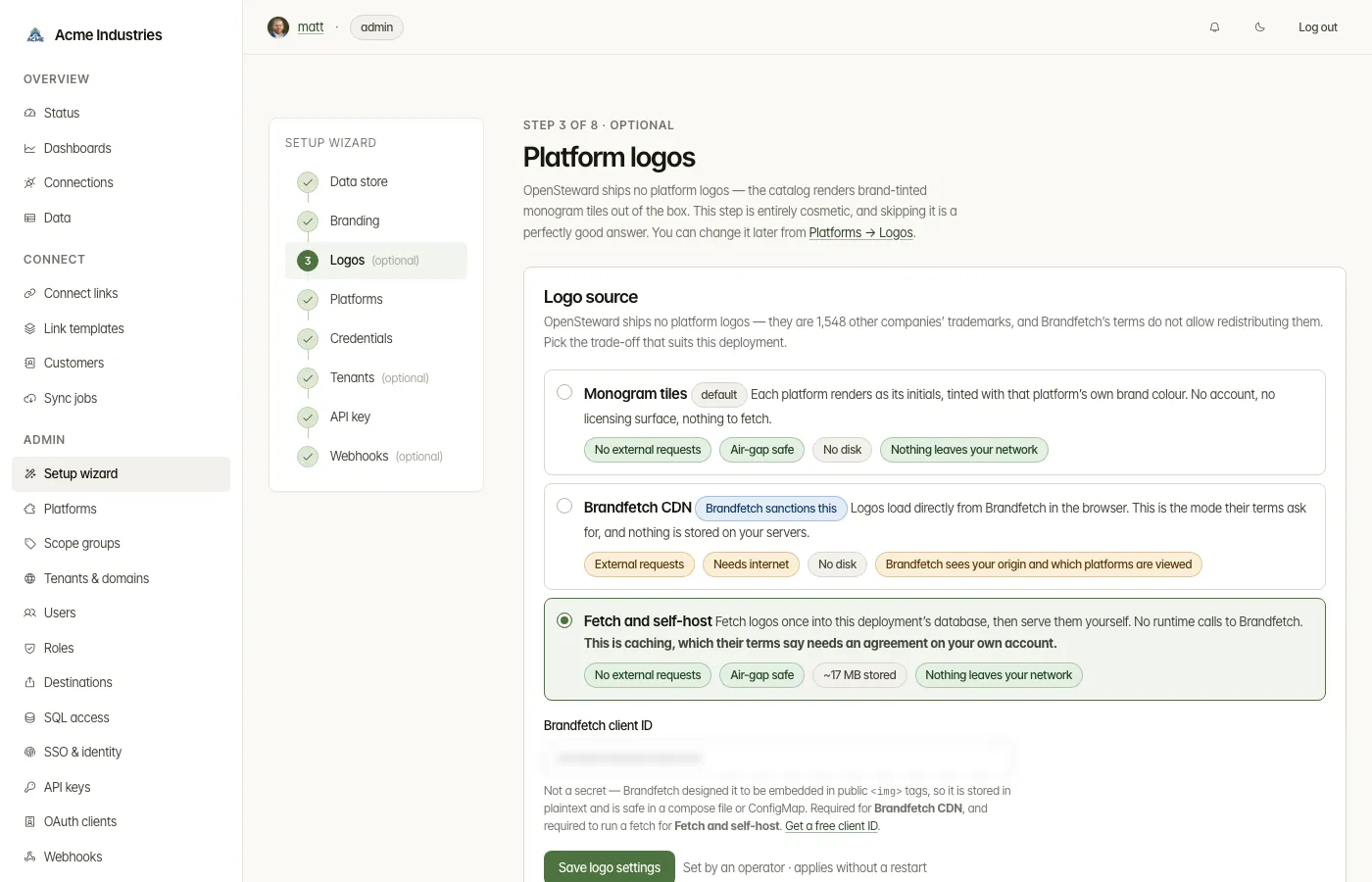
Optional, and cosmetic: it chooses where the catalog’s platform logos come from.
Renders the same two partials as Platforms → Logos (platforms/_logo-settings
and platforms/_logo-fetch) — one implementation, two surfaces — with
logoHistory deliberately empty, because run history belongs on the platforms
tab rather than a first-run flow.
Done-ness is logos.source being off its seeded default, not the row existing:
the row is seeded on first boot and would otherwise read as done before anyone
had seen the step. It is never a resume target, so an operator happy with
monogram tiles is not sent back to it.
Wizard step 4 — Pick adapters (/setup/wizard/platforms?vertical=...)
Section titled “Wizard step 4 — Pick adapters (/setup/wizard/platforms?vertical=...)”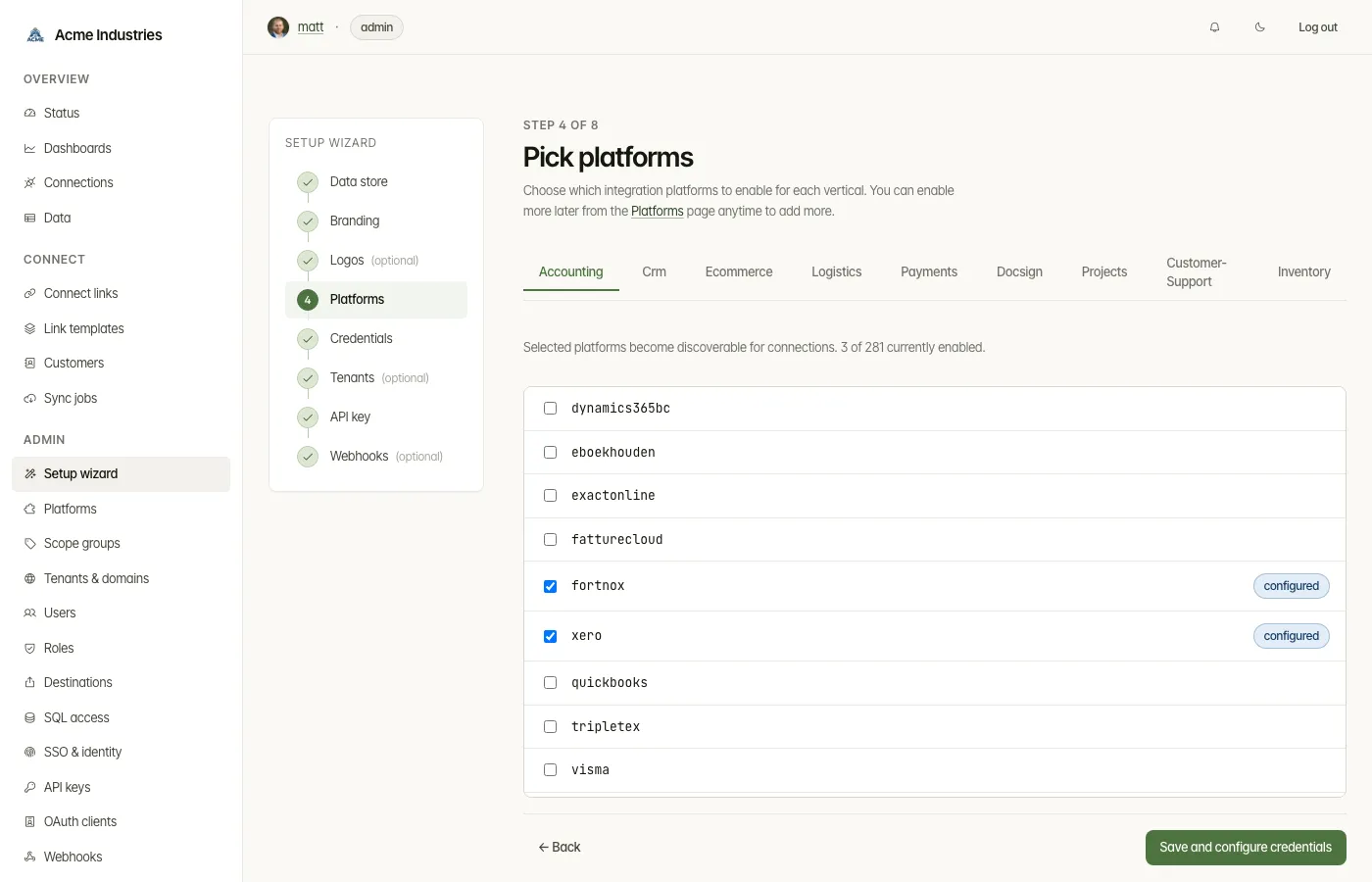
Tab-per-vertical interactive checkbox grid. Lists every known adapter for the selected vertical from apiClient.listPlatforms(token, vertical) (which proxies to admin-api GET /api/verticals/:vertical/platforms). The form posts to itself; the handler reconciles the checked set:
- For each adapter currently checked but not enabled → calls
apiClient.enablePlatform(token, vertical, slug) - For each adapter currently unchecked but enabled → calls
apiClient.disablePlatform(token, vertical, slug) - After reconciliation, redirects to step 5 (configure) with the first enabled adapter as the slug query param
Wizard step 5 — Configure credentials (/setup/wizard/configure?vertical=...&slug=...)
Section titled “Wizard step 5 — Configure credentials (/setup/wizard/configure?vertical=...&slug=...)”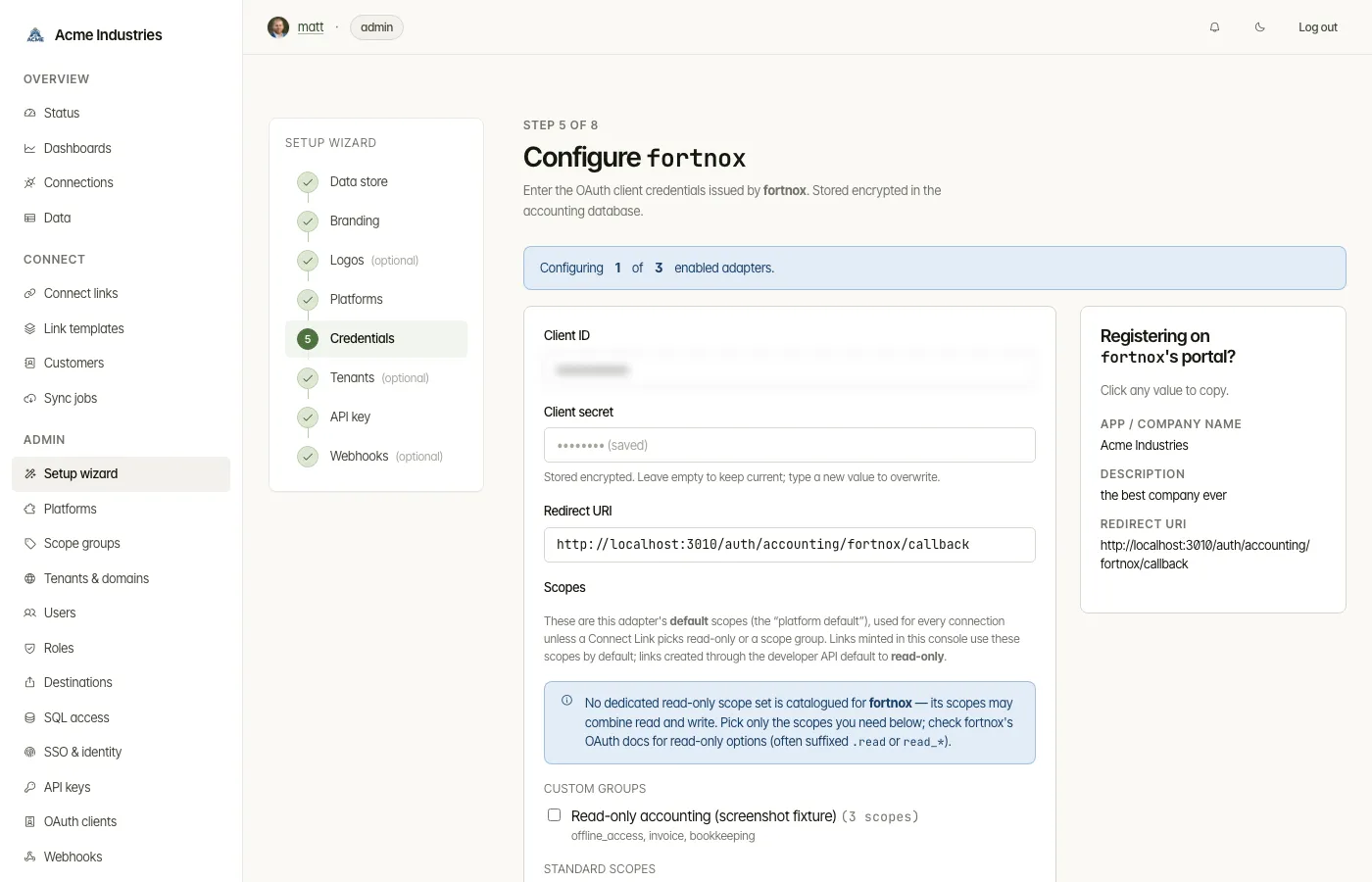
Credentials form with two columns:
- Left (form): clientId, clientSecret, redirectUri (auto-derived from
companyInfo.baseUrl + /auth/{slug}/callback), scopes - Right (sidebar): Developer-portal helper showing copy-to-clipboard rows for company name, website, privacy policy, ToS, support email
Calls apiClient.setPlatformConfig(token, vertical, slug, config). After save, looks at the list of enabled adapters and either:
- Advances to the next one (
?slug=<next>) if there are more - Or advances to step 6 (Tenants & domains) if this was the last one
Wizard step 6 — Tenants & domains (/setup/wizard/tenants)
Section titled “Wizard step 6 — Tenants & domains (/setup/wizard/tenants)”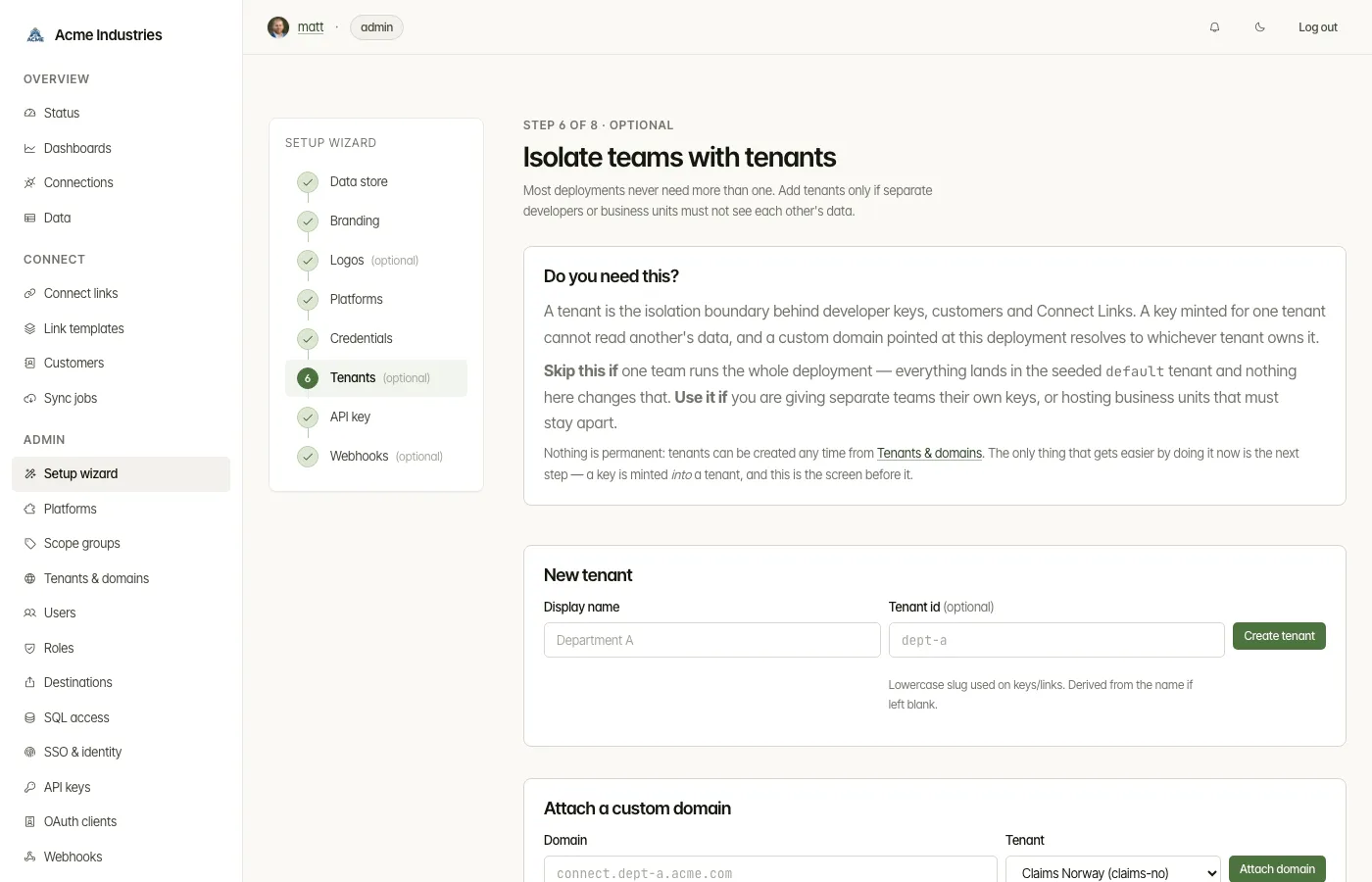
Optional, and skipped by most deployments. A tenant is the isolation boundary
behind developer keys, customers and Connect Links; one team running the whole
deployment never needs a second one, and everything lands in the seeded
default.
Renders the same partial /tenants does — views/tenants/_manage.ejs,
holding the create form, the attach-domain form and the tenant/domain table —
from the same two calls (listTenants + listTenantDomains). There are
deliberately no wizard copies of the POST routes: the partial’s forms post to
the real /tenants, /tenants/:id/delete, /tenant-domains and
/tenant-domains/delete, carrying a hidden returnTo so those routes send the
operator back to whichever surface they came from.
returnTo is a token, never a path — backTo() in routes/tenants.ts maps
'wizard' to the step and anything else to /tenants. A redirect target taken
from a form body would be an open redirect; a token cannot be. Same shape as the
returnTo in routes/connections.ts.
Done-ness is a tenant other than default existing — default is seeded, so
its presence says nothing about intent. Like logos, it is never a resume
target: it can never go done for a single-team deployment, and a step that
can never complete and is not skipped would strand the operator.
It sits immediately before the API key step on purpose: a key is minted into a tenant, and that step offers a picker whenever more than one exists.
Wizard step 7 — Mint your first dev API key (/setup/wizard/api-key)
Section titled “Wizard step 7 — Mint your first dev API key (/setup/wizard/api-key)”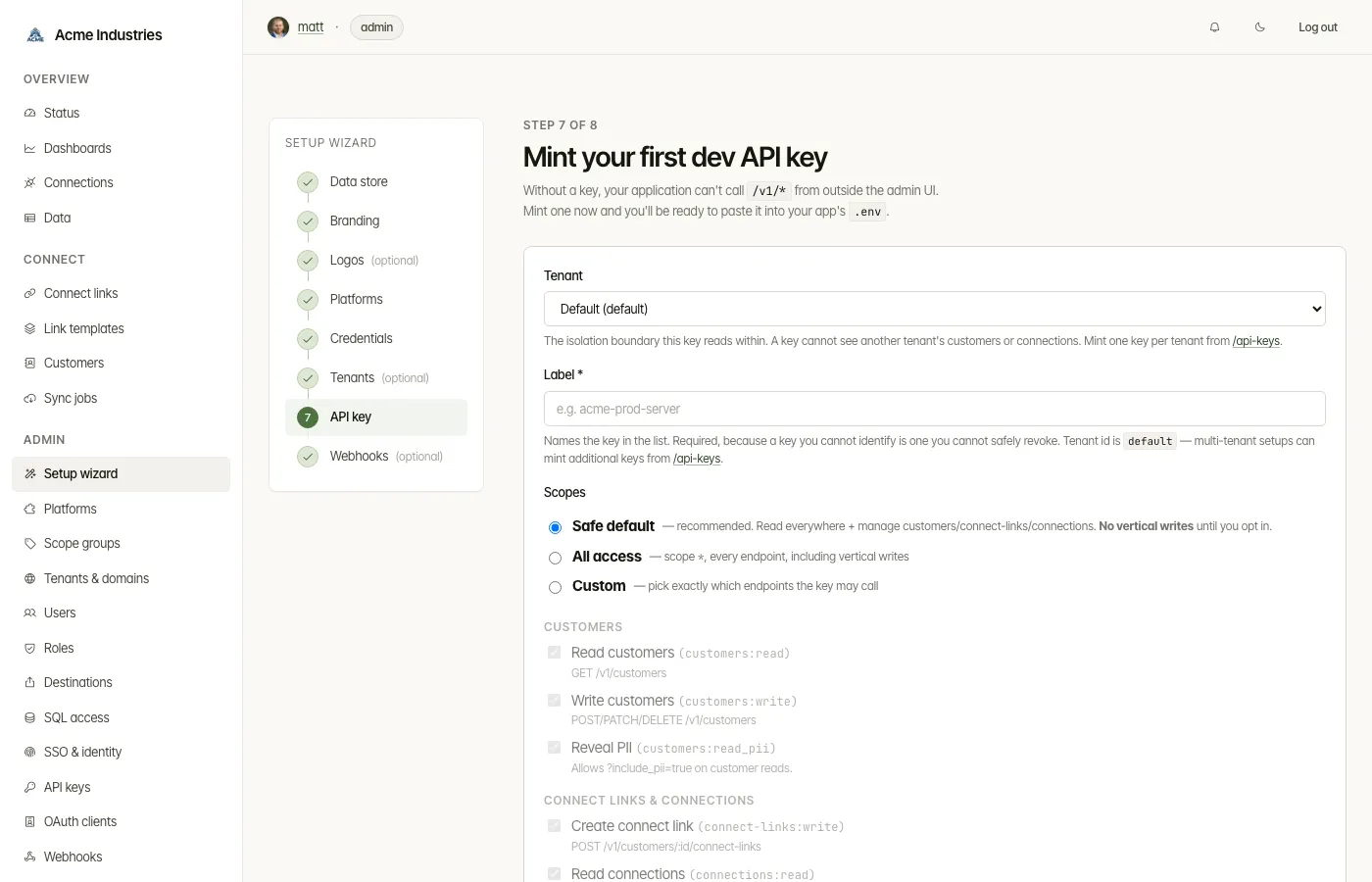
Admin-only (requireRole('admin')). A subset of /api-keys/new’s scope vocabulary folded into the wizard chrome — that page has six scope groups while the wizard exposes four, so in custom mode the wizard cannot grant webhook or MCP scopes even though safe-default includes the webhook pair (MCP is deliberate: the wizard mints an MCP key via its own dedicated button, described below). Form: a free-form label and a scopeMode (safe-default / all / custom) driving the wizard’s scope picker, in four groups: Customers, Connect Links & Connections, Verticals (touch axis — one entry per vertical plus vertical:read), and Verticals (verb axis — vertical:write alone). The label reads Label *: a trailing asterisk is the single required-field marker across the admin forms, and the word “required” appears in no label. safe-default is preselected and resolves to SAFE_DEFAULT_SCOPES (apps/admin/src/core/routes/api-keys-defaults.ts), which is every customer / connect-link / connection scope, the two outbound-webhook scopes (webhooks:read / webhooks:write), plus one vertical:<name> per known vertical and vertical:read — vertical:write is deliberately left out, so the first key an operator mints cannot push data upstream until they opt in. tenantId rides along as a hidden field defaulting to default; multi-tenant operators mint additional keys later from /api-keys.
Calls apiClient.mintApiKey(token, { tenantId, label, scopes }) and re-renders the same view with mintedKey populated, showing the plaintext exactly once with a copy-to-clipboard control and a .alert--warning reminder. Skip-for-now advances to step 8 without minting.
A second, optional button on the same page POSTs /setup/wizard/api-key/mcp and mints a fixed ['mcp:read', 'customers:read', 'vertical:read'] key labelled “MCP read-only (wizard)”. It is a separate key by necessity: assertMcpScopesCompatible refuses a mint that pairs mcp:read with any write-granting scope (*, <resource>:*, <resource>:write), so an MCP-capable agent needs its own key. See ../mcp.md.
Wizard step 8 — Register a webhook subscription (/setup/wizard/webhooks)
Section titled “Wizard step 8 — Register a webhook subscription (/setup/wizard/webhooks)”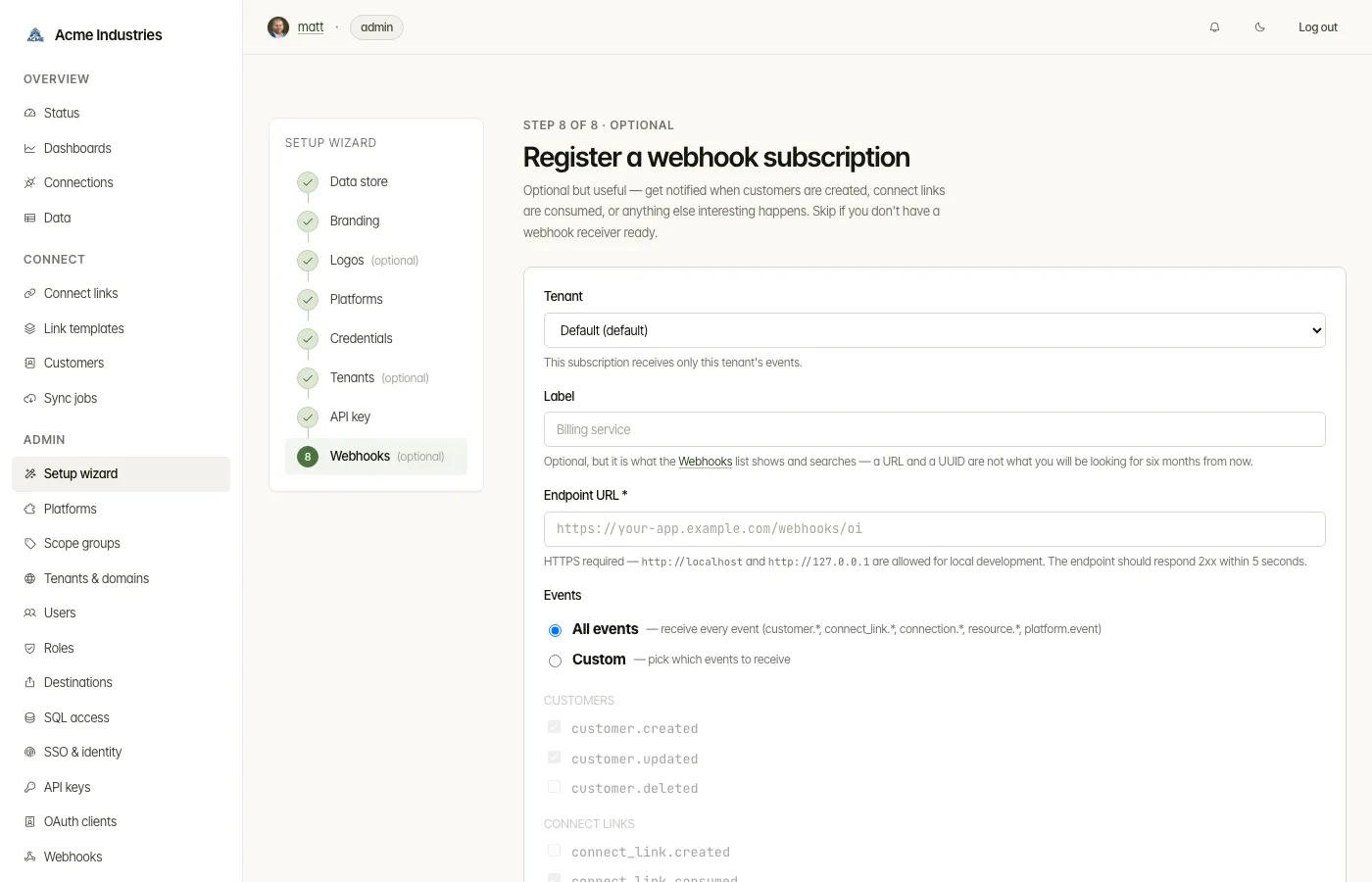
Admin-only. Conditional based on dataStore.mode:
externalmode: the rail label has no(optional)suffix and the in-step copy frames the subscription as required to make external mode useful. Pre-checksresource.synced/updated/deletedin custom mode.database/passthroughmode: the rail label gets(optional). Pre-checkscustomer.created/updated/deletedandconnect_link.created/consumedin custom mode.
Form: url (required in the markup, though the label itself carries no marker), eventMode (all / custom) with three event groups (Customers, Connect Links, Resources). Calls apiClient.createWebhookSub(token, { tenantId: 'default', url, events }) and re-renders with createdSub populated, showing the plaintext HMAC secret once. Skip-for-now or “Finish setup” both redirect to /?wizard=complete.
Why a state diagram
Section titled “Why a state diagram”The wizard has back-edges (every step has a Back link to the previous step) and conditional transitions (Step 5 loops on itself when there are more adapters to configure, and Step 8 changes label and copy based on dataStore.mode). Linear flowcharts can’t express these — a state diagram makes the branches explicit.
Operator journey: clone → working integration
Section titled “Operator journey: clone → working integration”Where the state diagram above shows transitions, the chart below scores the lived experience of running the wizard end-to-end. Dips in the score mark the friction points of the flow.


What the score dips tell us
Section titled “What the score dips tell us”Three steps land at 3/5 — these are the friction hotspots of the flow:
| Step | Score | Why it dips | Mitigation |
|---|---|---|---|
| Generate SESSION/JWT/STORE secrets | 3 | Operator has to mint one value per secret env var and get each to the service that reads it | scripts/generate-secrets.sh prints an .env-ready block for every secret the stack needs, and the check:secret-passthrough gate fails CI when a minted secret never reaches its service |
| Register OAuth app on dev portal | 3 | Operator leaves the admin UI to fill out a third-party form | Step 5’s sidebar shows copy-to-clipboard values + auto-derived redirect URI |
| Paste clientId/clientSecret | 4 | Tedious but unavoidable when the provider issues credentials in their portal | — |
Everything else lands at 4 or 5/5 — the wizard has been built deliberately to minimise friction at every other step.
Troubleshooting decision tree
Section titled “Troubleshooting decision tree”When something fails on the journey above, walk this checklist top-to-bottom. The first “no” tells you which subsystem to look at.


Each branch corresponds to a deeper subsystem document:
- Service health →
services.mdfor the topology and dependency graph. - Login / first-run → first-run guard at the top of this page;
auth-and-tenancy.mdfor role hierarchy. - Adapter discovery →
adapter-lifecycle.mdfor the enable/disable/config flow. - OAuth callback →
runtime-flows.mdChart 4b for the full state-and-credential dance. - Persistence →
persistence.mdfor theconnections,company_info, andconnect_link_sessionstables. - API key + webhook →
admin-page-map.mdfor the admin-api routes that step 7 + 8 proxy through.
See also
Section titled “See also”- admin-page-map.md — the full admin UI route inventory
- adapter-lifecycle.md — what happens inside the vertical when step 4/5 fire
- end-user-journey.md — what an end-user (a customer of the developer’s app) experiences via Connect Links
- persistence.md — Operating the resources cache — ops runbook referenced from step 1
opensteward.dev ·Plans and free license ·Terms ·Privacy ·support@opensteward.dev
© 2026 Falco Consulting AB. Built from open-steward/opensteward@a3961d8. This site sets no cookies, runs no analytics and loads nothing from other sites, except platform logos from Brandfetch on the Platforms page.