Admin frontend page map
Every route in the admin UI grouped by access level, with the navigation links between them. For what each page is for and how to use it, see the admin console guide; this page is the route reference.
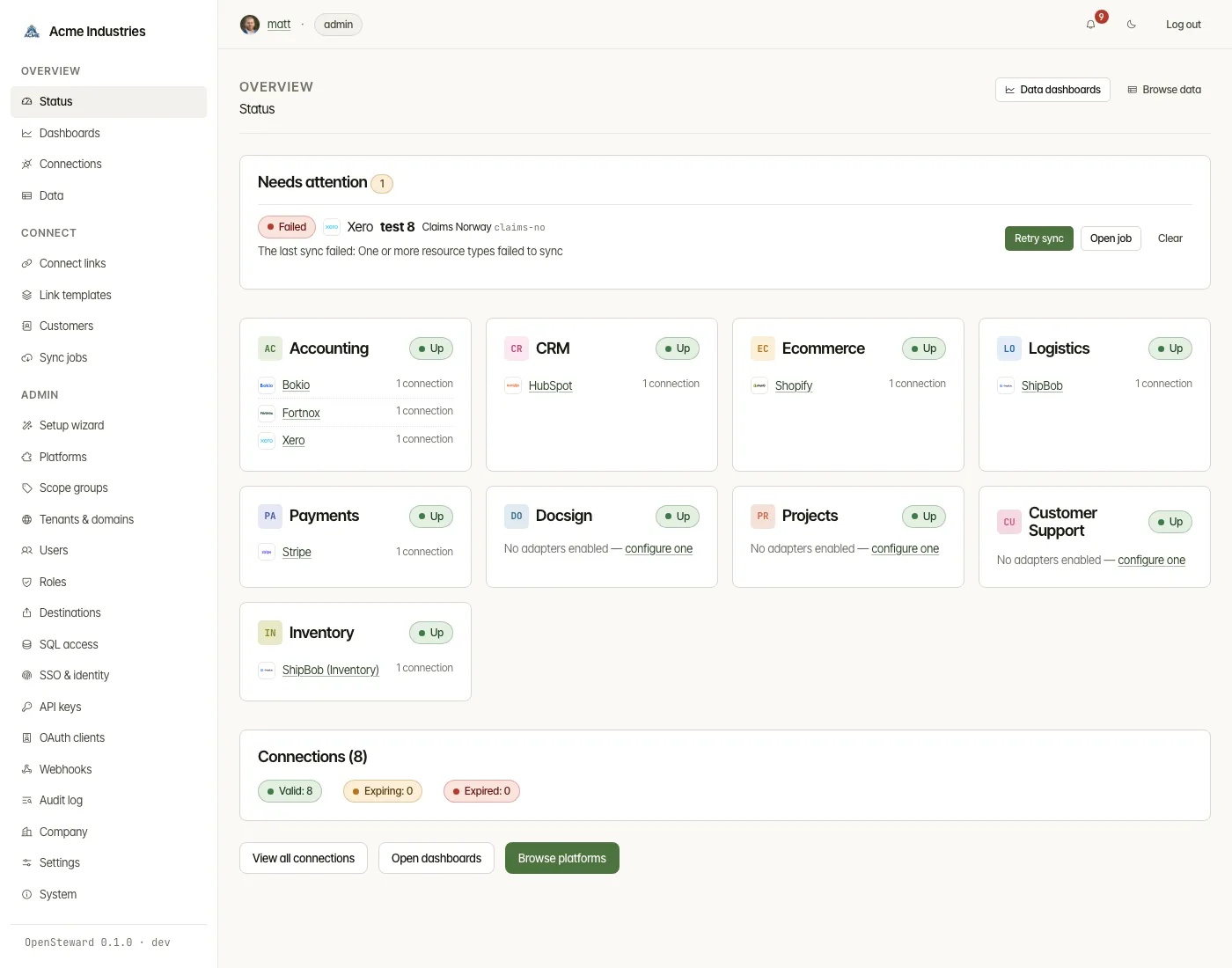
Notifications are not a sidebar entry: /notifications is reached from the
bell in the header, and My profile (/profile) from your name beside it
(see How the roles are wired).
Chart 12 — Admin UI route inventory
Section titled “Chart 12 — Admin UI route inventory”

Routes by middleware chain
Section titled “Routes by middleware chain”| Route | Method | Access | preHandler chain |
|---|---|---|---|
/health |
GET | public | (none) |
/login |
GET, POST | public | csrf (POST), rate-limit (POST 5/min) |
/login/sso/:slug |
GET | public | (none — redirects to admin-api /api/sso/:slug/login) |
/login/sso/:slug/ldap |
POST | public | rate-limit (5/min) |
/login/sso/complete |
GET | public | (none — exchanges the one-time handoff code) |
/setup/init |
GET, POST | public, only when no users | csrf (POST), rate-limit (POST 3/min), X-Bootstrap-Token forwarded when the deployment sets BOOTSTRAP_TOKEN |
/logout |
POST | authenticated | (none — exempt from CSRF) |
/ |
GET | authenticated | requireAuth — the Status page (nav: Status; the metric charts live under Dashboards). For an admin, the “Finish setting up” card (next wizard step, derived by the wizard’s own scan; gone when nothing is outstanding or skipped), then the “Needs attention” panel (a vertical that is down — never clearable, never behind the cap, one row for the integration server when every vertical is; rejected platform credentials; expired connections; failed syncs; and, as an early warning, still-valid connections whose last token refresh failed; derived per request, cache-control: no-store; a down vertical’s connections are reported as unchecked, never as none) above the vertical cards |
/dashboard/setup/skip |
POST | admin | requireRole(‘admin’), csrf — “Skip for now” on the setup card; stores wizard:<step> in the dismissal table, so the card returns by itself once the next step changes |
/dashboard/tasks/dismiss |
POST | operator+ (platform:creds:* rows admin) |
requireRole(‘operator’), csrf — one hidden JSON items field of {key, fingerprint} pairs; the server re-derives the rows and forwards only keys that are live and whose fingerprint still matches, so a stale page cannot clear a condition that changed under it |
/dashboard/tasks/undismiss |
POST | operator+ (platform:creds:* rows and wizard:* skips admin) |
requireRole(‘operator’), csrf — the Undo behind a clear, offered on the panel for 15 minutes; also the Undo behind the setup card’s Skip for now (wizard:<step>) |
/connections |
GET | authenticated | requireAuth |
/connections/:vertical/:id |
GET | authenticated | requireAuth |
/connections/:vertical/:id/sync |
POST | operator+ | requireRole(‘operator’), csrf |
/connections/:vertical/:id/rename |
POST | operator+ | requireRole(‘operator’), csrf |
/connections/:vertical/:id/sync-schedule |
POST | operator+ | requireRole(‘operator’), csrf |
/connections/:vertical/:id/delete |
POST | operator+ | requireRole(‘operator’), csrf |
/data/platforms/platforms.json |
GET | authenticated | requireAuth |
/notifications |
GET | authenticated | requireAuth — reached from the header bell (every signed-in page renders it with the unread count from admin-api’s GET /api/notifications/unread-count — exact, credential_expiring excluded — shown as 99+ past 99), not from the sidebar |
/notifications/:id/acknowledge, /notifications/acknowledge-all |
POST | operator+ | requireRole(‘operator’), csrf |
/users |
GET, POST | admin | requireRole(‘admin’), csrf (POST) |
/users/new |
GET | admin | requireRole(‘admin’) |
/users/:id |
GET | admin | requireRole(‘admin’) — account detail with a recent-audit card; ?reveal=true shows the identity fields, and the reveal is audited server-side |
/users/:id/role, /users/:id/password |
POST | admin | requireRole(‘admin’), csrf — the role picker lists built-in and custom roles and posts roleId (admin-api PUT /api/users/:id/role, which also needs users:manage) |
/users/:id/scope |
POST | admin | requireRole(‘admin’), csrf — the tenant-scope editor on the user page (admin-api PUT /api/users/:id/scope, users:manage; shown only to holders) |
/roles, /roles/new, /roles/:id |
GET | roles:manage |
requirePermission(‘roles:manage’) — the Roles nav entry appears for any holder, including a non-admin on a custom role |
/roles, /roles/:id, /roles/:id/delete |
POST | roles:manage |
requirePermission(‘roles:manage’), csrf — admin-api refuses built-in edits, in-use deletes and escalation |
/users/:id/delete |
POST | admin | requireRole(‘admin’), csrf |
/users/:id/email |
POST | admin | requireRole(‘admin’), csrf — set or clear a user’s email on the user page (blank clears; admin-api validates the address) |
/users/:id/avatar, /users/:id/avatar/delete |
POST | admin | requireRole(‘admin’), csrf — upload (multipart) or remove a user’s picture on the user page; admin-api also requires users:manage for anyone else’s picture and sniffs the bytes |
/users/:id/avatar |
GET | authenticated | requireAuth — the picture, proxied same-origin from admin-api (PNG, JPEG or WebP only, nosniff, default-src 'none', private caching, ETag); 404 when the user has none |
/profile |
GET | authenticated | requireAuth — My profile, reached from your name in the header: your email and picture |
/profile/avatar, /profile/avatar/delete |
POST | authenticated | requireAuth, csrf — upload (multipart) or remove your own picture; no id in the path, so it only ever acts on the session’s own account |
/audit, /audit/export |
GET | admin | requireRole(‘admin’) |
/company-info |
GET, POST | admin | requireRole(‘admin’), csrf (POST) |
/settings, /settings/system |
GET | admin | requireRole(‘admin’) |
/settings/update, /settings/:key/reset |
POST | admin | requireRole(‘admin’), csrf |
/api/schema-status |
GET | admin | requireRole(‘admin’) |
/oauth-clients, /oauth-clients/:id |
GET | operator+ | requireRole(‘operator’) — the OIDC issuers whose bearer tokens the developer API accepts, with readiness, each issuer’s service accounts and scope-mapping rules. Nothing on these pages is a secret: OpenSteward only verifies tokens against the issuer’s public keys |
/oauth-clients/new |
GET | admin | requireRole(‘admin’) |
/oauth-clients, /oauth-clients/discover, /oauth-clients/:id, /oauth-clients/:id/delete, /oauth-clients/:id/clients, /oauth-clients/clients/:id/revoke, /oauth-clients/:id/rules, /oauth-clients/rules/:id/delete |
POST | admin | requireRole(‘admin’), csrf — register (with a Test discovery call), update and delete issuers; register and revoke service accounts; add and remove scope-mapping rules |
/identity-providers, /identity-providers/new, /identity-providers/:id |
GET | admin | requireRole(‘admin’) |
/identity-providers… (create / update / delete / role-mappings / scim-tokens) |
POST | admin | requireRole(‘admin’), csrf |
/identity-providers/:id/scope-rules, /identity-providers/:id/scope-rules/:ruleId/delete, /identity-providers/:id/default-scope |
POST | admin + users:manage |
requireRole(‘admin’), csrf — admin-api additionally requires users:manage |
/tenants |
GET | authenticated | requireAuth |
/tenants, /tenants/:id/delete |
POST | operator+ | requireRole(‘operator’), csrf |
/tenant-domains, /tenant-domains/delete |
POST | operator+ | requireRole(‘operator’), csrf |
/setup/wizard |
GET | authenticated | requireAuth |
/setup/wizard/company-info |
GET, POST | authenticated | requireAuth, csrf (POST) |
/setup/wizard/logos |
GET, POST | authenticated (POST admin) | requireAuth, requireRole(‘admin’) on POST, csrf |
/setup/wizard/platforms |
GET, POST | authenticated | requireAuth, csrf (POST) |
/setup/wizard/configure |
GET, POST | authenticated | requireAuth, csrf (POST) |
/setup/wizard/tenants |
GET | authenticated | requireAuth |
/setup/wizard/api-key |
GET, POST | admin | requireRole(‘admin’), csrf (POST) |
/setup/wizard/api-key/mcp |
POST | admin | requireRole(‘admin’), csrf |
/setup/wizard/webhooks |
GET, POST | admin | requireRole(‘admin’), csrf (POST) |
/customers, /customers/:id |
GET | authenticated | requireAuth |
/customers/search.json |
GET | authenticated | requireAuth |
/customers/new |
GET | operator+ | requireRole(‘operator’) |
/customers, /customers/:id, /customers/:id/delete |
POST | operator+ | requireRole(‘operator’), csrf |
/customers/:id/mcp-tokens, /customers/:id/mcp-tokens/:tokenId/revoke |
POST | operator+ | requireRole(‘operator’), csrf |
/connect-links |
GET | authenticated | requireAuth |
/connect-links/platform-meta/:vertical/:slug |
GET | authenticated | requireAuth |
/connect-links/new |
GET | operator+ | requireRole(‘operator’) |
/connect-links |
POST | operator+ | requireRole(‘operator’), csrf |
/connect-links/:id/revoke |
POST | operator+ | requireRole(‘operator’), csrf |
/connect-link-templates, /connect-link-templates/:id/edit |
GET | authenticated | requireAuth |
/connect-link-templates/new |
GET | operator+ | requireRole(‘operator’) |
/connect-link-templates, /connect-link-templates/:id, /connect-link-templates/:id/delete |
POST | operator+ | requireRole(‘operator’), csrf |
/scope-groups, /scope-groups/:id/edit |
GET | authenticated | requireAuth |
/scope-groups/new |
GET | operator+ | requireRole(‘operator’) |
/scope-groups, /scope-groups/:id, /scope-groups/:id/delete |
POST | operator+ | requireRole(‘operator’), csrf |
/api-keys |
GET | operator+ | requireRole(‘operator’) |
/api-keys/new |
GET | admin | requireRole(‘admin’) |
/api-keys/:id |
GET | operator+ | requireRole(‘operator’) — the scope list and metadata the row has no column for; linked from the list with data-modal so it also opens in the shared resource dialog. Never renders the plaintext, which is unrecoverable after mint |
/api-keys |
POST | admin | requireRole(‘admin’), csrf |
/api-keys/:id/rotate |
POST | admin | requireRole(‘admin’), csrf — grace-window rotation: the replacement is minted immediately and its plaintext rendered once on the list view, like a mint; the old key keeps verifying for 24h (a “Rotating out” badge on the list) before revoking itself |
/api-keys/:id/revoke |
POST | admin | requireRole(‘admin’), csrf |
/webhooks |
GET | operator+ | requireRole(‘operator’) |
/webhooks/new |
GET | admin | requireRole(‘admin’) |
/webhooks |
POST | admin | requireRole(‘admin’), csrf |
/webhooks/:id/delete, /webhooks/:id/pause, /webhooks/:id/rotate-secret |
POST | admin | requireRole(‘admin’), csrf |
/webhooks/:id/test |
POST | admin | requireRole(‘admin’), csrf — sends one synthetic event; result rendered as a banner, nothing queued |
/webhooks/:id/settings |
GET | admin | requireRole(‘admin’) — the editor as a page of its own; linked from the list with data-modal so it also opens in the shared resource dialog |
/webhooks/:id/settings |
POST | admin | requireRole(‘admin’), csrf — payload format and custom headers; headers are replaced wholesale because their values are never rendered back |
/webhooks/:id/deliveries |
GET | operator+ | requireRole(‘operator’) |
/webhooks/:id/deliveries/:deliveryId/replay |
POST | admin | requireRole(‘admin’), csrf |
/platforms |
GET | admin | requireRole(‘admin’) |
/platforms/:vertical/:slug |
GET | admin | requireRole(‘admin’) |
/platforms/:vertical/:slug |
POST | admin | requireRole(‘admin’), csrf |
/platforms/:vertical/:slug/disable |
POST | admin | requireRole(‘admin’), csrf |
/sync-jobs |
GET | authenticated | requireAuth |
/data |
GET | data:read |
requirePermission(‘data:read’) — connections in the caller’s scope with per-type record counts and freshness; strict CSP |
/data/connections/:id |
GET | data:read |
requirePermission(‘data:read’) — a tab per stored resource type, cursor-paginated table (cursor + trail for Previous), filters on searchable fields only, search, column picker; 404 for a connection outside the scope; strict CSP |
/data/connections/:id/export |
GET | data:export |
requirePermission(‘data:export’); include_pii=1 also needs data:read_pii — streams admin-api’s export through untouched (audited there as data.export) |
/data/connections/:id/records/:type/:rid |
GET | data:read |
requirePermission(‘data:read’) — one masked record, JSON tree (public/js/json-view.js) and classification badges; Cache-Control: no-store; opens in the resource modal from the table |
/data/connections/:id/records/:type/:rid/reveal |
POST | data:read_pii |
requirePermission(‘data:read_pii’), csrf — renders the unmasked record with Cache-Control: no-store; admin-api audits data.pii_reveal with the typed reason before answering |
/dashboards |
GET | dashboards:view |
requirePermission(‘dashboards:view’) — built-in dashboards, then those shared with you, grouped Mine / Shared with your tenants / Shared with everyone (admins also see other users’ private ones); strict CSP |
/dashboards/:id |
GET | dashboards:view |
requirePermission(‘dashboards:view’) — widgets drawn by public/js/dashboard.js with ECharts (/vendor/echarts.min.js) in any of the 22 chart types; date-range presets, a custom range and a currency select (?currency=, validated against /api/dashboards/currencies for the dashboard’s scope; “All currencies (each separately)” draws small multiples, one per currency); each widget carries its pinned currency (else the filter), granularity and compare; strict CSP |
/dashboards/:id (connection filter) |
GET | dashboards:view + connections:read |
On a vertical dashboard (a built-in’s vertical, or a user dashboard whose non-system widgets share one), a filter bar: an Adapter select (?platform=, with counts) and a Connection text box over a <datalist> of the caller’s in-scope connections (value = id, text = label · adapter · id; from GET /api/dashboards/connections, narrowed to the dashboard’s pins). No script needed: on submit an exact in-scope id applies, anything else is a search — one match applies, several show Did you mean links (?connection=<id>), none shows a message and applies nothing. A chip shows the applied connection (label · adapter) with a clear link; presets, both forms, every widget and the currency list carry the filter. It applies to every widget, system charts included. Hidden, and the parameters ignored, on the system overview, mixed-vertical dashboards and without connections:read |
/dashboards/:id/connections |
GET | connections:read |
requirePermission(‘connections:read’) on top of the plugin’s dashboards:view — JSON { options: [{ value, text }], total } for ?search&platform, proxied from GET /api/dashboards/connections with the dashboard’s own vertical (worked out as the view does; a vertical in the query is ignored), scope ∩ pins; 404 for a dashboard you cannot see or one with no single vertical; public/js/dashboard.js refreshes the datalist from it as you type, only when more connections matched than the 200 the page listed |
/dashboards/metric/:metricId |
GET | dashboards:view |
requirePermission(‘dashboards:view’) — JSON: one metric for from..to, with dashboard, currency, granularity (never auto), compare, and — for a user with connections:read only — connection, platform and vertical (well-formed values only), proxied from admin-api so the browser never calls it |
/dashboards/new, /dashboards/:id/edit |
GET | dashboards:edit |
requirePermission(‘dashboards:edit’) — no-script editor: Add / ↑ / ↓ / Remove re-render the draft, only Save writes; built-ins and others’ dashboards are refused. Each widget row offers only its metric’s charts (a saved chart that no longer fits is reset to the default), a currency pin for currency-aware metrics, a granularity for series over time and a compare checkbox for comparable ones; the metric picker is grouped by vertical, then section. The form has a sharing fieldset (audience by tenant, Everyone only with dashboards:share_all) and a Data from pin list. |
/dashboards, /dashboards/:id, /dashboards/:id/delete |
POST | dashboards:edit |
requirePermission(‘dashboards:edit’), csrf — admin-api enforces owner-or-admin and validates the layout (each chart must be one of its metric’s charts) |
/vendor/echarts.min.js |
GET | public | static — the one vendored file, served same-origin for the dashboards’ CSP |
/dashboards/superset/:id |
GET | dashboards:view |
requirePermission(‘dashboards:view’) — one embedded Superset dashboard (only when admin-api has SUPERSET_URL), framed by public/js/superset-embed.js; strict CSP plus frame-src for the Superset origin |
/dashboards/superset/:id/guest-token |
POST | dashboards:view |
requirePermission(‘dashboards:view’), csrf, 60/min — JSON: a guest token proxied from admin-api, carrying the caller’s tenant scope as row-level security |
/dashboards/superset/:id/sharing |
GET, POST | dashboards:share_all |
requirePermission(‘dashboards:share_all’), csrf on POST — audience (tenants or everyone) and pinned tenants of an embedded Superset dashboard; admin-api enforces the rule and audits superset.share |
/vendor/superset-embedded-sdk.js |
GET | public | the vendored @superset-ui/embedded-sdk UMD bundle — one file, served same-origin |
/destinations |
GET | destinations:manage |
requirePermission(‘destinations:manage’) — destinations inside the caller’s scope with schedule, last run status and error; passthrough mode shows an explanation; strict CSP |
/destinations/new |
GET | destinations:manage |
one form per type, generated from GET /api/destinations/types (JSON Schema → text / number / checkbox / select inputs; nested objects such as a loader’s stage as fieldsets with dotted names; secret fields as empty password inputs; experimental badge); tenant + vertical picker limited to the caller’s scope; include-PII only for data:read_pii |
/destinations |
POST | destinations:manage |
csrf — creates through admin-api; a refusal (SCOPE_EXCEEDS_CALLER, PII_NOT_PERMITTED, HOST_NOT_ALLOWED, INVALID_CONFIG with its issues) re-renders the form without the secrets |
/destinations/:id |
GET | destinations:manage |
settings, credential names set, run history; 404 outside the scope; strict CSP |
/destinations/:id/{settings,test,run,backfill,credentials,delete} |
POST | destinations:manage |
csrf — each answers with a toast and a redirect; backfill, credential replacement and delete ask first (data-confirm) |
/sql-access |
GET | sql_access:manage |
status card (backend, managed/manual mode, catalog version, read host, warnings), provision button (managed) or the provisioning script in a copyable <pre> (manual), logins table with rotate / revoke, and the catalog browser for data:read holders; on SQLite an explanation that SQL access needs Postgres; strict CSP |
/sql-access/provision |
POST | sql_access:manage |
csrf, data-confirm — managed mode only |
/sql-access/principals/new |
GET | sql_access:manage |
label, tenant + vertical picker, expiry, connection limit; the unmasked (PII) option only for data:read_pii |
/sql-access/principals, /sql-access/principals/:id/rotate |
POST | sql_access:manage |
csrf — renders the one-time password page (Cache-Control: no-store) with psql and JDBC snippets on the advertised read host; nothing else ever shows the password |
/sql-access/principals/:id/revoke |
POST | sql_access:manage |
csrf, data-confirm; in manual mode shows the SQL to run |
/sync-jobs/:id |
GET | authenticated | requireAuth — one job in full, including the fields the row has no column for; linked from the list with data-modal so it also opens in the shared resource dialog |
/sync-jobs/:id/cancel |
POST | operator+ | requireRole(‘operator’), csrf |
How the roles are wired
Section titled “How the roles are wired”Six routers — connect-links, connect-link-templates, customers, scope-groups,
sync-jobs, tenants — hook requireAuth plugin-wide and put requireRole('operator')
on each individual write. A plugin-wide role hook would gate the GETs too — a
viewer would see the Connect group in the sidebar and get a 403 from every link
in it. The per-route form is deliberate: a POST added later is not covered by a
blanket hook, so it has to declare the role it needs.
The creation forms stay operator-only (/connect-links/new, /customers/new,
/scope-groups/new, /connect-link-templates/new) — there is nothing to read on a
form whose only purpose is to create something. Detail and edit pages are readable;
their save controls are hidden with a line saying why. A refused write renders
error.ejs with the required role named, not a bare JSON body.
Route access and sidebar visibility are separate: the sidebar’s Admin group is only
rendered for admin, so an operator or viewer reaches /scope-groups, /tenants
or /api-keys by URL rather than by link. The one exception is Roles, which
follows the roles:manage permission rather than the base role: a non-admin on
a custom role that holds it sees an Admin group containing only that link.
Destinations and SQL access work the same way in the Admin group, for
destinations:manage and sql_access:manage.
Data and Dashboards sit in the Overview group and also follow
permissions, not the base role: Data for data:read, Dashboards for
dashboards:view. The connection detail page’s Browse data button and the
home page’s Data dashboards / Browse data buttons follow the same two.
These pages, and the Destinations and SQL access pages, are served with a strict per-route
Content-Security-Policy — default-src 'self'; script-src 'self'; style-src 'self' 'unsafe-inline'; img-src 'self' data:; frame-ancestors 'none' plus a
font-src for branding fonts (core/csp.ts) — which is why the shell’s
behaviour lives in public/js/shell.js and theme-init.js rather than inline
scripts and onclick handlers, and why confirmations on these pages use
data-confirm instead of onsubmit.
Permissions and tenant scope come from admin-api’s GET /api/auth/me on each
request (cached per session token for 30 seconds, falling back to the built-in
set of the session’s role when admin-api cannot answer) and are attached to the
session user. requirePermission() in core/auth/middleware.ts gates a page on
one; the header shows the effective role name and a scoped badge for a
tenant-restricted user. See permissions-and-roles.md.
Notifications are not a sidebar entry. The header carries a bell linking to
/notifications with a server-rendered unread count, set by a layout-level
preHandler in core/server.ts on every signed-in GET. The count is best-effort:
when admin-api cannot be asked the bell renders without a number, and the page
still serves. On /notifications a viewer sees the list with no Dismiss buttons;
Open links go to the connection (as a modal) or, for an admin, the platform page.
What the Connect pages actually do
Section titled “What the Connect pages actually do”/connections lists label, platform, connection id, vertical, status and
created date. The id is rendered in full with a Copy button rather than truncated
— it is the value every /v1/* call needs as ?connection_id=, and the value a
support ticket quotes. The label is the link to the detail page; an unlabelled
connection falls back to the first block of its id.
The table uses the admin’s shared per-column filter row (_table-head.ejs /
_table-filters-form.ejs, GET-submitted on Enter or the Search button) rather
than an above-table search box — one filter box under each of Label,
Platform, Connection id, Vertical, Tenant and Status, plus sort links in the
column headers. ?search= still works as a bookmarkable legacy alias, matching
connection id or label, case-insensitively, on substrings — the first block
of a UUID is enough — through a hidden filter column that forwards it as
admin-api’s own search param. Filtering and sorting both run in admin-api
(GET /api/connections) upstream of the pagination slice, so meta.total
and the pager follow the current filter/sort rather than only the page in
view.
This filter-row convention is not unique to /connections — every Tier B
list table in the admin (/webhooks, /scope-groups, /api-keys,
/tenants, /connect-links and more) renders the same shared partials, so
a filter or sort added to one of them behaves identically everywhere else.
Operators and admins get a Sync now button per row, posting to
/connections/:vertical/:id/sync with returnTo=list. The handler enqueues via
admin-api’s POST /api/sync-jobs and redirects back carrying the outcome as a
flash message — a refusal such as a sync already running is reported as itself
rather than as a generic 500. Viewers do not see the column.
/connections/:vertical/:id adds an actions row: the same Sync now
(operator+), and Mint Connect Link → /connect-links/new (operator+), shown
when the connection is expired or platform_error, or its last refresh
expired. Re-authorisation is the customer’s to do through a Connect Link — the
admin origin does not serve /auth/…/connect, so the former Reconnect link
there went nowhere. The Last refresh field
prints the reason alongside the outcome (connection.lastRefreshError); a row with
no recorded reason says so explicitly instead of showing a blank.
The Label field is an inline form for operator+ and plain text for a viewer.
Saving it posts to /connections/:vertical/:id/rename → admin-api
PATCH /api/connections/:vertical/:id → integration-server
PATCH /admin/connections/:id, the admin twin of the developer API’s
PATCH /v1/connections/{id}. Emptying the box clears the label (label: null).
Labels are unique per tenant and platform, so a collision answers 409; the
route reports it as a flash on the same page rather than an error page, because
the operator fixes it by choosing another name.
The Sync schedule section states the connection’s schedule — Default (every
N), Custom (every N), Trigger only, or One-time — with when it last synced and
when it next will. That is the scheduler’s own answer, read from
connection.sync. For operator+ it is a form: saving posts to
/connections/:vertical/:id/sync-schedule → admin-api
PUT /api/connections/:vertical/:id/sync-schedule → integration-server
PUT /admin/connections/:id/sync-schedule. A bad interval is a flash on the
same page. In passthrough mode the section says nothing is synced and offers no
form. The new Connect Link form offers the same choice (blank = deployment
default); a one-time link ignores it. The Sync jobs list words each job’s
origin under its Created time (Scheduled, Sync now, API, After connecting,
On boot).
Delete connection (operator+) posts to /connections/:vertical/:id/delete
behind a confirm() and redirects to /connections. The delete cascades in
integration-server — store.onDelete drops the connection’s cached resource
rows and its sync-job history — and only a new Connect Link restores it. Unlike
the rename, a failed delete is deliberately not caught: it renders the error
page carrying the upstream reason, so a redirect and a success banner can never
imply credentials were revoked when they were not.
/customers/:id carries a Connections card above the connect-links table,
listing label, platform, vertical, status and created date, each linking through to
the connection detail page. It is derived from the customer’s connect links, so a
connection made another way is not in it — the card says so and points at
/connections. The table below it is titled Connect links (it lists
connect-link sessions), and its Connection column resolves the vertical from the
Connections card above so the link can be built.
Global hooks (run on every request in order)
Section titled “Global hooks (run on every request in order)”- Session deserialization — parse signed
sessioncookie intorequest.sessionUser - CSRF protection —
csrfProtection(secret)validates_csrfform field on POST/PUT/DELETE (skipped for/logout,/health, and routes with no session cookie) - CSRF token generation — generates a fresh token from session + secret and exposes it as
request.csrfToken - First-run guard — if
hasUsers() === false, redirect to/setup/init(skipped for anything under/setup,/public,/design, and for/health,/version,/api/version-info) - Company info loader — fetches
companyInfofrom admin-api and stores it onrequest.companyInfo(skipped for unauthenticated routes) reply.localsinjection — mutatesreply.locals.companyInfoso every EJS render sees it without per-route plumbing, and pre-rendersreply.locals.brandingHeadso the operator’s favicon / font / accent overrides apply to the admin UI itself, not only the Connect Link pages- Unread-notification count — reads admin-api’s
GET /api/notifications/unread-countand setsreply.locals.unreadNotificationsfor the header bell (GET only;null, never0, when admin-api does not answer) - License banner (admins only) — reads admin-api’s
GET /api/licenseand setsreply.locals.licenseBannerfor EXPIRING, GRACE, DEGRADED, INVALID and MISSING, whichlayout.ejsrenders above every page as[data-license-banner]. One deployment-wide answer, cached 60 s (15 s after an outage; a 401/403 is never cached, since it belongs to one session). Skipped for non-GET requests, routes without the shell,/api/*, and/settings/system, which shows its own alert. A failure, or an answer the alert cannot be built from, costs the banner, never the page
The order matters: session must be deserialized before CSRF (CSRF validates against the session cookie); company info must load after the session (it needs the JWT); reply.locals injection runs after the company info loader so the company info is in place by the time any route handler calls reply.view(). The unread-count and license-banner hooks run after it and only add their own reply.locals keys, so their order relative to it does not matter.
See also
Section titled “See also”- setup-wizard.md — wizard state machine in detail
- auth-and-tenancy.md — what “authenticated” and “admin role” mean
opensteward.dev ·Plans and free license ·Terms ·Privacy ·support@opensteward.dev
© 2026 Falco Consulting AB. Built from open-steward/opensteward@a3961d8. This site sets no cookies, runs no analytics and loads nothing from other sites, except platform logos from Brandfetch on the Platforms page.