Custom domain deployment
When you send Connect Links over email, the URL should read like
https://connect.acme.com/connect/..., not the raw Docker hostname.
This page covers how to put every public OpenSteward entry point behind a
custom domain with TLS, keep the internal services private, and leave the
application stateless about cert lifecycle.
What OpenSteward does
Section titled “What OpenSteward does”-
Honours
X-Forwarded-Proto/X-Forwarded-HostwhenTRUST_PROXYis set, so the resolved canonical URL reflects what the customer actually used. It is off by default (apps/integration-server/src/server.ts): trusting the header unconditionally would let any client spoofrequest.ipand dodge IP-keyed rate limits. Behind a proxy, pinPUBLIC_BASE_URLand setTRUST_PROXYtoo (a CIDR list is safer thantrue) — see Env summary for why pinning alone is not enough. -
Resolves the canonical public URL by precedence —
PUBLIC_BASE_URLenv, then the tenant’s own domain (see “Custom domains per tenant” below), thencompanyInfo.baseUrl(admin form), then the inbound request’s own protocol + host (packages/shared/src/control-plane/public-base-url.ts) — and uses it when emitting:- the Connect Link URL returned to the admin on session creation
- the default OAuth
redirect_uri— used when an adapter’s authorize URL carries none; otherwise the adapter’s own configured Redirect URI is what the provider sees and what the token exchange replays - any absolute URL in the hosted Connect HTML
The tenant-domain step applies only to the Connect Link URL. The two link-minting routes are the only callers that pass a tenant domain; the
redirect_uriand the hosted-page URLs are resolved without it, deliberately, so an upstream provider needs just one allow-listed callback however many tenant domains you add. -
Withholds a Connect Link URL rather than emitting an unreachable one. An admin-minted link reaches integration-server from admin-api over the compose network, so the last fallback above would see
Host: integration-server:3010and hand backhttp://integration-server:3010/connect/<token>— an address no customer’s browser can resolve. A bare single-label hostname is treated as not browser-addressable: both link-minting routes returnurl: nullwithurlUnresolved: true, and the session is still created. SetPUBLIC_BASE_URLor Company Info → Base URL to get a URL back. -
Returns a fast 404 (no logging, no body) for
/.well-known/acme-challenge/*so misrouted ACME traffic doesn’t pollute logs. The application never participates in cert issuance.
What OpenSteward does NOT do
Section titled “What OpenSteward does NOT do”- Terminate TLS in-app
- Run an ACME / Let’s Encrypt client
- Auto-renew certificates
- Manage DNS records or DNS-01 challenges
All of that lives in your reverse proxy. Pick whichever proxy your team already runs.
Which services face the internet
Section titled “Which services face the internet”The proxy is the only thing that should listen publicly. The examples below use one hostname per public service:
| Hostname | Upstream | Public? | What it serves |
|---|---|---|---|
connect.acme.com |
integration-server:3010 |
yes | The developer API (/v1/*), hosted Connect Links (/connect/*), OAuth callbacks (/auth/{vertical}/{platform}/callback) and provider webhooks (POST /webhooks/{vertical}/{platform}) |
admin.acme.com |
admin:3000 |
yes (consider an IP allow-list) | The operator console |
docs.acme.com |
docs-server:3003 |
yes, read-only | Guides, the OpenAPI spec and the Swagger console |
hooks.acme.com |
webhook-gateway:3004 |
optional, receiver route only | POST /webhooks/{platform} — see below |
sso.acme.com |
admin-api:3001 |
only with SSO/SCIM, four path prefixes only | See Admin SSO and SCIM |
| — | admin-api:3001 (everything else), redis:6379, the SQLite volumes |
never | Internal |
Where provider webhooks land. integration-server receives and verifies
them itself: POST /webhooks/{vertical}/{platform} looks up that vertical’s
handler, checks the signature over the raw body, and answers 501 when no
verifier is wired (packages/shared/src/control-plane/webhooks-router.ts).
When an adapter registers its webhook with the provider programmatically, it
registers <canonical public URL>/webhooks/{vertical}/{platform} — the
integration-server host (packages/shared/src/control-plane/auth-router.ts).
So connect.acme.com already covers webhooks; nothing else is required.
webhook-gateway is an optional durability buffer in front of that route. It
answers POST /webhooks/{platform} (one path segment, no vertical), records the
delivery, and forwards it to integration-server’s
/webhooks/{vertical}/{platform}, retrying and dead-lettering on failure. It
only knows the platforms listed in apps/webhook-gateway/config/config.yml and
404s any other. Publish hooks.acme.com only if you point a provider’s webhook
at it by hand, and publish only the receiver: its /webhooks/log,
/webhooks/dlq and /webhooks/dlq/{id}/retry routes expose captured webhook
bodies and replay, and are operator routes (guarded by ADMIN_SECRET,
apps/webhook-gateway/src/core/server.ts).
The gateway relays the raw request bytes and all headers except hop-by-hop headers, cookies, the internal
x-admin-secret/x-service-secret, and clientx-forwarded-*. Retries replay both unchanged, but providers with a signature timestamp window (Stripe about 300 s, Svix/Standard Webhooks about 5 min) reject retries that land outside it. Providers whose signature covers the request URL (e.g. HubSpot, Square, Salt Edge, CoinPayments) must post straight to the connect host, because the gateway changes the path from/webhooks/{platform}to/webhooks/{vertical}/{platform}. Pointing providers atconnect.acme.comis still the simpler default.
Put the proxy on the compose network. The recipes below address upstreams
by compose service name (integration-server:3010), which resolves only for a
container on the stack’s network. The proxy is then the one container
published on the public interface (80/443). The caddy service in
docker-compose.yml is not that proxy: it belongs to the https profile,
binds 127.0.0.1:443 and serves localhost from a local CA
(deploy/local-https/Caddyfile), for local OAuth testing only.
Keep the host ports closed. docker-compose.yml publishes every service
port on 127.0.0.1 only, so a stock local stack works in a browser on the
same machine and nothing is reachable from the network. Do not widen those
mappings to 0.0.0.0 to “make it public” — the services speak plain HTTP; the
proxy is the way in. docker-compose.hardening.yml removes admin-api’s mapping
altogether (ports: !reset []); you can drop the others the same way in your
docker-compose.override.yml once the proxy is in front. Redis (scale
profile) has no password and must never be published beyond loopback. The
SQLite named volumes (admin-data, webhook-data,
integration-server-data) hold encrypted credentials, operator accounts and
captured webhook bodies, and must never be served or mounted anywhere
reachable.
On Kubernetes? The Helm chart does this with an Ingress instead of a reverse proxy: set
ingress.hosts[].serviceper host and terminate TLS viaingress.tls.certManager(per-host certs from a ClusterIssuer) oringress.tls.existingSecret(BYO). The originalHostis preserved for custom-domain-per-tenant routing — one Ingress host per domain is the equivalent of one reverse-proxy vhost below. The chart refuses to routeadmin-apias a whole; to publish only the SSO/SCIM prefixes below, enableingress.sso. See the “Ingress & admin-api” section ofdeploy/helm/opensteward/README.md.
Recipe: Caddy (recommended for simplicity)
Section titled “Recipe: Caddy (recommended for simplicity)”Caddy ships an ACME client built-in and is the smallest config:
connect.acme.com {  reverse_proxy integration-server:3010}
admin.acme.com {  reverse_proxy admin:3000}
docs.acme.com {  reverse_proxy docs-server:3003}
# Optional — only if a provider is pointed at the gateway by hand.hooks.acme.com {  @operator path /webhooks/log /webhooks/dlq /webhooks/dlq/*  handle @operator {    respond 404  }  handle {    reverse_proxy webhook-gateway:3004  }}
# Only with admin SSO or SCIM. Everything else on admin-api stays private.sso.acme.com {  @sso path /api/sso/*/login /api/sso/*/callback /api/sso/*/acs /scim/v2/*  handle @sso {    reverse_proxy admin-api:3001  }  handle {    respond 404  }}
That’s it. Caddy handles HTTP-01 / TLS-ALPN-01 itself on :80/:443,
fetches and renews the cert, and proxies HTTP to the container. Then
in admin → Company info, set baseUrl to https://connect.acme.com
(or set PUBLIC_BASE_URL=https://connect.acme.com in the
integration-server env), and set the other URLs in
Env summary.
Only the first matching handle block runs, and one without a matcher is the
fallback (Caddy handle).
A * in the middle of a path pattern is a globular match, a trailing * a
prefix match, and multiple paths are OR’ed
(Caddy matchers).
Recipe: Traefik
Section titled “Recipe: Traefik”services: integration-server: # ... existing definition ... labels: - "traefik.enable=true" - "traefik.http.routers.connect.rule=Host(`connect.acme.com`)" - "traefik.http.routers.connect.entrypoints=websecure" - "traefik.http.routers.connect.tls.certresolver=letsencrypt" - "traefik.http.services.connect.loadbalancer.server.port=3010" admin: labels: - "traefik.enable=true" - "traefik.http.routers.admin.rule=Host(`admin.acme.com`)" - "traefik.http.routers.admin.entrypoints=websecure" - "traefik.http.routers.admin.tls.certresolver=letsencrypt" - "traefik.http.services.admin.loadbalancer.server.port=3000" docs-server: labels: - "traefik.enable=true" - "traefik.http.routers.docs.rule=Host(`docs.acme.com`)" - "traefik.http.routers.docs.entrypoints=websecure" - "traefik.http.routers.docs.tls.certresolver=letsencrypt" - "traefik.http.services.docs.loadbalancer.server.port=3003" webhook-gateway: # optional — receiver route only labels: - "traefik.enable=true" - "traefik.http.routers.hooks.rule=Host(`hooks.acme.com`) && Method(`POST`) && PathRegexp(`^/webhooks/[^/]+$`)" - "traefik.http.routers.hooks.entrypoints=websecure" - "traefik.http.routers.hooks.tls.certresolver=letsencrypt" - "traefik.http.services.hooks.loadbalancer.server.port=3004" admin-api: # only with SSO/SCIM — four prefixes, never the whole service labels: - "traefik.enable=true" - "traefik.http.routers.sso.rule=Host(`sso.acme.com`) && (PathRegexp(`^/api/sso/[^/]+/(login|callback|acs)$`) || PathPrefix(`/scim/v2/`))" - "traefik.http.routers.sso.entrypoints=websecure" - "traefik.http.routers.sso.tls.certresolver=letsencrypt" - "traefik.http.services.sso.loadbalancer.server.port=3001"Traefik handles ACME on its own; the services see plain HTTP. Method,
PathRegexp (Go regexp syntax), &&, || and parentheses are standard rule
syntax (Traefik rules).
The hooks rule admits only POST to a single segment under /webhooks/, which
keeps the gateway’s GET /webhooks/log, GET /webhooks/dlq and
POST /webhooks/dlq/{id}/retry off the internet.
Recipe: nginx + certbot (webroot)
Section titled “Recipe: nginx + certbot (webroot)”server { listen 443 ssl http2; server_name connect.acme.com; ssl_certificate /etc/letsencrypt/live/connect.acme.com/fullchain.pem; ssl_certificate_key /etc/letsencrypt/live/connect.acme.com/privkey.pem;
location /.well-known/acme-challenge/ { root /var/www/certbot; }
location / { proxy_pass http://integration-server:3010; proxy_http_version 1.1; proxy_set_header Host $host; proxy_set_header X-Forwarded-Proto $scheme; proxy_set_header X-Forwarded-Host $host; proxy_set_header X-Forwarded-For $proxy_add_x_forwarded_for; }}Run certbot in webroot mode against /var/www/certbot and configure a
cron / systemd timer to renew. integration-server never sees ACME
traffic.
The other hosts repeat that server block — same listen, certificate and
ACME-webroot lines with their own server_name — changing only the
location blocks. Every proxied location also carries the
proxy_http_version and four proxy_set_header lines above (a shared
include keeps them in one place):
# admin.acme.com / docs.acme.com — whole servicelocation / { proxy_pass http://admin:3000; }        # docs: http://docs-server:3003
# hooks.acme.com (optional) — receiver onlylocation = /webhooks/log  { return 404; }location = /webhooks/dlq  { return 404; }location /webhooks/dlq/   { return 404; }location /                { proxy_pass http://webhook-gateway:3004; }
# sso.acme.com (only with SSO/SCIM) — four prefixes, nothing elselocation ~ ^/api/sso/[^/]+/(login|callback|acs)$ { proxy_pass http://admin-api:3001; }location /scim/v2/ { proxy_pass http://admin-api:3001; }location /         { return 404; }
An = location is an exact match; otherwise nginx picks the longest matching
prefix location, then lets a matching regex location override it
(location).
So /webhooks/dlq/{id}/retry falls under /webhooks/dlq/, a platform slug that
merely starts with log is still proxied, and the SSO regex wins over /. proxy_pass inside a regex location must carry no URI
(proxy_pass).
OAuth provider redirect URIs
Section titled “OAuth provider redirect URIs”When you switch to a custom domain, every OAuth provider you’ve registered with needs the new callback URL added to their allowlist:
https://connect.acme.com/auth/{vertical}/{platform}/callbackFor each enabled adapter, log into the provider’s developer console
(Xero, QuickBooks, HubSpot, …) and add the URL above. Pre-existing
callbacks pointing at localhost or the Docker hostname can stay
during transition; remove them once the new domain is verified.
The same goes for webhooks you configure by hand in a provider’s console:
point them at https://connect.acme.com/webhooks/{vertical}/{platform} (or,
if you run the gateway publicly, https://hooks.acme.com/webhooks/{platform}).
Webhooks an adapter registers programmatically are registered once, at connect
time, against the public URL in force then; nothing re-registers them when the
URL changes, so connections made before the switch keep the old URL until they
are reconnected or edited in the provider’s console.
Admin SSO and SCIM
Section titled “Admin SSO and SCIM”admin-api is internal, with one exception: if you configure SSO or SCIM, the
IdP and the operator’s browser must reach /api/sso/{slug}/login,
/api/sso/{slug}/callback, /api/sso/{slug}/acs and /scim/v2/* on
SSO_PUBLIC_BASE_URL (apps/admin-api/src/core/routes/sso.ts,
apps/admin-api/src/core/routes/scim.ts). The sso.acme.com blocks above
publish those and nothing else. The admin UI’s LDAP form, the login-options
lookup and the post-login code exchange go from admin to admin-api over the
compose network and need no public route. Proxy the paths unchanged: the OIDC
callback rebuilds its URL as SSO_PUBLIC_BASE_URL + the request path, so
stripping or rewriting a prefix breaks the token exchange. Provider setup is in
sso-setup.md.
Env summary
Section titled “Env summary”Everything below is a browser- or provider-facing URL, so it must be the
https:// hostname, never a compose service name.
# integration-serverPUBLIC_BASE_URL=https://connect.acme.com    # overrides tenant domain + company-info baseUrlCORS_ORIGIN=https://docs.acme.com           # lets the Swagger console on docs call the APITRUST_PROXY=<proxy IP or CIDR list>         # not a URL: real client IP for rate limits; see below
# adminPUBLIC_BASE_URL=https://connect.acme.com    # printed into the MCP agent-config snippetDOCS_SERVER_URL=https://docs.acme.com       # cross-app "Guide" linksSSO_PUBLIC_BASE_URL=https://sso.acme.com    # "Sign in with <IdP>" links (SSO only)# SESSION_COOKIE_SECURE — leave unset: cookies are Secure because the image sets NODE_ENV=production
# admin-apiSSO_PUBLIC_BASE_URL=https://sso.acme.com    # OIDC redirect URI, SAML ACS, SCIM base (SSO only)ADMIN_UI_URL=https://admin.acme.com         # where the post-login handoff lands
Where each is read: PUBLIC_BASE_URL in
packages/shared/src/control-plane/public-base-url.ts (and, for the admin’s
snippet, apps/admin/src/core/routes/customers.ts); CORS_ORIGIN and
TRUST_PROXY in apps/integration-server/src/config.ts; DOCS_SERVER_URL and
SSO_PUBLIC_BASE_URL in apps/admin/src/config.ts; SSO_PUBLIC_BASE_URL and
ADMIN_UI_URL in apps/admin-api/src/config.ts; the cookie flag in
apps/admin/src/core/auth/session-cookie.ts. docs-server needs no URL of its
own; the server its Swagger console targets comes from admin → Settings →
OpenAPI / docs (openapi.servers.*, see ../dev-api.md),
so set its host to connect.acme.com, scheme https, port 443.
docker-compose.yml defaults PUBLIC_BASE_URL to http://localhost:3010 —
the port it publishes — so a stock local stack emits working Connect Links
with no configuration. Set it to your real origin as soon as the deployment
is reachable from anywhere but the machine running it. Its other defaults
(CORS_ORIGIN=http://localhost:3003, DOCS_SERVER_URL, SSO_PUBLIC_BASE_URL,
ADMIN_UI_URL) are likewise localhost values that stop being right the moment
the proxy is in front.
Trust-proxy is off by default. With PUBLIC_BASE_URL pinned, URLs no
longer depend on it, but integration-server’s per-IP rate limits (the global
bucket and the /connect bucket) still key on request.ip, which behind a
proxy is the proxy’s own address — so every caller shares one budget. Set
TRUST_PROXY to your proxy’s address or CIDR list (true works but trusts any
peer; a bare hop count is refused at boot). Only integration-server reads
TRUST_PROXY: admin, admin-api, docs-server and webhook-gateway always
see the proxy’s address, so their per-IP limits — the admin login, and on the
SSO host the 10/min SSO login/callback/ACS limit
(apps/admin-api/src/core/routes/sso.ts) — are shared by everyone behind the
proxy.
Custom domains per tenant
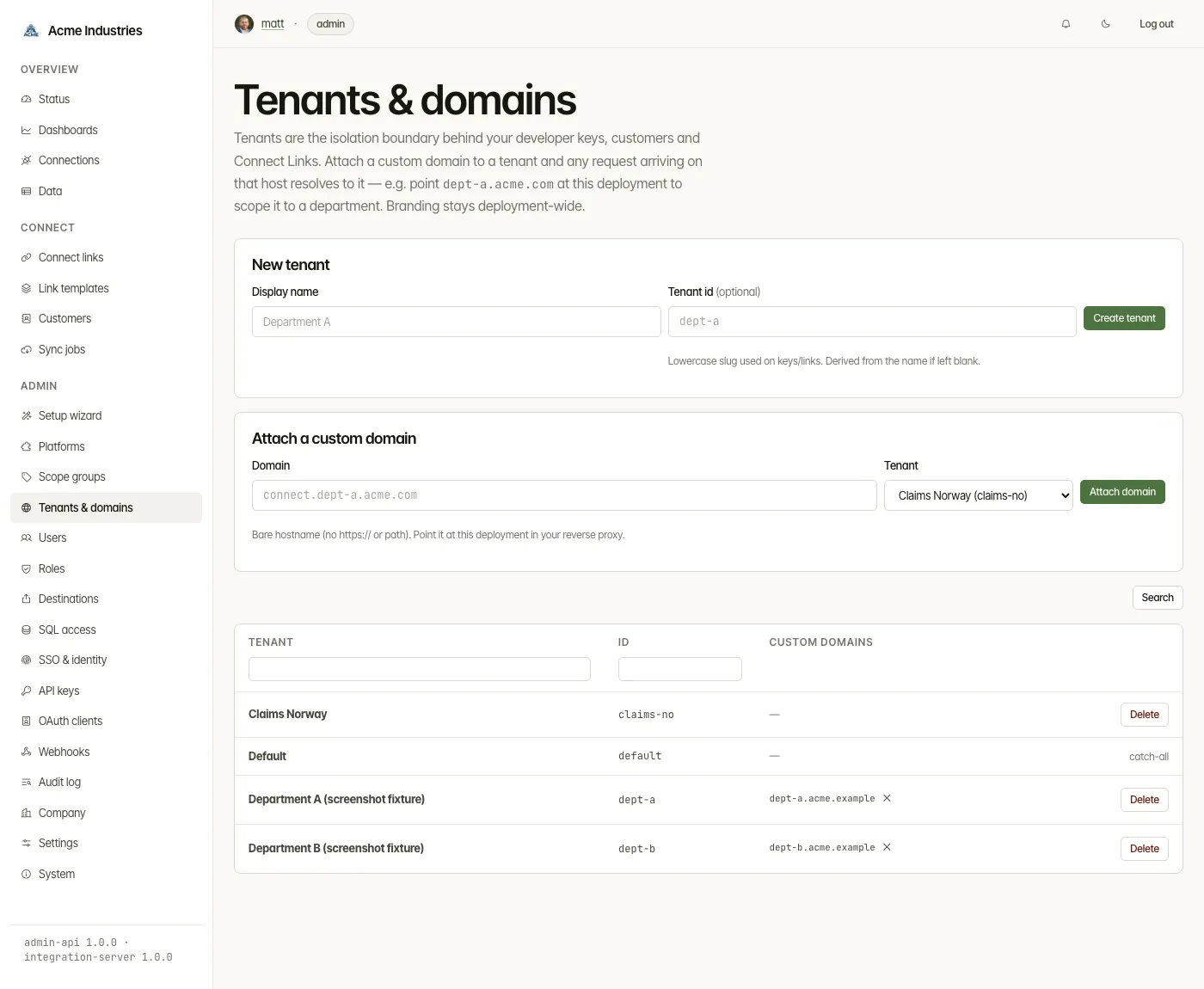
Section titled “Custom domains per tenant”A single deployment can map several custom domains to different tenants —
the isolation boundary already behind your developer keys, customers and
Connect Links. This is useful when, say, each department of an organisation
should reach its own data on its own hostname (dept-a.acme.com,
dept-b.acme.com).
Branding stays deployment-wide (one company_info record) — this is
custom-domain-per-tenant routing, not per-tenant white-label. The admin console
stays operator-wide: you manage every tenant from one login.
How to set it up
Section titled “How to set it up”- In admin → Tenants & domains, create a tenant (e.g.
dept-a) and attach one or more domains to it (e.g.dept-a.acme.com). - In your reverse proxy, point each domain at the same integration-server
(one Caddy/Traefik/nginx vhost per domain, all proxying
integration-server:3010). TLS is still terminated at the proxy exactly as above — nothing changes about cert handling, and the app never issues certs. - Mint Connect Links / developer keys for that tenant. A Connect Link minted
for
dept-ais issued ondept-a’s domain automatically.
How resolution works
Section titled “How resolution works”integration-server reads the public domain→tenant map and resolves the incoming
Host header to a tenant. A request on a tenant’s domain is scoped to that
tenant: a developer key from another tenant used on the wrong domain is rejected
(TENANT_MISMATCH), and a connection is only reachable on the domain of the
tenant that owns it. A host that isn’t mapped (or when no domains are
configured) resolves to the default tenant, so existing single-domain
deployments are unaffected.
OAuth callbacks stay on the canonical domain
Section titled “OAuth callbacks stay on the canonical domain”The OAuth redirect_uri is the adapter’s configured Redirect URI, falling back
to the canonical PUBLIC_BASE_URL / companyInfo.baseUrl — never a tenant
domain, even when the Connect picker is served from a per-tenant domain. This means you still register exactly one callback URL per provider
(https://<canonical>/auth/{vertical}/{platform}/callback) — you do not have to
allowlist every tenant domain at every provider. Tenant binding is preserved by
the signed OAuth state, not by the callback’s hostname.
PUBLIC_BASE_URL (when set) remains a global override that wins over per-tenant
domains — use it to pin a single canonical host for the whole deployment.
opensteward.dev ·Plans and free license ·Terms ·Privacy ·support@opensteward.dev
© 2026 Falco Consulting AB. Built from open-steward/opensteward@a3961d8. This site sets no cookies, runs no analytics and loads nothing from other sites, except platform logos from Brandfetch on the Platforms page.