Connections
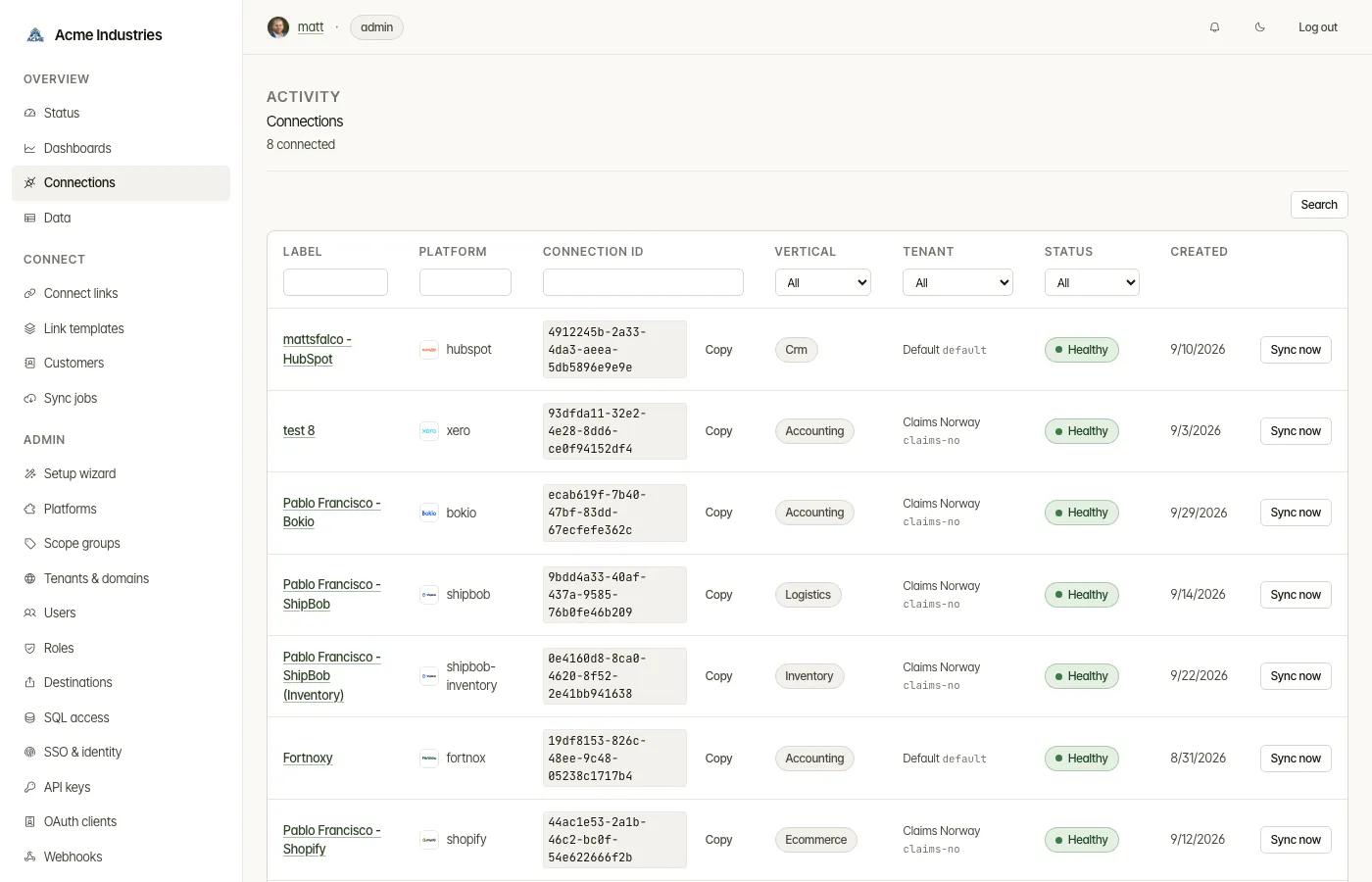
Every platform account a customer has authorized, at /connections. Each
connection’s page also sets its sync schedule.
What it’s for
Section titled “What it’s for”A connection is one authorized account on one platform, for example a
customer’s Xero organisation or Shopify store. Your application passes its id
as ?connection_id= on every /v1 call. This page is where you find
connections, check their health, and decide how often their data is re-read
from the platform.
Who can use it
Section titled “Who can use it”- Every signed-in user can view connections.
- Operators and admins can rename, sync, delete and set the sync schedule. This is decided by the base role (operator or admin), not by a permission.
- Browse data needs
data:read(operator, admin). - A tenant-restricted user sees only their tenants’ connections.
What you can do
Section titled “What you can do”On the list:
- Filter and sort by label, platform, connection id, vertical, tenant, status or created date. Part of an id is enough; the first block of the UUID will do.
- Copy a connection’s full id with Copy.
- See each status: Healthy, Expiring soon, Expired or Platform creds (the platform’s credentials were rejected). A Refresh failing badge means the token still works but its last refresh failed.
- Sync now (operator) queues a background sync for that connection.
- Open a connection. It opens in a dialog, or as a page without JavaScript.
On a connection’s page:
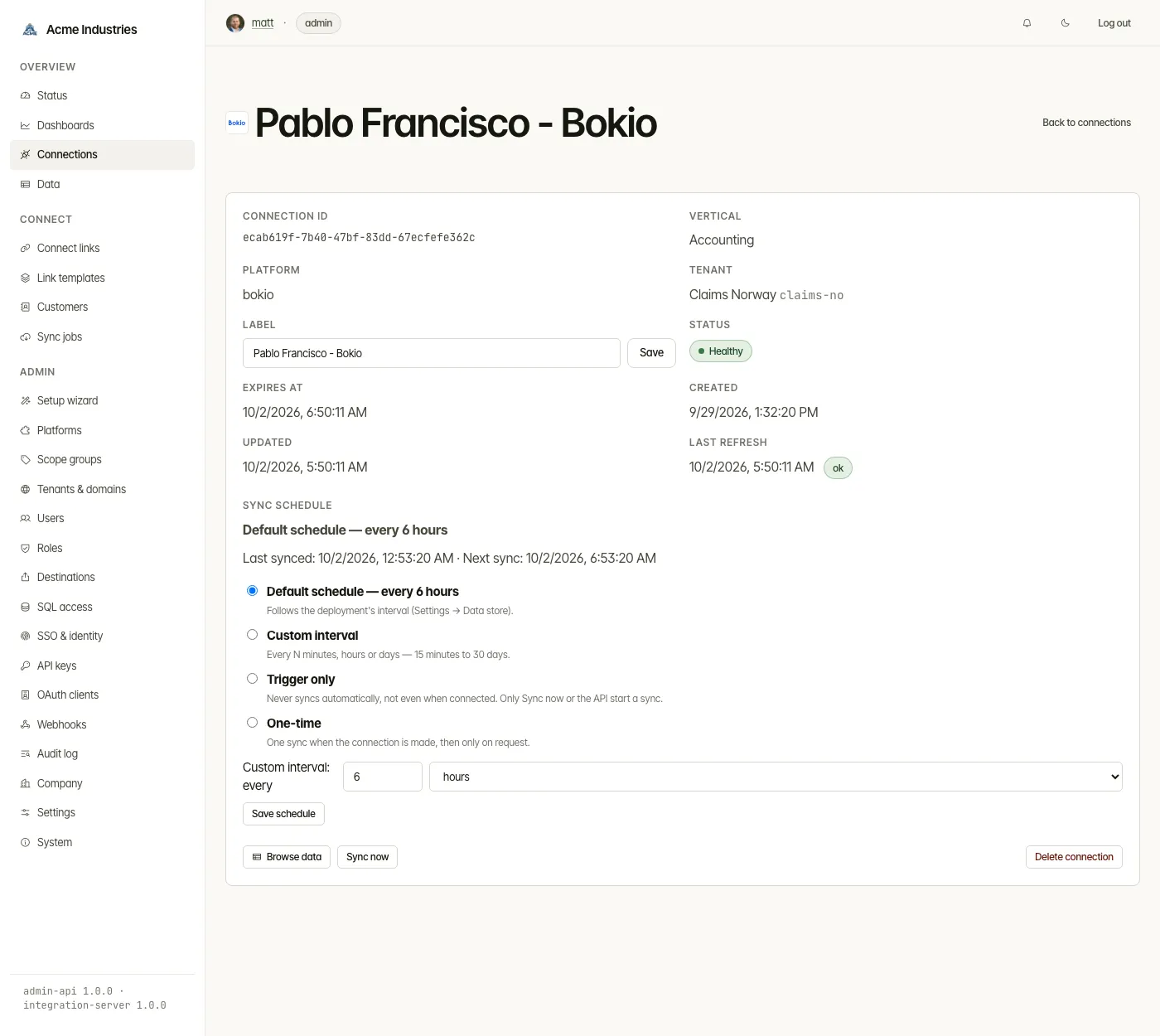
- See its id, vertical, platform, owning tenant, status, expiry, and when it was created and updated.
- See the last token refresh and, if it failed, the reason.
- Rename it (operator). The label is what the list shows and searches.
- Set the sync schedule (operator). See the next section.
- Browse data opens its records in the data viewer.
- Sync now (operator).
- Mint Connect Link appears when the authorization has expired. Only the customer can re-authorize, so you send them a new Connect Link.
- Delete connection (operator). This removes the stored credentials, cached data and sync history. Only the customer can restore the connection, through a new Connect Link.
If the provider rejects the platform’s own OAuth client credentials, the page says so. Re-authorizing won’t help. An admin fixes it on the platform page, and the fix covers every connection on that platform.
Sync schedules
Section titled “Sync schedules”Each connection has a schedule that says how often its data is re-read from the platform. The section shows the current schedule, when it last synced, and when it syncs next. The next sync can read as:
- a time;
- Due now or Syncing now;
- Paused until the customer re-authorizes;
- Paused until the platform credentials are fixed.
The section also reports the last failure, if there was one.
| Schedule | What happens |
|---|---|
| Default schedule | Syncs every deployment interval. This is 6 hours unless an admin changed it under Settings → Data store (data_store.sync.default_interval_minutes). |
| Custom interval | Syncs every N minutes, hours or days, from 15 minutes to 30 days. |
| Trigger only | Never syncs automatically, not even after connecting. Only Sync now or the API starts a sync. |
| One-time | Syncs once when the connection is made, then only on request. |
- A failed scheduled sync is retried after 15 minutes, then less often after each further failure, but never later than the interval.
- A Connect Link can set the starting schedule when you create the link.
- Admins can stop all scheduled syncing with
data_store.sync.scheduler_enabledin Settings. Sync now and API syncs still run. - In
passthroughmode nothing is cached, so nothing is synced on a schedule.
Related docs
Section titled “Related docs”- Developer Guide §7: data store and sync schedules:
syncMode, job origins and retries, as the API sees them. - Sync jobs: the jobs that schedules and Sync now create.
- Architecture: persistence: the read-through cache and sync store.
opensteward.dev ·Plans and free license ·Terms ·Privacy ·support@opensteward.dev
© 2026 Falco Consulting AB. Built from open-steward/opensteward@a3961d8. This site sets no cookies, runs no analytics and loads nothing from other sites, except platform logos from Brandfetch on the Platforms page.