Adapter lifecycle
How runtime adapter management works: an operator clicks “enable fedex” in the wizard and within ~50ms the FedEx adapter is registered, persisted, and ready to serve requests — no container restart, no YAML editing.
Chart 9a — Enable adapter end-to-end
Section titled “Chart 9a — Enable adapter end-to-end”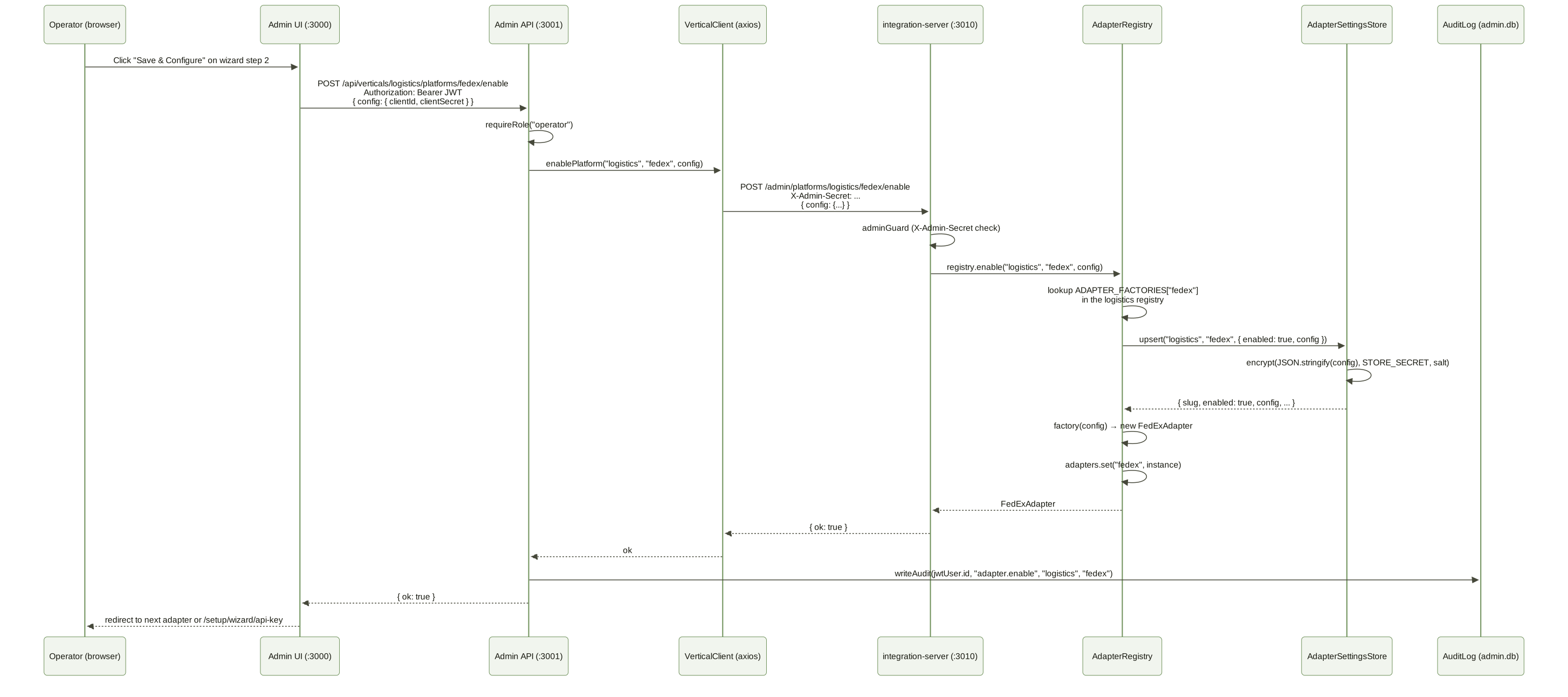
Chart 9b — Adapter state machine
Section titled “Chart 9b — Adapter state machine”

Critical property: disabling an adapter does not delete the config — re-enabling restores the OAuth credentials without the operator having to re-enter them.
What gets persisted, where
Section titled “What gets persisted, where”| Layer | Data | Storage |
|---|---|---|
| Provider config (clientId, clientSecret, redirectUri, scopes) | per (vertical, slug) | adapter_settings table (encrypted) |
| Operator’s intent (enabled/disabled) | per (vertical, slug) | same table, enabled column |
| OAuth tokens (accessToken, refreshToken, expiresAt) | per (vertical, platform, tenant, label) | credentials table (encrypted) — the connections table, named credentials in SQL |
Refresh health (last_refresh_at, last_refresh_status, last_refresh_error) |
per connection | same table, plaintext columns |
| Audit log (who toggled what) | per change | admin-api’s audit_log table (plaintext) |
The two stores (adapter_settings and credentials) live in the same database — credentials.db by default, or the Postgres pointed at by DATABASE_URL — but have completely separate schemas, salts, and lifecycles. AdapterSettingsStore derives its key with the salt opensteward-adapter-settings, so the two never share an encryption key even though they share STORE_SECRET.
API endpoints
Section titled “API endpoints”integration-server (all nine verticals)
Section titled “integration-server (all nine verticals)”One router — createUnifiedAdminPlatformsRouter in @opensteward/shared — serves
every vertical. All routes go through adminGuard: ADMIN_SECRET set requires a
matching X-Admin-Secret header, unset allows the request outside production and
403s inside it.
| Method | Path | Body | Returns |
|---|---|---|---|
GET |
/admin/platforms?vertical= |
— | { data: [{ vertical, slug, enabled, hasConfig }] } for every known adapter, optionally filtered to one vertical |
POST |
/admin/platforms/:vertical/:slug/enable |
{ config? } |
{ ok: true } or 404 (unknown vertical/slug) |
POST |
/admin/platforms/:vertical/:slug/disable |
— | { ok: true } or 404 |
GET |
/admin/platforms/:vertical/:slug/config |
— | { data: { clientId, redirectUri, scopes, hasSecret, recommendedScopes, readScopes, supportsScopeOverride } } — clientSecret is never returned |
PUT |
/admin/platforms/:vertical/:slug/config |
{ config } |
{ ok: true }, 400 (no config object) or 404 |
Admin API (proxy)
Section titled “Admin API (proxy)”All require JWT auth. Mutations require operator role.
| Method | Path | Returns |
|---|---|---|
GET |
/api/verticals/:vertical/platforms |
proxies to integration-server, JWT auth (any role) |
GET |
/api/verticals/:vertical/platforms/:slug/config |
proxies the redacted config read |
POST |
/api/verticals/:vertical/platforms/:slug/enable |
proxies + writes audit log entry adapter.enable |
POST |
/api/verticals/:vertical/platforms/:slug/disable |
proxies + writes audit log entry adapter.disable |
PUT |
/api/verticals/:vertical/platforms/:slug/config |
proxies + writes audit log entry adapter.config |
Admin frontend (UI routes)
Section titled “Admin frontend (UI routes)”| Method | Path | What it does |
|---|---|---|
GET |
/setup/wizard/platforms?vertical=... |
Tab-per-vertical checkbox grid (during wizard onboarding) |
POST |
/setup/wizard/platforms |
Reconciles enabled set: enables checked, disables previously-on-but-now-unchecked |
GET |
/setup/wizard/configure?vertical=...&slug=... |
Credentials form for one adapter, with developer-portal sidebar |
POST |
/setup/wizard/configure |
Calls setPlatformConfig and either advances to the next adapter or finishes the wizard |
GET |
/platforms |
Standalone admin page — every adapter across all verticals with enabled / configured / connection-count columns. Reachable from the sidebar after first-run. |
GET |
/platforms/:vertical/:slug |
Per-adapter detail page reusing the wizard’s credentials form. Pre-fills non-secret fields via the redacted getPlatformConfig endpoint. |
POST |
/platforms/:vertical/:slug |
Save config (merge semantics — empty clientSecret keeps stored value). Auto-enables a previously-disabled adapter. |
POST |
/platforms/:vertical/:slug/disable |
Disable without clearing config. |
The wizard routes and the standalone /platforms page write through the same apiClient.setPlatformConfig → admin-api PUT /api/verticals/:vertical/platforms/:slug/config → registry setConfig chain. setConfig merges with existing config, so a partial submit (e.g. updating only clientId) is safe.
Bootstrap behaviour
Section titled “Bootstrap behaviour”buildServer opens one AdapterSettingsStore over credentials.db (salt
opensteward-adapter-settings) and hands it to every vertical. For each
vertical, build<Vertical>Registry({ unifiedRegistry, settingsStore }):
- Constructs an
AdapterRegistrywith{ vertical, factories: ADAPTER_FACTORIES, settingsStore } - Calls
registry.hydrate(), which loads theenabled = truerows for that vertical fromadapter_settingsand re-instantiates each adapter via its factory — an unknown slug in the table is skipped, not fatal - Registers itself in the
UnifiedAdapterRegistryunder its vertical name, so(vertical, slug)lookups resolve across all nine
The settings table is the only source of enabled state. There is no
config.yml list of adapters to enable — config.yml carries ports, store
paths, rate limits, CORS and inbound webhook signing secrets, nothing that
turns an adapter on. What the admin UI persists is what the next boot
runs.
expired means a human must act
Section titled “expired means a human must act”Access tokens are short — Fortnox’s live one hour — and are renewed automatically, by the keep-alive worker ahead of expiry and by the request path on demand. So a healthy connection that nobody has used for a while routinely holds a lapsed access token and a perfectly good grant behind it.
connection.status therefore reports that as valid, not expired, provided
the grant has already proven it can renew (last_refresh_status = 'ok').
expired is reserved for the cases where somebody has to do something: the
refresh grant is dead, or the token lapsed with no evidence the connection can
renew itself — a connection that has never refreshed, or whose last attempt
failed, is not assumed to be fine.
The practical effect: a dashboard counting expired connections counts real
problems, not idle ones.
Credential failure modes — two distinct causes
Section titled “Credential failure modes — two distinct causes”When a token refresh fails (on-request or via the keep-alive worker), the OAuth error code decides which credential is at fault and who must act:
| Refresh error | connection.status |
last_refresh_status |
Webhook event | Who fixes it |
|---|---|---|---|---|
invalid_grant / unauthorized_client / invalid_token |
expired |
expired |
connection.authorization_expired |
Customer re-authorizes this one connection |
invalid_client |
platform_error |
platform_error |
connection.platform_credentials_invalid |
Operator fixes the platform’s client id/secret in Platforms |
| network / 5xx / rate-limit | unchanged | failed |
— | nobody (retried next tick) |
The distinction matters because a rotated/expired/wrong platform client_secret
breaks every connection for that platform at once. A per-customer expired
status would send operators down a dead end — telling customers to re-authorize
fails again because the client secret is the real cause. The
platform_error status routes the operator to Platforms → {platform} instead,
and the admin dashboard / connection detail / a deduped notification all say so.
Classification lives in packages/shared/src/auth/refresh-error.ts
(classifyRefreshError).
Alongside the status, the failure’s reason is persisted on the connection row
in last_refresh_error — describeRefreshError builds it from the OAuth error
code, its error_description and the HTTP status, and nothing else. Never the
response body, request headers or the axios config, since a refresh error
carries the client credentials in config.headers and the refresh token in
config.data. It is cleared on the next successful refresh and shown on the
admin connection detail page, so a failing connection always shows why.
See also
Section titled “See also”- persistence.md — the
adapter_settingstable schema - setup-wizard.md — the wizard state machine that drives this
- vertical-internals.md — where
registry.hydrate()fits in the boot sequence
opensteward.dev ·Plans and free license ·Terms ·Privacy ·support@opensteward.dev
© 2026 Falco Consulting AB. Built from open-steward/opensteward@a3961d8. This site sets no cookies, runs no analytics and loads nothing from other sites, except platform logos from Brandfetch on the Platforms page.