Connect Links
A Connect Link is a tokenised, single-use URL that an admin emails to an end-customer. The customer opens it, picks an integration, completes OAuth (or fills in a credential form for non-OAuth adapters), and lands on a thank-you page. The resulting connection row is owned by the business tenant — credentials never leave the deployment.
This unlocks the “ask for QuickBooks access over email” workflow without forcing the host to embed OpenSteward into their own product.
Three mint modes
Section titled “Three mint modes”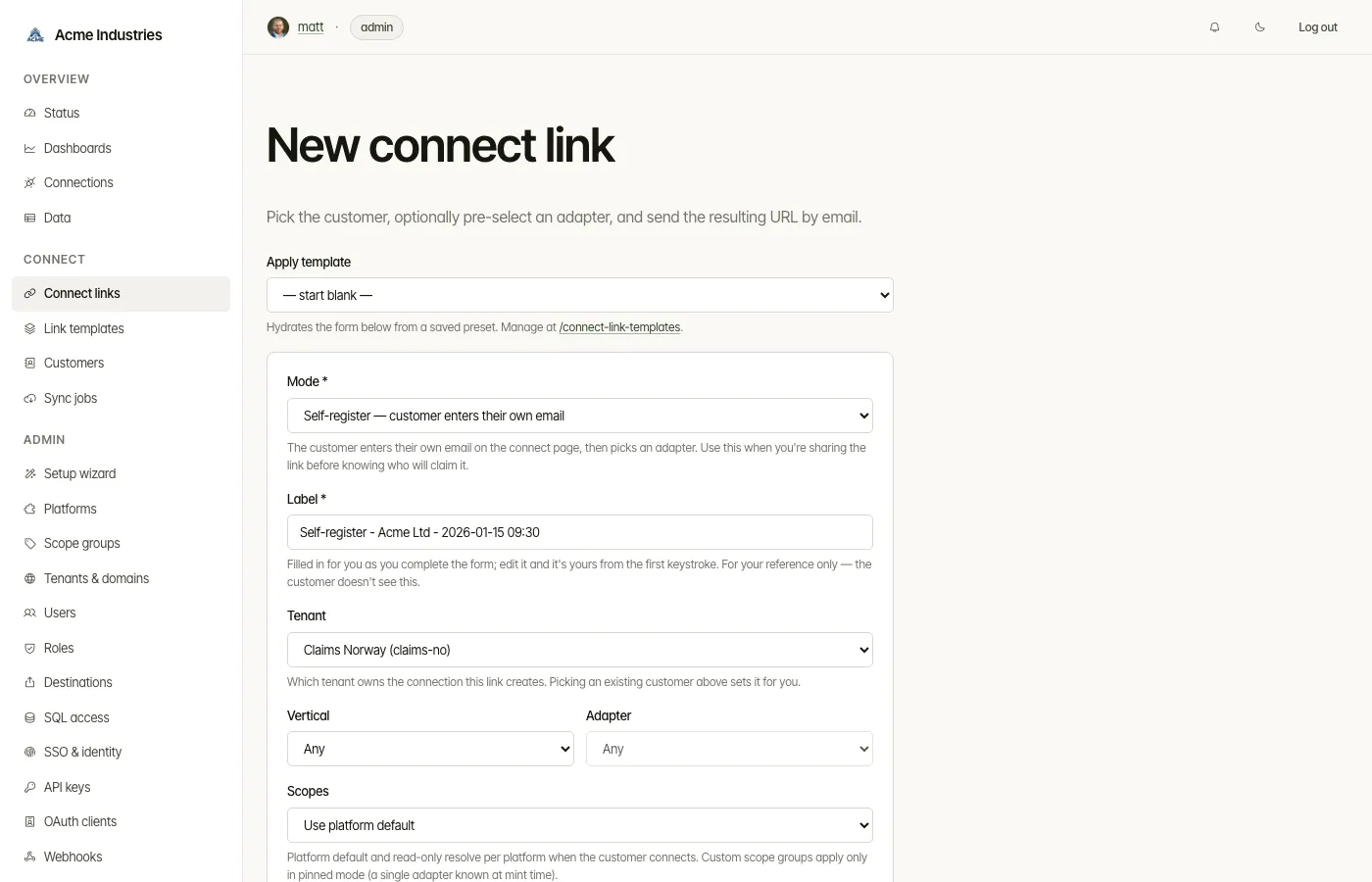
Connect Links support three explicit creation modes, surfaced as the
Mode field on the new-link form. Mode is a UX abstraction — the
server stores the underlying field combination on connect_sessions
and never persists the mode label.
| Mode | end_user_id at mint |
allowed_platforms |
allow_self_register |
|---|---|---|---|
pinned |
expected | exactly one (vertical+slug) | 0 |
customer-picks-adapter |
expected | empty or filtered | 0 |
self-register |
NULL | empty or filtered | 1 |
Only two of those cells are enforced. self-register strips endUserId /
customerEmail / customerDisplayName at the route boundary, so the link cannot
arrive pre-bound; and pinned is rejected unless it names both a vertical and an
adapter. The customer field is expected in the other two rows but never
required — nothing in the form or the route refuses a mint without it.
Pick by use case:
- Pinned — admin knows the customer and the adapter; customer skips
the picker and goes straight to OAuth. Because the link is the adapter
choice, both fields are required in this mode: the form’s
applyMode()setsrequiredon the two selects from the same lines that write the*into their labels, andPOST /connect-linksre-renders with a reason if either is missing. Both selects still lead with an “Any” option, so the server-side re-check matters — a pinned submit that keeps them is rejected rather than minting an adapter-unrestricted link from a form that had just said the fields were required. - Customer picks adapter — admin knows the customer; customer chooses any allowed adapter at connect time. A custom scope group cannot apply here (it is written against one platform, and the platform isn’t known until the customer picks), so the selector offers only Use platform default and Read-only, both of which resolve per-platform at OAuth-start. Same for self-register.
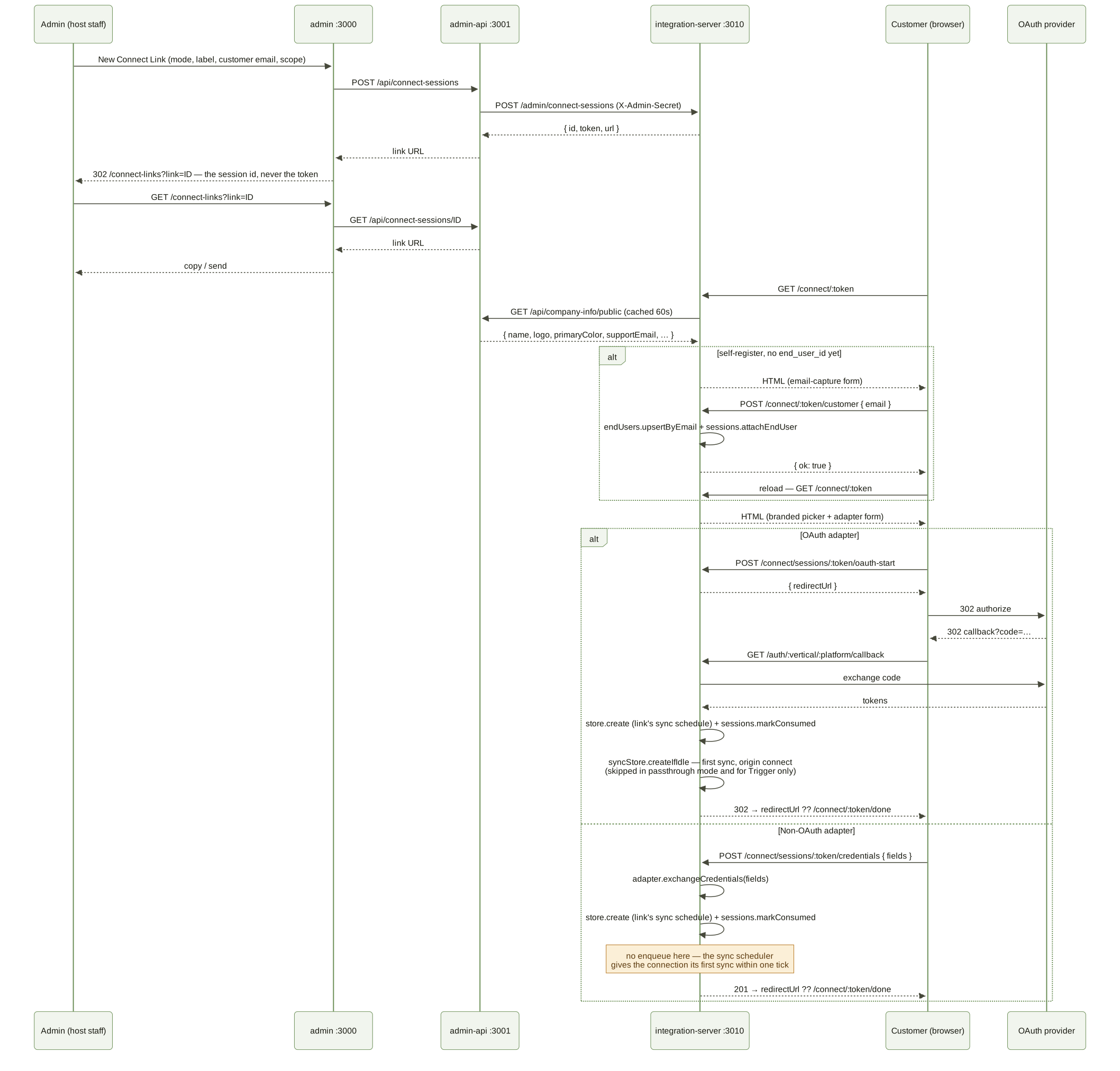
- Self-register — admin doesn’t know the customer. The landing page
renders an email-capture form first; on submit the public
POST /connect/:token/customerendpoint upserts an end-user viaEndUserStore.upsertByEmailand atomically attaches it viaConnectSessionStore.attachEndUser. The attach refuses to overwrite an existing binding (idempotent on race).
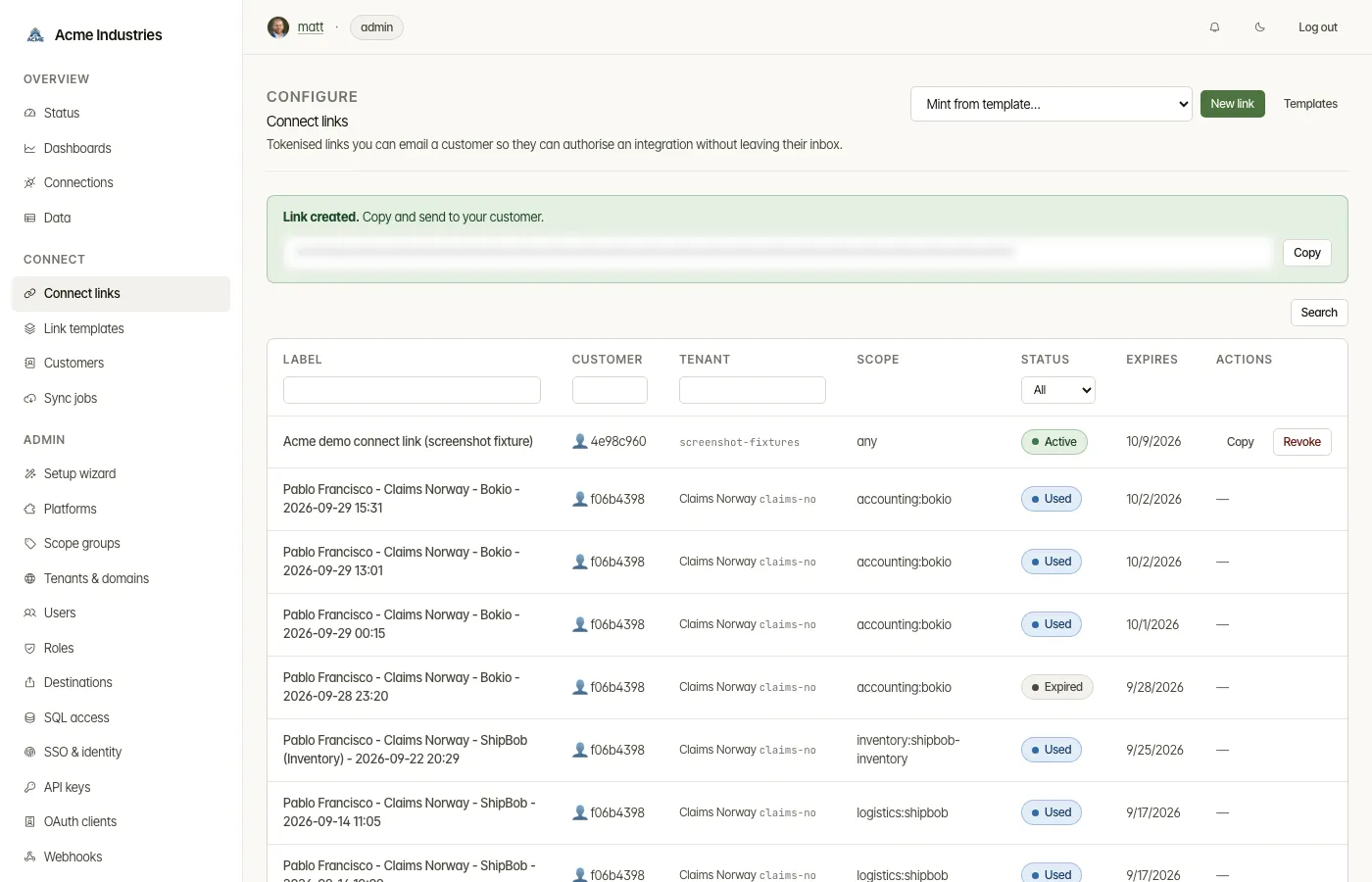
The operator-facing mint succeeds with a copy-ready URL the operator emails to the customer:
Sync schedule and the first sync
Section titled “Sync schedule and the first sync”A link carries the sync schedule the connection it creates starts with —
the Sync schedule field on the new-link form: blank for the deployment
default, Custom interval (15 minutes to 30 days), Trigger only or
One-time. It is stored on the session (sync_mode,
sync_interval_minutes) and copied onto the connection when the customer
connects, by both the OAuth callback and the credential form. A one-time link
(oneTimeOnly) always gives its connection once, because the connection is
deleted after its first sync; minting one with any other schedule is refused
(400 SYNC_SCHEDULE_CONFLICT). The developer API’s
POST /v1/customers/:id/connect-links sets no schedule, so its connections
start on the default. Operators change a connection’s schedule later on its
admin page; what each mode does is in
dev-api.md §7.
The first sync, when dataStore.mode != passthrough:
- OAuth branch — the callback enqueues a sync for the new connection
right after
store.create(originconnect), unless the link’s schedule is Trigger only. The enqueue is wrapped in try/catch, so a failed enqueue (e.g. a job already active) never breaks the redirect to the thank-you page. - Credential-form branch — enqueues nothing itself. The sync scheduler picks a never-synced connection up first, within one tick (60 s by default), unless it is Trigger only.
See runtime-flows.md §4d for the worker side.
Data model
Section titled “Data model”Two tables on integration-server’s encrypted store (separate from
admin.users, which is for host operators):
end_users— external customers receiving links. Plaintext columns for search (email,display_name,external_reference); encrypted blobpii_datafor the rest (first/last name, phone, address, personal-ID number). PII is decrypted only on the detail page; reveals ofpersonalIdNumberwrite an audit row.connect_sessions— the link itself. Carriestoken,tenant_id, optionalend_user_id, allowed verticals/platforms, expiry, redirect override, the starting sync schedule (sync_mode,sync_interval_minutes; NULL = the deployment default), and (after consumption)connection_id. Three feature flags:one_time_only(delete the connection after the first sync),scopes(JSON array — per-link OAuth scope override applied viaadapter.getAuthUrl(state, overrideScopes)),allow_self_register(gate the public self-register endpoint). Plusscope_policy(read_only|platform_default|custom), which decides howscopesis read — see below. A NULLscope_policynormalises tocustomwhen the row carries an explicitscopesarray and toplatform_defaultotherwise.connect_link_templates(admin-api SQLite, not on integration-server) — reusable presets for the new-link form. Tenant-scoped (UNIQUE(tenant_id, name)), FKsscope_groups. Templates prefill, do not bind — there is notemplate_idFK onconnect_sessions, so editing a template is non-destructive to historical links.
The credentials table carries no connect-link-specific columns; the
customer ↔ connection association is derived via connect_sessions.
Status lifecycle
Section titled “Status lifecycle”active → (expired at expires_at) or (consumed once a connection
lands). Consumed sessions retain their connection_id for audit.
Revoking a session backdates expires_at so the same code path that
handles natural expiry handles revocation too.
Branding
Section titled “Branding”The hosted page renders the host’s logo, name, primary colour, and
support email from company_info via admin-api’s unauthenticated
GET /api/company-info/public endpoint. integration-server caches the
response for 60s. If admin-api is unreachable, the page falls back to
the OpenSteward default branding — never throws.
Custom domain
Section titled “Custom domain”The link URL is built with this precedence:
PUBLIC_BASE_URLenv on integration-servercompanyInfo.baseUrlfrom the Company info formrequest.protocol+request.hostname(honoursX-Forwarded-*when behind a reverse proxy withtrustProxy: true)
See deployment/custom-domain.md for
Caddy / nginx / Traefik recipes. TLS + ACME stay in the proxy.
Connect Link templates
Section titled “Connect Link templates”Operators define reusable presets at /connect-link-templates (admin
sidebar → Connect → Link templates). CRUD endpoints:
GET /api/connect-link-templates?tenantId=…POST /api/connect-link-templatesGET /api/connect-link-templates/:idPUT /api/connect-link-templates/:idDELETE /api/connect-link-templates/:idA template carries every field the new-link form needs: linkMode,
allowedVerticals, allowedPlatforms, scopeGroupId, expiryDays,
oneTimeOnly, redirectUrl, plus name / description. The new-link
form has an “Apply template” dropdown, and the /connect-links list
page has a “Mint from template…” select that navigates to
/connect-links/new?template=<id> so the form arrives prefilled. The
in-form template-apply handler is reused for both client-side picks
and server-side ?template=<id> prefill — single source of truth.
Scope policy, per-link override, and adapter signal
Section titled “Scope policy, per-link override, and adapter signal”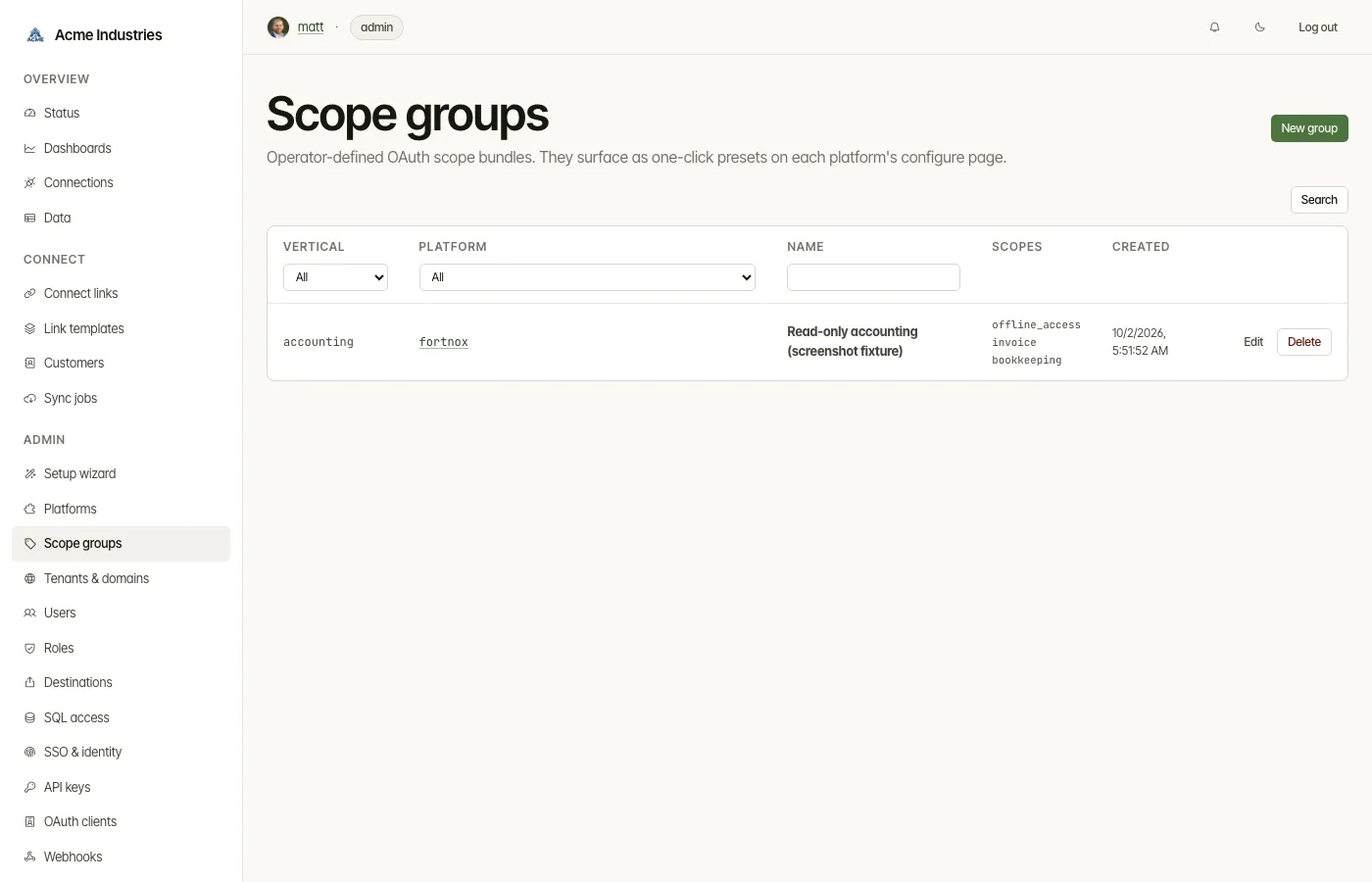
The two ways of minting a link default differently:
- Admin console. The scope selector on the new-link form leads with
“Use platform default”, and
POST /connect-linkstreats an absent selector the same way, so the link asks for the scopes configured on the platform’s OAuth app. The one exception is a scope group that can no longer be found: that falls back to read-only, the least a deliberate choice could have meant. “Read-only” is offered in every link mode; scope groups only in pinned mode, where the adapter is known. - Developer API.
POST /v1/customers/:id/connect-linksstays read-only by default: noscopePolicyand noscopesin the body resolves toread_only.
connect_sessions.scope_policy records which of three things the link
means, and resolveOverrideScopesFor
(packages/shared/src/control-plane/connect-router.ts) turns it into the
overrideScopes argument at OAuth-start:
scope_policy |
Selector option | overrideScopes at OAuth-start |
|---|---|---|
platform_default |
Use platform default (the form’s default) | none — the OAuth app’s own scopes apply |
read_only |
Read-only | that platform’s curated readScopes, or none when it has no catalogue |
custom |
a named scope group | the group’s scopes array |
The policy is stored, not the resolved scope list. That is what lets a
link whose adapter is not yet known still mean “read-only”: the router
builds a (vertical:slug) → readScopes map from platform metadata at
boot and looks the chosen platform up once the customer picks it. A
platform with no curated readScopes yields no override rather than an
empty scope request, so read-only degrades to the platform default
instead of to nothing. check:read-scopes keeps every readScopes
entry inside that platform’s recommendedScopes catalogue, which is the
net against a write scope landing in a “read-only” set.
connect_sessions.scopes is the JSON array passed to
adapter.getAuthUrl(state, overrideScopes) when the policy is custom.
Ten OAuth platforms configure scopes at the OAuth-app level (not
per-request) and ignore ?scope= on the authorize URL; their platform
metadata sets supportsScopeOverride: false and the new-link form
disables the scope-group dropdown for them with a hint pointing at the
platform configure page. No error UX. The flag is exposed at
/admin/platforms/:vertical/:slug/config (passthrough to admin-api),
consumed by the form via the helper route
/connect-links/platform-meta/:vertical/:slug.
The scope-override.test.ts parity suite (929 cases) verifies every
OAuth adapter either honours the override (the override marker shows
up in the URL) or emits no scope param at all.
Adapter coverage
Section titled “Adapter coverage”OAuth2 adapters are link-ready by default. Non-OAuth adapters must
implement two optional BaseAdapter methods:
credentialFields(): CredentialField[]exchangeCredentials(fields: Record<string, string>): Promise<Credentials>Adapters that don’t implement both are hidden from the Connect Link catalog.
Templates (in @opensteward/shared)
Section titled “Templates (in @opensteward/shared)”simpleApiKey()— singleapiKeypassword field; returns{ accessToken: fields.apiKey }. Covers mostapi_key/session/localadapters.oauth2ClientCredentials({ tokenUrl, scopes? })—clientId+clientSecretform that POSTsgrant_type=client_credentialsto the token endpoint and parses the response.customForm({ fields, exchange })— escape hatch for bespoke multi-field shapes (e.g. AbraFlexi’sinstanceUrl+ basic auth).
Auto-retrofit script
Section titled “Auto-retrofit script”apps/integration-server/scripts/retrofit-credential-forms.ts walks
every adapter directory, reads its auth_type from the vertical’s
metadata, and idempotently patches the adapter’s index.ts:
api_key/session/local→ spreadssimpleApiKey()intocredentialFields+exchangeCredentials.oauth2_cc→ flaggedoauth-cc-manual, no patch (each one has bespoke extra fields — see below).oauth2→ no-op (already link-ready via the OAuth flow).
Run it with:
pnpm --filter integration-server tsx scripts/retrofit-credential-forms.ts [--vertical=accounting] [--dry-run]OAuth adapters with a per-customer host (oauthFields)
Section titled “OAuth adapters with a per-customer host (oauthFields)”Some OAuth providers put the authorize and token endpoints on a host that
belongs to the customer, not to the deployment: Shopify’s
{shop}.myshopify.com, Zendesk’s {subdomain}.zendesk.com. Deployment
config cannot know that value, and the admin platform form only writes
clientId / clientSecret / redirectUri / scopes / sandbox. Before this
mechanism existed the Shopify adapter read shop from config, found
undefined, and every OAuth start died with Cannot read properties of undefined (reading 'endsWith') — a 500 on a page already in the customer’s
inbox.
An OAuth adapter declares the non-secret inputs it needs before the redirect:
oauthFields(): CredentialField[] { return [{ name: 'shop', label: 'Shopify store', type: 'text', required: true, placeholder: 'my-store', helpText: '… my-store for my-store.myshopify.com.' }]}getAuthUrl(state, overrideScopes?, codeChallenge?, inputs?) { /* inputs.shop */ }exchangeCodeWithInputs(code, redirectUri, inputs, codeVerifier?) { /* same host */ }The flow, for an adapter that declares them:
- The catalog entry carries
oauthFields; the hosted page renders them for the OAuth tile with the same markupcredentialFieldsuse. POST /connect/sessions/:token/oauth-start(and the directGET /auth/:vertical/:platform/connect?shop=…) runs the body throughcollectOAuthInputs: undeclared keys are dropped, values trimmed, and a blank required one is a400 MISSING_OAUTH_FIELDSnaming the field — the adapter is never reached with a half-filled form.- The inputs go to
getAuthUrl(…, inputs)and are parked in pending state next to the PKCE verifier, keyed by the OAuthstate. They never travel through the customer’s browser. - The callback prefers
exchangeCodeWithInputswhen inputs are in flight (it also receives the verifier, so an adapter needing both implements one method), then persists the inputs undercredentials.extra— the adapter’s ownextrawins, so it can store a normalised value. The API client reads the host from there afterwards.
Adapters that declare no oauthFields see no change: inputs is null,
getAuthUrl is called exactly as before, and the exchange path is
untouched. The values are non-secret by design (they land in the credential
blob as plain identifiers), so type: 'password' is not appropriate here.
Reference implementation: ecommerce/shopify (oauthFields,
normaliseShop, exchangeCodeWithInputs, client host from
credentials.extra.shop, with a deployment-wide shop config key kept as
a fallback).
Unsupported platforms
Section titled “Unsupported platforms”A platform can be listed but not connectable. Its entry in the vertical’s
platforms/metadata.ts carries:
unsupported: { reason: 'Why it cannot be connected today, shown to operators and in API errors.', issueUrl: 'https://github.com/open-steward/opensteward/issues/<n>',}Behaviour:
- It stays in
GET /v1/platforms, the admin catalog and the generated platform docs, with the reason and issue link. - Enabling it (
POST /admin/platforms/:vertical/:slug/enable), starting OAuth (POST /connect/sessions/:token/oauth-start,GET /auth/:vertical/:platform/connect), submitting credentials (POST /connect/sessions/:token/credentials,POST /auth/:vertical/:platform/connect) all answer400with{ "error": { "code": "PLATFORM_UNSUPPORTED", "message", "reason", "issueUrl" } }. - The Connect Link catalog never offers it.
- Connections created before it was marked keep working (reads, sync, refresh, an in-flight OAuth callback); only new connections and enabling are refused.
Reasons in use today:
- Per-instance OAuth clients. On self-hosted or
instance-scoped platforms the OAuth client must be registered inside each
customer’s own instance (Acumatica, Abacus, Accelo, Carerix, Corteza, OroCRM,
Pega, 1CRM, Creatio, eGain, Genesys Cloud, Agiloft, Icertis, Ironclad, ONES,
OpenProject, SuiteProjects Pro, Workfront). One deployment-wide
clientId/clientSecretcan only authorize the instance it was registered in, so collecting the customer’s host (oauthFields) is necessary but not sufficient. Supporting them needs per-connection client credentials: a secret-capable pre-OAuth input held server-side with the OAuth state, used for authorize, exchange and refresh. Zendesk, Talkdesk and Fatture in Cloud remain supported but need a vendor-approved global client before they can serve arbitrary customers. - Client targets an API the platform does not have.
- No usable public API or discontinued product.
oauth2_cc adapters — dynamic-host token URLs
Section titled “oauth2_cc adapters — dynamic-host token URLs”Client-credentials adapters split into two patterns. Fixed token
URL adapters (most common) use oauth2ClientCredentials({ tokenUrl })
with a literal string. Dynamic-host adapters resolve the token URL
from a customer-supplied input (region, baseUrl, host, slug), so
tokenUrl accepts a function form:
const CREDENTIAL_FORM = oauth2ClientCredentials({ tokenUrl: (input) => `https://auth.${input.region}.commercetools.com/oauth/token`, additionalFields: [ { name: 'region', label: 'Region', type: 'select', options: [...], required: true }, ],})The function resolves at exchange time from the form fields the customer
fills out. Two adapters (shopware, shopware-b2b) need a JSON
token-body shape rather than form-urlencoded; they wire customForm
around the existing fetchAccessToken helper.
retrofit-credential-forms.ts --dry-run reports, by name, the
oauth2_cc adapters that lack a credentialFields /
exchangeCredentials pair (oauth-cc-manual), alongside the non-OAuth
adapters the codegen would still patch. The Connect Link picker hides
any adapter missing the pair.
opensteward.dev ·Plans and free license ·Terms ·Privacy ·support@opensteward.dev
© 2026 Falco Consulting AB. Built from open-steward/opensteward@a3961d8. This site sets no cookies, runs no analytics and loads nothing from other sites, except platform logos from Brandfetch on the Platforms page.