SSO & identity
Corporate sign-in for the console, at /identity-providers. It supports OIDC
or OAuth2, SAML 2.0, and LDAP or Active Directory, with SCIM provisioning per
provider.
What it’s for
Section titled “What it’s for”With SSO, your team signs in to the console with the identity system they already use. Their console role, and optionally their tenant scope, comes from their groups. Accounts can be created at first sign-in (just-in-time) or provisioned ahead of time by your IdP over SCIM 2.0.
Who can use it
Section titled “Who can use it”Admins only. Setting tenant-scope rules also needs users:manage.
What you can do
Section titled “What you can do”-
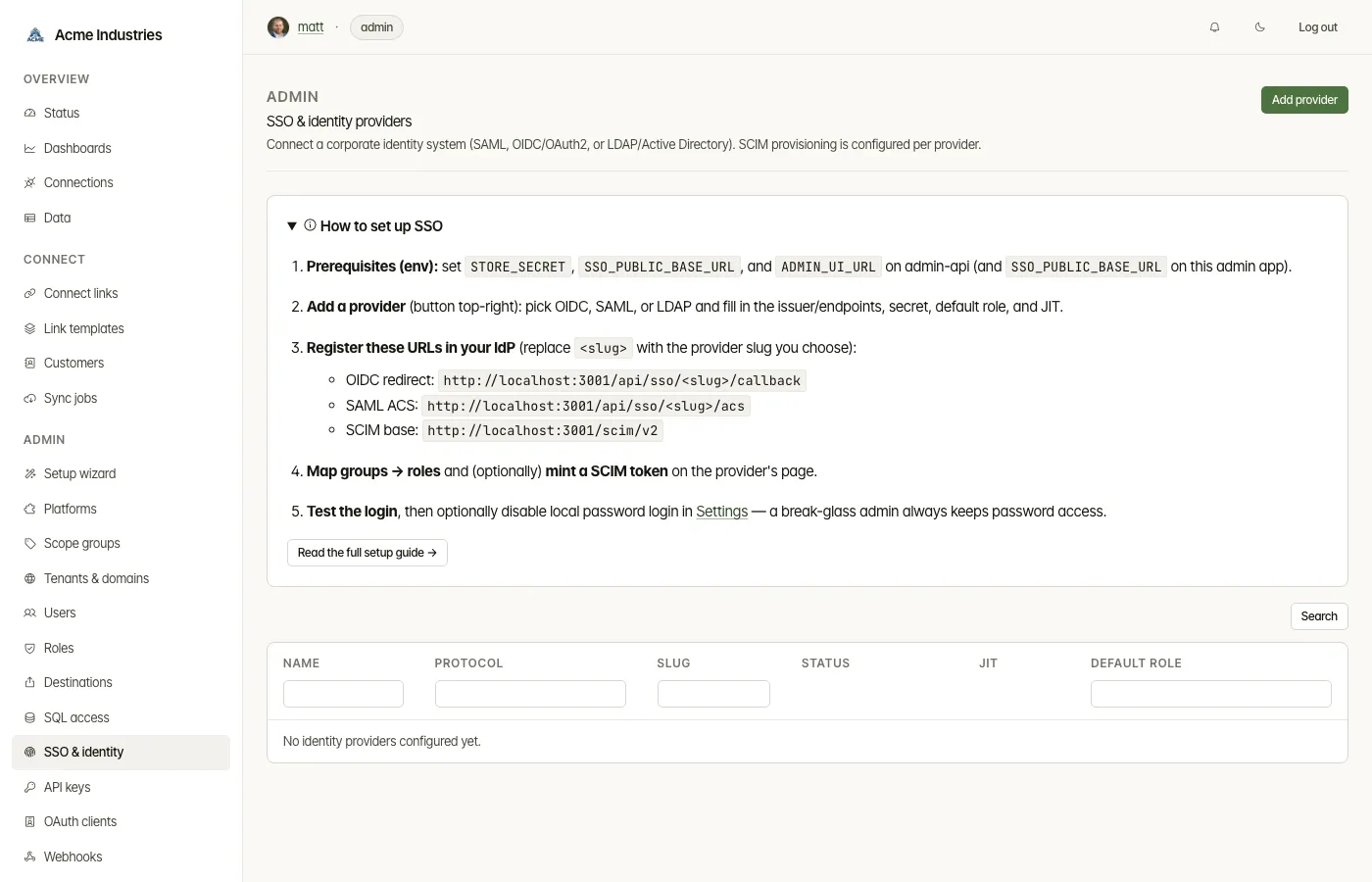
Read the setup checklist. How to set up SSO lists:
- the environment variables admin-api needs;
- the URLs to register in your IdP: the OIDC redirect
(
/api/sso/<slug>/callback), the SAML ACS (/api/sso/<slug>/acs) and the SCIM base (/scim/v2).
-
Add a provider. Give it a display name and a slug (used in callback URLs), then pick a protocol:
- OIDC / OAuth2: issuer URL, client ID and secret, scopes, groups claim.
- SAML 2.0: IdP SSO URL, IdP issuer, SP entity ID, IdP signing certificate, groups and email attributes.
- LDAP / Active Directory: LDAP URL, bind DN and password, search base and filter, and group, email and display-name attributes.
OIDC and SAML can also take a picture attribute. Set a default role, and choose whether to allow just-in-time provisioning.
-
Map groups to roles. Rules match a group with equals, contains or regex. They are evaluated by priority, and the first match wins; otherwise the default role applies. A rule can grant a custom role. Mapping a group to an admin role gives those users every tenant.
-
Map groups to tenant scope. Unlike role rules, every matching scope rule applies, and their tenants are combined.
- A default scope covers users that no rule matches.
- Scope rules only ever narrow non-admins.
- They are re-applied at each SSO sign-in to users whose scope is managed by the IdP.
-
Provision with SCIM.
- Mint SCIM token creates a bearer token for your IdP. It is shown once.
- Revoke a token when you no longer need it.
-
Delete a provider under Danger zone.
Once a provider is enabled, the login page shows Sign in with <provider>. To make SSO the only way in, turn off password login in Settings under Authentication. A break-glass admin always keeps password access.
Related docs
Section titled “Related docs”- SSO setup guide: step-by-step setup for Okta, Entra ID, Google, Keycloak, SAML and LDAP, including tenant scope from IdP groups.
- Architecture: SSO and identity providers: login flows, JIT, scope mapping, SCIM and break-glass.
- Rehearsing admin SSO locally: the mock IdP in
the
sso-devcompose profile. - Users, roles and tenant scope.
opensteward.dev ·Plans and free license ·Terms ·Privacy ·support@opensteward.dev
© 2026 Falco Consulting AB. Built from open-steward/opensteward@a3961d8. This site sets no cookies, runs no analytics and loads nothing from other sites, except platform logos from Brandfetch on the Platforms page.